
'Philips Hue Sync' App Launches for Mac and PC to Sync Lights With Movies, Music, and Games - MacRumors
Skip to Content

'Philips Hue Sync' App Launches for Mac and PC to Sync Lights With Movies, Music, and Games

by

A few days after updating its iOS app to version 3.0, Philips Hue today is launching the "Philips Hue Sync" app for Mac and PC computers. Using the app, users can sync their Hue lights to films, music, and games that they're interacting with for an even more "immersive experience," according to the company.
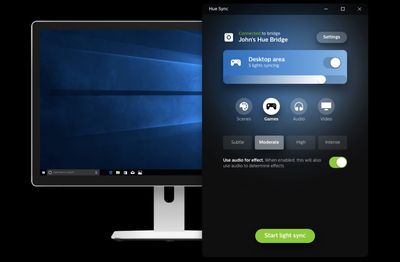
philips hue sync
The app works by creating light scripts for nearby Hue lights, based on screen-grabbed content from the Mac and what Philips calls a "smart color algorithm." With this information gathered, the app then matches the chosen Hue lights to the on-screen action of games and films in real time.

For music, Philips Hue Sync creates light scripts based on the beat and type of song "on the fly," and matches the playing music with dynamic lighting effects. Any of these features can be further customized, including brightness levels, "immersion controls" from subtle to intense, and a mode change for easily switching out the color pallet.


To set up the app, users will need to create a new entertainment area within the updated Philips Hue app on iOS or Android devices. Entertainment areas can encompass everything from one Hue bulb to a collection of devices like Hue Light Strips and table lamps (totaling up to 10 lights), but they most be color capable. Then simply download the Philips Hue Sync app for Mac, connect to a bridge, and choose the new entertainment area in the start-up menu.

Following the 3.0 iOS app update and the new Sync app for Mac, Philips is planning a line of Hue lights for outdoors that will be coming in July. With the outdoor Hue bulbs, users can connect and control their lighting on a patio, balcony, or other environments outside. The new lights include the Philips Hue Lily, which can be used to highlight key features in a garden, and the Philips Hue Calla, which can be placed in the ground and light pathways through outdoor spaces.


Top Rated Comments

Hermes Monster Avatar
102 months ago
This would make much more sense as a tvOS app
Score: 26 Votes (Like | Disagree)
BeardMan7 Avatar
102 months ago
Sigh.

Is it actually that hard to:

1. Get up.
2. Walk over to light switch.
3. Dim/turn off lights (using said switch).

Seriously?!?
Must be fun for you, standing at the light switch, dim/turn on and off the lights manually to sync to your watched movie. :D
Score: 16 Votes (Like | Disagree)
larryj Avatar
102 months ago
Sigh.

Is it actually that hard to:

1. Get up.
2. Walk over to light switch.
3. Dim/turn off lights (using said switch).

Seriously?!?
You didn't read the article, did you?
Score: 11 Votes (Like | Disagree)
x-evil-x Avatar
102 months ago
This is way more immersive than just turning on a light though.
It's a cool feature but not necessary.
Some people dont get it, its ok. If you cant imagine what its like in a house full of voice controlled lights or watch/phone controlled then you dont get it. Changing how your place feels in .2 of a second is pretty fun to do. Laying in bed and turning the air on without getting up is nice. Turning off all the lights with one button or voice command is pretty big. It makes little things like turning on a light switch seem that much more ancient.
Try Turning off 18 lights multiple times a day dimming them, changing the color hue to fit how you want your place to look. Then turning them off when you go to sleep and see how much better having a smart controlled home is.
But its true if you dont have it you dont know what your missing
Score: 9 Votes (Like | Disagree)
chrixxa Avatar
102 months ago
This would make much more sense as a tvOS app
^^ SO much this. I'm way past watching movies on my computer. tvOS app please. only makes sense people!!
Score: 7 Votes (Like | Disagree)
102 months ago
Sigh.

Is it actually that hard to:

1. Get up.
2. Walk over to light switch.
3. Dim/turn off lights (using said switch).

Seriously?!?
Smart lights are more than turning them on and off like traditional light switches. You can set them up to be on timers when you are on holidays/vacations which is my main reason for purchashing them. After buying them for that reason i fou d out loads of other great features like geofencing your location so it turns the lights on when you get home andturn all lights off at 11pm. So good
Score: 6 Votes (Like | Disagree)

Popular Stories

iOS 26

iOS 26.4 Adds Two New Features to CarPlay

Tuesday March 24, 2026 1:55 pm PDT by
iOS 26.4 was released today, and it includes a couple of new features for CarPlay: an Ambient Music widget and support for voice-based chatbot apps. To update your iPhone 11 or newer to iOS 26.4, open the Settings app and tap on General → Software Update. CarPlay will automatically offer the new features so long as the iPhone connected to your vehicle is running iOS 26.4 or later....
Apple Business hero

Apple Unveils 'Apple Business' All-in-One Platform

Tuesday March 24, 2026 8:53 am PDT by
Apple today announced Apple Business, a new all-in-one platform that unifies device management, productivity tools, and customer outreach features. The service is designed to be a consolidated replacement for several of Apple's existing business-focused offerings, including Apple Business Essentials, Apple Business Manager, and Apple Business Connect. It provides organizations with a single...
AirPods Pro Firmware Feature

Apple Releases New Firmware for AirPods Pro 3, AirPods Pro 2 and AirPods 4

Tuesday March 24, 2026 12:31 pm PDT by
Apple today released new firmware for the AirPods Pro 2, AirPods Pro 3, and the AirPods 4. The firmware has a version number of 8B39, up from 8B34 on the AirPods Pro 3, 8B28 on the AirPods Pro 2, and 8B21 on the AirPods 4. There is no word on what's included in the firmware, but Apple has a support document with limited notes. Most updates are limited to bug fixes and performance...















