
Pixelmator Pro, a graphics and image editing app from the Pixelmator team, received its first major update today to introduce new features that include MacBook Pro Touch Bar support, new tools for exporting images, auto color adjustment options, a Tutorials page, and more.

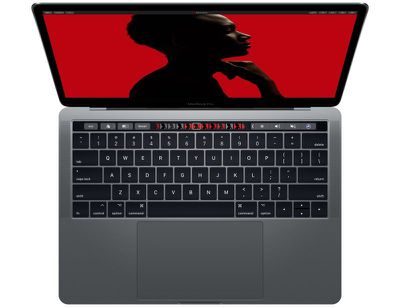
The app now includes full support for the Touch Bar on recent 13 and 15-inch MacBook Pro models, providing quick access to tools for making color adjustments, choosing effect presets, selecting colors for brushes, and more. The Touch Bar has been designed to offer up the most useful options whenever you switch to a new tool.
pixelmatorpromonsoon1
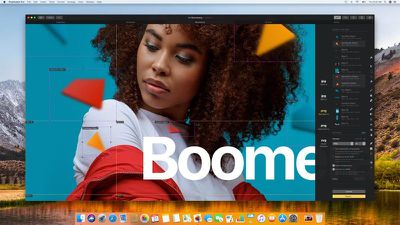
New Export for Web features are designed to allow users to prepare and optimize images for the web with advanced compression techniques in just a few clicks. The Pixelmator team says these tools compress images to the smallest size possible without a loss of quality.

Quick Export offers up a web-friendly image optimized with your most-used settings, while a new Slice tool is meant to make it easier to create web designs by slicing images into smaller images with the option of optimizing each one separately.
pixelmatorpromonsoon2
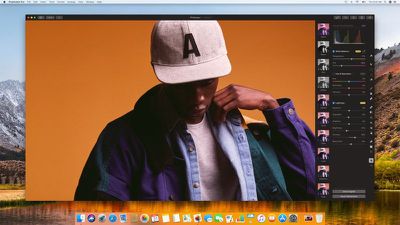
There are new Auto White Balance, Auto Lightness, and Auto Hue & Saturation tools that are powered by machine learning. These tools are meant to let users make one-click adjustments to optimize photos. Pixelmator says its machine learning algorithm was trained on millions of images to identify the contents of a photo and select the best lighting, contrast, and colors.
pixelmatorpromonsoon3
Other new features in Pixelmator Pro include support for opening and exporting vector images using the SVG format, support for exporting HEIF images, live previews when formatting text or tweaking layer blend options, a Select Color Range tool for selecting similarly colored areas of an image, and a whole new Tutorials page designed to help new users learn the ins and outs of Pixelmator Pro.

Dozens of other tweaks and bug fixes have been added, with release notes available on the Pixelmator Pro website.

Pixelmator Pro, which requires macOS High Sierra and a Metal-compatible graphics card, can be downloaded from the Mac App Store for $59.99. [Direct Link]


Top Rated Comments

Toutou Avatar
101 months ago
Personally I prefer Affinity, but I'll cheer for anything that's not Adobe. Go Pixelmator, go Affinity!
Score: 9 Votes (Like | Disagree)
GoAndrius Avatar
101 months ago
This version fixed the Photos app access issue that I had been having within Pixelmator Pro itself. It used to get stuck trying to load the library and no albums/thumbnails would ever appear in the pop-up window. Now it works instantly, similar to the iOS version of Pixelmator.
Yay, we completely rewrote the Photo Browser to make it work much faster, so I'm glad to hear this is working!
Score: 5 Votes (Like | Disagree)
GoAndrius Avatar
101 months ago
And still no text on a path? That’s a deal breaker for me.
That's fair — text on a path is on the roadmap along with additional text improvements, but it may take a little while longer for it to happen.

Still waiting for the iPad version - hopefully on the horizon.
We should have some news about this fairly soon. ;)
Score: 3 Votes (Like | Disagree)
Seuck Avatar
101 months ago
Unfortunately there is no upgrade discount coming from Pixelmator. If it's a limitation of App Store, sorry but that's not my problem as a customer.
Meanwhile Pixelmator becomes older and older and unsupported (and starts to crash often). I'm not happy.
Score: 2 Votes (Like | Disagree)
wwchris Avatar
101 months ago
So....you were totally okay with Pixelmator deciding to make a version of their existing product that they slapped the word "pro" onto, didn't have everything their existing one had so as to provide updates promising to add those things back in and more (like Apple) and charge $60 for it?

Okay....
Yes, I am totally ok with it. If you bought Pixelmator on sale at any one of the times they had it on sale you probably got it for $29. Hell, Adobe charges $10 per month. That version of Pixelmator has been out for, I dunno, at least 4-5 years as I recall, so yes, them releasing a 2.0/Pro version with tons of new features and a rewrite seems fine. Yes. I would like them to stay in business :-) Also, the old version still works.
Score: 2 Votes (Like | Disagree)
GoAndrius Avatar
101 months ago
I’m trying hard to replace Photoshop with Pixelmator Pro but it just keeps letting me down.

Why can’t text be free transformed? This is such an obvious one. You have to try out different font sizes to try to get the size just right.

Why no distortion handles? You can’t change the perspective of an object to match the layer you’re adding it to.

So many basic features are missing and you realize it as you use Pixelmator Pro.

Hopefully it’ll get there soon. Meanwhile, I have to keep Photoshop around.
Text can now be transformed in layer groups — select a text layer, Command-G, then resize.

For perspective transform, you can use Insert > Effects > Perspective Transform. We also have plans for more comprehensive distortion/warping tools as well.
Score: 1 Votes (Like | Disagree)

Popular Stories

wwdc sans text feature

Apple Rumored to Announce New Product on February 19

Thursday February 5, 2026 12:22 pm PST by
Apple plans to announce the iPhone 17e on Thursday, February 19, according to Macwelt, the German equivalent of Macworld. The report, citing industry sources, is available in English on Macworld. Apple announced the iPhone 16e on Wednesday, February 19 last year, so the iPhone 17e would be unveiled exactly one year later if this rumor is accurate. It is quite uncommon for Apple to unveil...
Apple Logo Zoomed

Tim Cook Teases Plans for Apple's Upcoming 50th Anniversary

Thursday February 5, 2026 12:54 pm PST by
Apple turns 50 this year, and its CEO Tim Cook has promised to celebrate the milestone. The big day falls on April 1, 2026. "I've been unusually reflective lately about Apple because we have been working on what do we do to mark this moment," Cook told employees today, according to Bloomberg's Mark Gurman. "When you really stop and pause and think about the last 50 years, it makes your heart ...
Finder Siri Feature

Why Apple's iOS 26.4 Siri Upgrade Will Be Bigger Than Originally Promised

Friday February 6, 2026 3:06 pm PST by
In the iOS 26.4 update that's coming this spring, Apple will introduce a new version of Siri that's going to overhaul how we interact with the personal assistant and what it's able to do. The iOS 26.4 version of Siri won't work like ChatGPT or Claude, but it will rely on large language models (LLMs) and has been updated from the ground up. Upgraded Architecture The next-generation...
maxresdefault

Apple Shows Off a Key Reason to Upgrade to the iPhone 17

Saturday February 7, 2026 9:26 am PST by
Apple today shared an ad that shows how the upgraded Center Stage front camera on the latest iPhones improves the process of taking a group selfie. "Watch how the new front facing camera on iPhone 17 Pro takes group selfies that automatically expand and rotate as more people come into frame," says Apple. While the ad is focused on the iPhone 17 Pro and iPhone 17 Pro Max, the regular iPhone...
iOS 26

iOS 26.3 and iOS 26.4 Will Add These New Features to Your iPhone

Tuesday February 3, 2026 7:47 am PST by
While the iOS 26.3 Release Candidate is now available ahead of a public release, the first iOS 26.4 beta is likely still at least a week away. Following beta testing, iOS 26.4 will likely be released to the general public in March or April. Below, we have recapped known or rumored iOS 26.3 and iOS 26.4 features so far. iOS 26.3 iPhone to Android Transfer Tool iOS 26.3 makes it easier...















