

Apple today previewed macOS Mojave during its keynote event at the Worldwide Developers Conference in San Jose, California. Version 10.14 of the Mac operating system introduces a slew of new features, including a Dark Mode, Dynamic Desktop wallpapers, Desktop Stacks, a redesigned Mac App Store, and more.

The new optional Dark Mode lets users shift their desktop to a darkened color scheme that touches almost every part of the OS, including System Preferences, Messages, Mail, Maps, Photos, Calendar, and more. Developers will be happy to learn that the newest version of Xcode coming in Mojave also supports the new Dark Mode, and Apple is making an API available so developers can implement Dark Mode in their own apps.
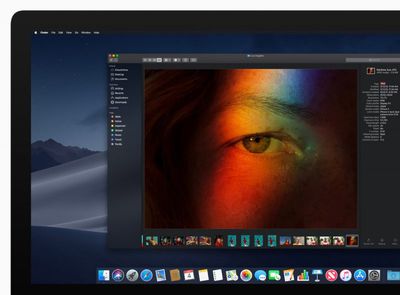
"macOS Mojave is a major update that introduces powerful new features for a wide range of Mac users, from consumers to pros," said Craig Federighi, Apple’s senior vice president of Software Engineering. "Dark Mode brings a dramatic new look to macOS that puts your content front and center, familiar iOS apps come to the Mac for the first time and the redesigned Mac App Store makes finding new apps easier and more enjoyable than ever."
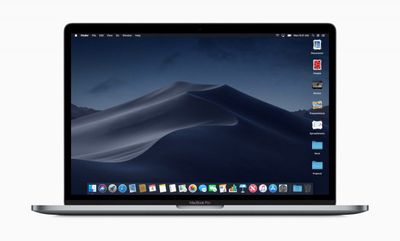
Mojave's Dark Mode also includes a new Dynamic Desktop feature that automatically transitions new desktop wallpapers to match the time of day.
Meanwhile, a new Desktop Stacks feature is designed to keep your desktop more organized. The new Stacks feature organizes messy desktops by automatically stacking files into neat groups based on file type. Users can customize their Stacks to sort based on other file attributes like date and tags.
In addition, a new Gallery view for Finder makes it easier to preview files visually, including images, video, presentations, spreadsheets, PDFs, and more. It also comes with a new Finder sidebar that offers media metadata and Quick Actions, which allow users to do things like create and password-protect PDFs and run custom Automator Actions on files.
Finder's Quick View has also been updated with new Markup tools, and will allows users to rotate and crop images, mark up PDFs, and trim video and audio clips without ever opening an app.
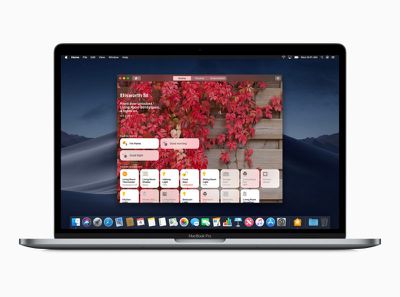
macOS Mojave also introduces desktop versions of a number of iOS apps, including News, Stocks, Voice Memos and Home. The apps were were brought to Mac using iOS frameworks that have been adapted to macOS. Apple says that starting in late 2019, these additional frameworks will be available for developers to bring their iOS apps to macOS.
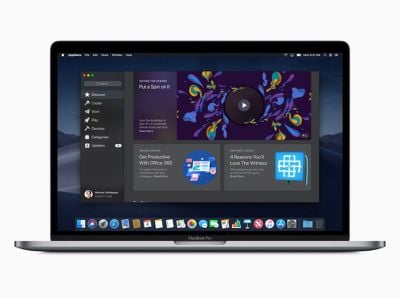
An all-new redesigned Mac App Store is also coming with macOS Mojave. Like the iOS App Store, the redesigned Mac App Store has a new look and includes rich editorial content to help app discovery. The new design also highlights new and updated apps in a Discover tab, while tabs for Create, Work, Play and Develop aim to help users find apps for a specific project or purpose.
Apple has also focused on improving security and privacy in macOS 10.14. For example, the new Safari browser includes enhanced Intelligent Tracking Prevention to help block social media "Like" or "Share" buttons and comment widgets from tracking users without permission.
In addition, Safari now presents simplified system information when users browse the web, preventing them from being tracked based on their system configuration. In another security measure, Safari will automatically create, autofill, and store strong passwords when users create new online accounts, and flag reused passwords so users can change them.
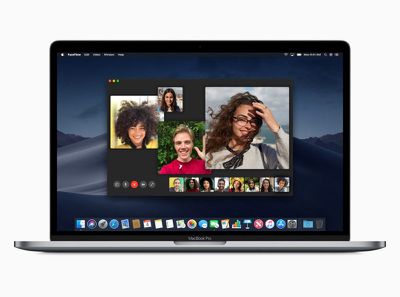
Group FaceTime is another feature exclusive to macOS Mojave, and enables users to initiate chat sessions with up to 32 people at the same time. FaceTime users can also join later if a conversation is still active and choose to join using video or audio from an iPhone, iPad or Mac, or using FaceTime audio via Apple Watch. Group FaceTime is also available on iPhones and iPads running iOS 12.
Elsewhere, in an extension of Apple's existing Continuity features, a new function called Continuity Camera allows the Photos app in macOS Mojave to access still shots and video captured from nearby iOS devices. Screenshots in macOS will also include new on-screen controls for accessing existing but hidden screenshot options as well as new video recording and photo editing capabilities.
macOS Mojave will be available this fall as a free software update for Macs introduced in mid-2012 or later, plus 2010 and 2012 Mac Pro models with recommended Metal-capable graphics cards.






















