
macOS 'Quick Look' Bug Can Leak Encrypted Data Through Thumbnail Caches

A long-standing bug in macOS's Quick Look feature has the potential to expose sensitive user files like photo thumbnails and the text of documents, even on encrypted drives, according to security researchers.

Details on the Quick Look flaw were shared earlier this month by security researcher Wojciech Regula and over the weekend on security researcher Patrick Wardle's blog (via The Hacker News).
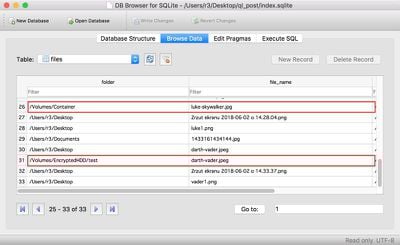
quicklookbug

Image via Wojciech Regula

Quick Look in macOS is a convenient Finder feature that's designed to present a zoomed-in view when you press the space bar on a photo or document that's selected.

To provide this preview functionality, Quick Look creates an unencrypted thumbnail database where thumbnails of files are kept, with the database storing file previews from a Mac's storage and any attached USB drives whenever a folder is opened. These thumbnails, which provide previews of content on an encrypted drive, can be accessed by someone with the technical know how and there's no automatic cache clearing that deletes them. As Regula explains:

It means that all photos that you have previewed using space (or Quicklook cached them independently) are stored in that directory as a miniature and its path. They stay there even if you delete these files or if you have previewed them in encrypted HDD or TrueCrypt/VeraCrypt container.

This is an issue that's existed for at least eight years and concerns have been raised about it in the past, but Apple has made no changes in macOS to address it. "The fact that behavior is still present in the latest version of macOS, and (though potentially having serious privacy implications), is not widely known by Mac users, warrants additional discussion," writes Wardle.

As Wardle points out, this information is valuable in law enforcement investigations, but most users are not going to be happy to learn that their Mac records file paths and thumbnails of documents from every storage device that's been attached to it.

For a forensics investigation or surveillance implant, this information could prove invaluable. Imagine having a historic record of the USB devices, files on the devices, and even thumbnails of the files...all stored persistently in an unencrypted database, long after the USB devices have been removed (and perhaps destroyed). For users, the question is: "Do you really want your Mac recording the file paths and 'previews' thumbnails of the files on any/all USB sticks that you've ever inserted into your Mac?" Me thinks not...

It's worth noting that if the main drive on the Mac is encrypted, the Quick Look cache that's created is too. Wardle says that data "may be safe" on a machine that's powered off, but on a Mac that's running, even if encrypted containers are unmounted, the caching feature can reveal their contents.

"In other words, the increased security encrypted containers were thought to provide, may be completely undermined by QuickLook," writes Wardle.

Wardle recommends that users concerned about unencrypted data storage clear the Quick Look cache manually whenever a container is unmounted, with instructions for this available on Wardle's website. It's also worth checking out Wardle's site for full details on the Quick Look bug.


Popular Stories

Apple Logo Zoomed

Tim Cook Teases Plans for Apple's Upcoming 50th Anniversary

Thursday February 5, 2026 12:54 pm PST by
Apple turns 50 this year, and its CEO Tim Cook has promised to celebrate the milestone. The big day falls on April 1, 2026. "I've been unusually reflective lately about Apple because we have been working on what do we do to mark this moment," Cook told employees today, according to Bloomberg's Mark Gurman. "When you really stop and pause and think about the last 50 years, it makes your heart ...
wwdc sans text feature

Apple Rumored to Announce New Product on February 19

Thursday February 5, 2026 12:22 pm PST by
Apple plans to announce the iPhone 17e on Thursday, February 19, according to Macwelt, the German equivalent of Macworld. The report, citing industry sources, is available in English on Macworld. Apple announced the iPhone 16e on Wednesday, February 19 last year, so the iPhone 17e would be unveiled exactly one year later if this rumor is accurate. It is quite uncommon for Apple to unveil...
Finder Siri Feature

Why Apple's iOS 26.4 Siri Upgrade Will Be Bigger Than Originally Promised

Friday February 6, 2026 3:06 pm PST by
In the iOS 26.4 update that's coming this spring, Apple will introduce a new version of Siri that's going to overhaul how we interact with the personal assistant and what it's able to do. The iOS 26.4 version of Siri won't work like ChatGPT or Claude, but it will rely on large language models (LLMs) and has been updated from the ground up. Upgraded Architecture The next-generation...
iOS 26

iOS 26.3 and iOS 26.4 Will Add These New Features to Your iPhone

Tuesday February 3, 2026 7:47 am PST by
While the iOS 26.3 Release Candidate is now available ahead of a public release, the first iOS 26.4 beta is likely still at least a week away. Following beta testing, iOS 26.4 will likely be released to the general public in March or April. Below, we have recapped known or rumored iOS 26.3 and iOS 26.4 features so far. iOS 26.3 iPhone to Android Transfer Tool iOS 26.3 makes it easier...
iphone 17 pro dark blue 1

iPhone 18 Pro Max Rumored to Deliver Next-Level Battery Life

Friday February 6, 2026 5:14 am PST by
The iPhone 18 Pro Max will feature a bigger battery for continued best-in-class battery life, according to a known Weibo leaker. Citing supply chain information, the Weibo user known as "Digital Chat Station" said that the iPhone 18 Pro Max will have a battery capacity of 5,100 to 5,200 mAh. Combined with the efficiency improvements of the A20 Pro chip, made with TSMC's 2nm process, the...

Top Rated Comments

luvbug Avatar
100 months ago
It's a one line command (in terminal) to clear the cache. You need to be an "admin" user, but you don't need to be root:

qlmanage -r cache

Of course, someone here will figure out a reason to whine about having to do this.
Score: 20 Votes (Like | Disagree)
InuNacho Avatar
100 months ago
I’ve known about this for years. I accidently locked a word file and was able to “rescue” it by hitting the space bar.
Great security.
Score: 18 Votes (Like | Disagree)
magicschoolbus Avatar
100 months ago
This is an issue that's existed for at least eight years and concerns have been raised about it ('http://osxdaily.com/2010/07/25/filevault-and-quicklook-leak-some-information-from-encrypted-volumes/') in the past, but Apple has made no changes in macOS to address it. "The fact that behavior is still present in the latest version of macOS, and (though potentially having serious privacy implications), is not widely known by Mac users, warrants additional discussion," writes Wardle.
Apple does not care about the Mac. The hardware and this proves it. You guys should seriously consider naming this site iosrumors.com (that's not a shot at you either.. Apple is all about iOS)
Score: 17 Votes (Like | Disagree)
Acidsplat Avatar
100 months ago
So, you get the prize for first whiner! I guess assigning blame is more important to you than addressing the problem in the first person using readily available information.
Ordinary people wouldn’t know to input a terminal command, or even know that Quick Look is leaking their data.

The bug lies with Apple’s code. How is this the fault of the consumer? The consumer is certainly not the party to blame in this situation.
Score: 12 Votes (Like | Disagree)
Acidsplat Avatar
100 months ago
It's a one line command (in terminal) to clear the cache. You need to be an "admin" user, but you don't need to be root:

qlmanage -r cache

Of course, someone here will figure out a reason to whine about having to do this.
You shouldn't have to do this because of a bug in the software left in from literally years ago.
Score: 11 Votes (Like | Disagree)
AL1630 Avatar
100 months ago
Hmm. It seems like these flaws are becoming more common lately. Not sure if that's just me paying more attention or if the amount of flaws is actually increasing.
Score: 8 Votes (Like | Disagree)














