

Facebook is working on its own in-house time usage insight dashboard, following in the footsteps of Apple's iOS 12 keynote at WWDC, which included the announcement of a "Screen Time" digital health feature. Discovered by Jane Manchun Wong (via TechCrunch), "Your Time on Facebook" shows a list of of how long you've spent on the Facebook app over the last week.
This includes the average time you spent in the app per day, as well as the ability to set a limit to the amount of time you want to spend in the app, and an accompanying reminder about that limit. Confirming the feature is in testing, Facebook said, "We're always working on new ways to help make sure people's time on Facebook is time well spent."
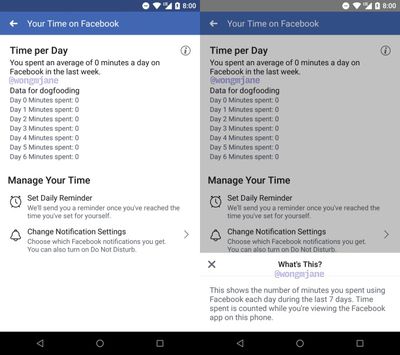
In the image shared by Wong on Twitter, the text in the dashboard reads, "Time spent is counted while you're viewing the Facebook app on this phone," so it appears this feature will not count Facebook web browsing. The dashboard also has a shortcut for users to jump to a page that allows them to change their notification settings and turn on do not disturb. Although discovered within the Android app for Facebook, once "Your Time on Facebook" rolls out to a wide audience it's expected to launch across iOS and Android devices.
Facebook-owned Instagram is also developing a "Time Spent" usage insights feature so users can see how long they spend in the app. In May, Instagram CEO Kevin Systrom said, "Understanding how time online impacts people is important, and it's the responsibility of all companies to be honest about this. We want to be part of the solution. I take that responsibility seriously."
While the digital health trend continues on an app-by-app basis, it's yet to be seen if any individual company will provide features that Apple doesn't already have in its all-encompassing Screen Time area of Settings in iOS 12. Screen Time collects data on every app you open and use on your iPhone or iPad, breaking them down by different categories of apps, showing you exactly how much time you spend in each app, how often you pick up your iPhone, which apps send the most notifications, and more.
You can set up App Limits to reduce the amount of time you spend in any app, and view weekly reports to see an overall view of what you were doing on your iOS devices the last seven days. Improvements to digital health in iOS 12 also include Do Not Disturb during Bedtime, greater control over notifications, "Downtime," and more.





















Top Rated Comments