
Hands-On With the Siri Shortcuts Beta App in iOS 12 - MacRumors
Skip to Content

Hands-On With the Siri Shortcuts Beta App in iOS 12

Apple last week introduced a beta version of the Siri Shortcuts app that's designed to let iOS 12 users create Workflow-style shortcuts and assign Siri commands to them, allowing a range of actions to be executed with voice-based requests.

While the app is complex, powerful, and can be explored for hours without uncovering all that it can do, we thought we'd take a quick look at it in our latest YouTube video to give MacRumors readers an idea of what to expect from Siri Shortcuts when it launches this fall.


The Shortcuts app (and the Siri Shortcuts feature) is based on the Workflow app that Apple acquired in 2017, so if you've used Workflow before, Siri Shortcuts and the dedicated Shortcuts app will be immediately familiar to you.

Shortcuts allows you to create multi-step customizable workflows that can use first-party apps, third-party apps, and Apple services and settings, which ultimately leads to a huge number of possibilities for tasks that can be streamlined and simplified. While much of this was possible with Workflow, adding Siri to the mix makes it easier to execute your shortcuts.
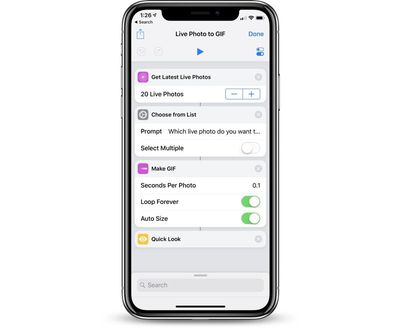
shortcutsexample
If you're unfamiliar with Shortcuts, the best way to describe the feature is through examples.

You can create a "I'm going home" shortcut that sets the thermostat at a lower temperature using the Nest app, texts your roommate that you're on the way home from work, turns on the lights at home, and opens up the Maps app with directions to your house, with the entire action activated using Siri.

Or, as Apple demonstrated during the WWDC keynote, you can make an "I'm going surfing" shortcut that uses a Siri command to get a surf report, display the current weather, calculate an estimated time of arrival to the beach, and prepare a reminder to put on sunscreen. Simpler shortcuts do things like turn a Live Photo into a GIF or surface photos you took a year ago.

When you install the Shortcuts app, you'll see that it's already populated with a huge gallery of pre-created shortcut options, along with all of your previously created Workflow shortcuts if you regularly use Workflow.
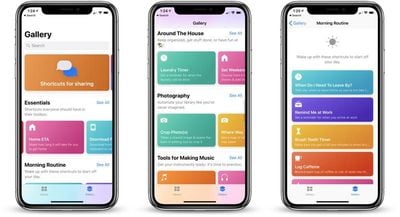
shortcutsgalleryoptions
The Gallery section provides multiple suggestions on how shortcuts can be used, offering up options like "Home ETA," which shares how long it will take you to get home, "Photo Grid," which lets you select photos and organize them into a grid," "Log Day One Activity," which starts a new diary entry in the Day One app," and "Make Top 25 Playlist," which creates a playlist from your 25 most listened to songs.

Shortcuts in the Gallery are organized in different sections like "Designed for Safari," "Share From Other Apps," "Essentials," "Morning Routine," "Explore Apple Music," "Stay Healthy," "Photography," "Do More Around the House," "On the Interweb," and much more, and there's a search option if you're looking for something specific.
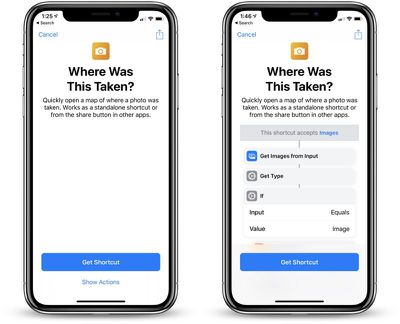
shortcutsaddtolibrary
You can modify any of the shortcuts in the gallery to tailor them to your needs or you can create shortcuts from scratch. All of your shortcuts you download are stored in the Library tab, and if you tap the "+" button in this section, you can create new shortcuts.
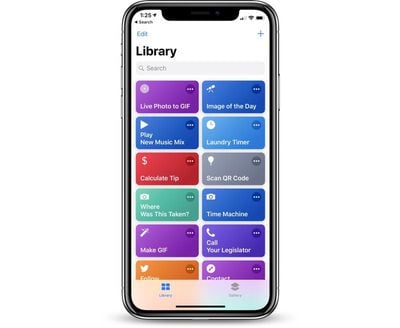
shortcutslibrary
When making your own shortcuts, there are a huge range of actions and options to choose from, from both first and third-party apps. You can access actions from apps that include Health, Contacts, Calendar, Maps, Music, Photos, the web, and more, with these options set to expand over the course of the beta testing period as third-party apps begin implementing Shortcuts support.
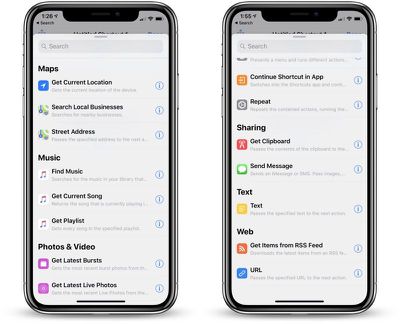
shortcutcreationoptions
All of your shortcuts can be "Added to Siri," which assigns a personalized phrase to the shortcut. Going forward, the shortcut can then be activated using that particular Siri command.
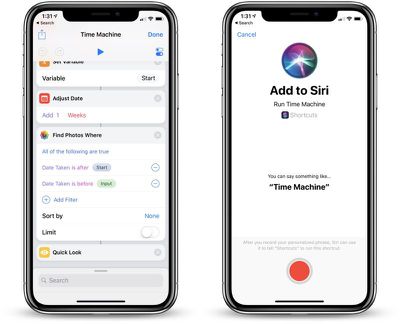
shortcutsaddtosiri
The Shortcuts app is limited to developers at the current time, and developers who have not signed up for the Shortcuts TestFlight beta can do so through the "Request" option available in the download section of the Apple Developer Center.

It is not clear if Apple will expand the TestFlight beta to its public beta testing group, but expect the Shortcuts app to launch alongside iOS 12 this fall.

What do you think of the new Shortcuts app and the Siri Shortcuts feature in iOS 12? Let us know in the comments.


Related Forum: iOS 12

Popular Stories

M5 MacBook Pro

RIP, MacBook Ultra

Monday October 19, 2026 9:37 am PDT by
Apple today sent out invites for an experience in Los Angeles on Wednesday, October 28, and the "Pro and tell" tagline on the invitation likely means that the rumored MacBook models with touch-enabled OLED displays will stick with MacBook Pro branding instead of the once-rumored "MacBook Ultra" name. The long-rumored "iPhone Ultra" ended up being named iPhone Duo, so speculation that Apple...
iPhone Duo Trio

Here's What Apple's Apps Look Like on the iPhone Duo

Tuesday October 20, 2026 11:12 am PDT by
With just three days to go until the iPhone Duo is released, Apple is getting ready for the launch. Behind the scenes, the App Store now has screenshots of Apple's built-in apps running on the Duo. We've seen some apps in marketing materials, but images of the ones we haven't seen give us an idea of what it will be like using the iPhone Duo day to day. Many apps are shown in landscape...
apple pro tell logo

Apple Announcing New Products Next Week: 'Pro and Tell'

Monday October 19, 2026 9:05 am PDT by
Apple's Greg Joswiak today hinted at new product announcements coming next week, sharing a social media post that says "Can't wait to pro and tell next week." Rumors suggest Apple is planning to debut the new MacBook Pro with an OLED touchscreen display, an M6 entry-level MacBook Pro, an M6 iMac, an iPad mini with an OLED display. Can't wait to pro and tell next week....

Top Rated Comments

108 months ago
It's so nice to see a team/app bought up by Apple, and then allowing them to do what they do best.

Sidenote: A nice site has already been launched to share shortcuts at http://sharecuts.app
Score: 11 Votes (Like | Disagree)
TimmeyCook Avatar
108 months ago
Apple should concentrate on developing Siri to be more competent as a digital assistant, rather than make pack of shortcuts. Sure it's great for children in elementary school to play with, but what about adults that have real productivity needs. At least Samsung takes AI seriously, and invests in it. They're already winning AI competitions. That's what happens when you wait and play the long game, rather than rush out a gimmicky thing like Siri. Bixby 2.0 should be a big leap forward. Bone crushing dominance in AI.



Read ('https://www.neowin.net/news/samsung-ai-tops-microsoft-machine-reading-comprehension-challenge')
I can open an email and tell Siri to remember me about it when I arrive at office.

Siri is smart enough to figure it all out, including where my office is.

Bixby can’t do that.

Also saying this is “for children” is just ridiculous.
Score: 8 Votes (Like | Disagree)
ipedro Avatar
108 months ago
Apple should concentrate on developing Siri to be more competent as a digital assistant, rather than make pack of shortcuts. Sure it's great for children in elementary school to play with, but what about adults that have real productivity needs. At least Samsung takes AI seriously, and invests in it. They're already winning AI competitions. That's what happens when you wait and play the long game, rather than rush out a gimmicky thing like Siri. Bixby 2.0 should be a big leap forward. Bone crushing dominance in AI.

Read ('https://www.neowin.net/news/samsung-ai-tops-microsoft-machine-reading-comprehension-challenge')
None of what you said makes any sense. You’re complaining about the very thing that is solving the very problem you’re complaining about. If you had bothered to look at what Shortcuts is, you’d have known that it’s not just an app. It’s a brand new Siri framework that’ll enable it to be infinitely scalable. The original Siri wasn’t scalable which is why it got stuck in the mud for the past several years. The new foundation upon which Shortcuts is built will allow for Siri to grow, not only through manual automations but through machine learning. People like you have been complaining about Siri for years (and you continue to complain). Shortcuts and the framework behind it is the fix.
Score: 7 Votes (Like | Disagree)
ipedro Avatar
108 months ago
Do this is basically "Automator" for the iPhone? I can't help but feel like this is a bit... uninspired.

I purchased Workflow and loved it. I really thought Apple would do something more... exciting.

IFTTT has much easier, accessible user interface with "triggers" or "calls for action" that Shortcuts lacks.

{{{For example, to turn off my ringer when I get to work and send an email to my boss stating. "In the office ready for the morning muster."}}}

SHORTCUTS
(User-generated input)
"Siri, activate morning routine!" or push the shortcut widget button. (Need to prompt 5 days a week)

IFFTTT
NO USER INPUT
--- Everytime when the phone is at the preset work location the IFTTT triggers the cascading actions---
A lot of people are missing the bigger announcement: this is a new Siri framework that's infinitely scalable. It no longer relies on Apple releasing specific Siri APIs for niche app types. Any and all apps in the world's biggest App Store can integrate any of its functions with Siri. Siri itself will be using this new framework, replacing outdated and constrained frameworks that have been around since before Apple acquired Siri.

The big news isn't the app. That's just a way to control the framework manually. I agree that IFTTT is more user friendly than Shortcuts but it's also more limited, requiring developers to provide specific functions for their apps as "If" and "That" functions. In app shortcut suggestions will do that. Shortcuts, the app, is far more broad.

If this all seems very complicated, think of Shortcuts as three things that act on a new Siri framework:

- Siri machine learning watches your common tasks and suggests shortcuts
- Third party apps suggest common tasks within the app that can easily be turned into Siri commands
- Shortcuts the app, provides manual construction of Siri commands, giving you near infinite control over what Siri can do

Regular users won't ever have to open the Shortcuts app and still get a ton of use out of the new Shortcuts framework with Siri and third party apps suggesting shortcuts with one button tap.
Score: 5 Votes (Like | Disagree)
ghostface147 Avatar
108 months ago
This seems to be a bit much to manage.
Score: 3 Votes (Like | Disagree)
108 months ago
I really can’t wait for this to go live. Loved Workflow and knew it was a great acquisition by Apple to really beef up Siri. I’m mostly excited that it’ll be considered a native app for Apple allowing more integration with your device(s) and hopefully, like some users mentioned, it’ll mark the beginnings of Siri becoming a better virtual assistant than the competitors (i.e. allowing background access such as running particular Shortcuts when arriving home, etc. without the need of activating Siri).

I think more users are going to be happier with this than they think now when it’s officially released. Workflow has been a game changer and it’s great to see Apple really let the team remain it’s own even after acquisition (though I’d think they’ll officially retire the Workflow app when iOS 12 is released to the public.)
Score: 2 Votes (Like | Disagree)
Latest Stories
Apple Updates More Apps With iPhone Duo Support
27 minutes ago
Apple Will Label Apps 'Made for iPhone Duo' in App Store
3 hours ago
Amazon Takes $49 Off iPad With Prices Starting at $399.99
4 hours ago
F1 on Apple TV Now Available in Dolby Atmos
4 hours ago
Apple Reveals More Than 50 Apps That Will Be Updated for iPhone Duo
5 hours ago
Apple Blocks Certificates That Could Help Attackers Fake Websites
6 hours ago
Giant iPhone Duo Installations Spotted at Apple Fifth Avenue
7 hours ago
iPhone Duo 2 Prototypes Include Under-Display Face ID
7 hours ago
Tesla App Gains iPad and iPhone Duo Support
11 hours ago
Apple Reportedly Boosts iPhone Duo Orders by 44%
12 hours ago
Fortnite Returning to Australian App Store After Court Ruling
12 hours ago
Apple Ordered to Open iPhone to Rival App Stores in Australia
12 hours ago
Apple Suppliers Face Hurdles Cutting Circuit Board Emissions
13 hours ago
Things Updated for iPhone Duo With Adaptive Layout
13 hours ago
Simplicity and Siri AI Are HomeView's Killer Features, Apple Says
14 hours ago
iPhone Duo Reviewers Really Miss Face ID
19 hours ago
Does the iPhone Duo Run Hot? Here's What Reviews Found
20 hours ago
Apple Music's New Look is Now Live on Apple's Website
21 hours ago
Anthropic Launches Claude Duet, a Proactive AI Agent
21 hours ago
What 32,000 Folds Did to the iPhone Duo's Hinge
22 hours ago
iPhone Duo's Hidden FaceTime Camera Takes 'Trash' Photos
23 hours ago
iPhone Duo Has 'Edge Light' Feature That Debuted on Macs Last Year
1 day ago
Apple Support App Updated for iPhone Duo's Larger Display
1 day ago
Amazon Sweetens the Deal on Entry-Level 16-Inch MacBook Pro With $570 Off
1 day ago
iPhone Duo Tips Over on MagSafe Stands When Unfolded
1 day ago
Apple Music's New Look Officially Announced
1 day ago
iPhone Duo Supports Apple Pencil Starting With iOS 27.2
1 day ago
iPhone Duo Accessories Roundup: Cases and Screen Protectors From OtterBox, ZAGG, and More
1 day ago
Apple Stores Will Have 'Limited' Availability of iPhone Duo for Walk-In Customers
1 day ago
iPhone Duo Reviews Explain Why Device is Both 'Fun' and 'Frustrating'
1 day ago








































