
Astropad today introduced new updates for both its Astropad Studio and Astropad Standard apps, bringing support for the Luna Display adapter, which is also now available for pre-order.

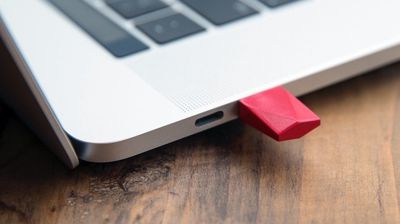
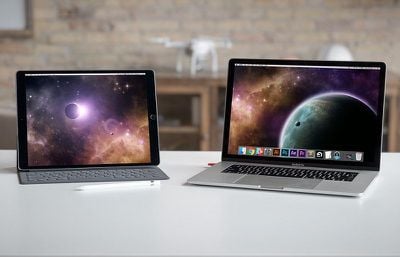
Introduced as a Kickstarter project last year, the Luna Display is designed to turn any iPad into a wireless second display for the Mac.
astropadluna
Astropad alone mirrors the Mac display, but Luna Display is designed to extend the Mac display rather than simply mirror it.

The Luna Display adapter plugs into a Mac using Mini DisplayPort or USB-C, and then after downloading the app, the Luna Display serves as an extension of the Mac, letting Mac content be accessed directly from an iPad.

Both of the Astropad apps now support Luna Display, and the Luna Display itself can be pre-ordered from the Luna Display website for $69.99.
astropadluna2
Astropad also announced today that it is discontinuing all support for third-party styluses. The company says that third-party styluses deliver poor performance compared to Apple Pencil and create engineering complexities.

Astropad no longer recommends third-party styluses for artists. Support will cease at the end of 2018 to allow Astropad to focus on optimizing its apps for the Apple Pencil.

Astropad Standard can be downloaded from the App Store for $29.99. [Direct Link]

Astropad Studio, which costs $11.99 per month for syncing and monthly feature updates, is free to download initially. [Direct Link]


Top Rated Comments

Cindori Avatar
99 months ago
Other apps have allowed wireless display transmission, but at less than optimal frame rates and resolution using WiFi. Is this like some sort of lower-latency USB 3.0 thing with a built-in H.265 encoder or something? It can't be too proprietary considering that the iPad only has Bluetooth, LTE and WiFi to communicate and I don't see a dongle on the iPad end.
The dongle is simply a display emulator. A chip tricking the OS that "hey a display was connected". By doing this you can then capture the "fake" display and stream it as video to the iPad (over WiFi). There is no real magic behind the Luna dongle except it being USB-C. There's tons of this type of dongle available in HDMI-format for cheap:

https://www.headlessghost.com/

https://www.amazon.com/CompuLab-fit-Headless-Display-Emulator/dp/B00FLZXGJ6

Price is 90% less than what Astropad is charging for their dongle.
Score: 3 Votes (Like | Disagree)
aevan Avatar
99 months ago
Am I understanding this right -- could you take an image you're working on and drag it over to the iPad Pro display and draw on it with the Apple Pencil? (I mean, assuming the app supports that?)
Just with the app, the iPad mirrors your Mac’s screen and, yes, you can draw on it great. Works really well.

Luna is a smart hardware hack that “tricks” macOS that there is a second monitor present and then the iPad image is “mirrored” from that virtual monitor - esentially creating a separate display on the iPad. You can draw on this too, of course.

So, Astropad - mirrored Mac screen you can draw on, Astropad + Luna - separate Mac screen you can draw on :)
[doublepost=1531323299][/doublepost]
Other apps have allowed wireless display transmission, but at less than optimal frame rates and resolution using WiFi. Is this like some sort of lower-latency USB 3.0 thing with a built-in H.265 encoder or something? It can't be too proprietary considering that the iPad only has Bluetooth, LTE and WiFi to communicate and I don't see a dongle on the iPad end.
It uses wifi or a lightning cable to connect (latency is better with the cable).

The adapter on the Mac is Luna Display, a little dongle that makes your Mac think there is a separate display which it can mirror on the iPad with Astropad. It’s the only way you can get a separate (non-mirrored) image with Astropad.

Please note I’m not affiliated with Astropad in any way - I’m just a user :)
Score: 2 Votes (Like | Disagree)
ipedro Avatar
99 months ago
Nice ad.
How much do you pay MacRumors to read their site?

...oh, you don’t? Breaking news: advertising pays the bills so you don’t have to.
Score: 2 Votes (Like | Disagree)
cocoua Avatar
99 months ago
What’s the difference between Standard and Studio?

I used to use Astropad but the pixelation sucked and Duet was better. Then Duet started requiring a subscription to use the Pencil so I stopped using mirroring apps like these alltogether and went with using native apps for Mac and iOS that could open each other’s files (I.e. Lightroom for Mac and iOS).

I’d consider going back to Astropad if it works with Apple Pencil and has solved the pixelation problem. I already paid for Astropad, I’m not going to pay for a subscription too.
Subscription is way too expensive...
Score: 1 Votes (Like | Disagree)
aevan Avatar
99 months ago
How good is it for drawing when it comes to latency etc?
Very good - you can definitely do professional work on it with ease. This is coming from someone who used various Cintiqs and Intuoses. Please note that I use a lightning cable for best results.
Score: 1 Votes (Like | Disagree)
aevan Avatar
99 months ago
What’s the difference between Standard and Studio?

I used to use Astropad but the pixelation sucked and Duet was better. Then Duet started requiring a subscription to use the Pencil so I stopped using mirroring apps like these alltogether and went with using native apps for Mac and iOS that could open each other’s files (I.e. Lightroom for Mac and iOS).

I’d consider going back to Astropad if it works with Apple Pencil and has solved the pixelation problem. I already paid for Astropad, I’m not going to pay for a subscription too.
Duet can’t really compare with Astropad when it comes to drawing. Not even close. Yes, there used to be pixelation in Astropad before, but that was because the app was art-focused, putting low lag before picture quality. But now even that is fixed. If you want a second screen, Duet is fine, but for actual art, Astropad is the only choice.

As for Standard and Studio - Studio has some nice gestures, shortcuts and pressure curve settings. Standard has the same performance and the most important features. If you plan on using a keyboard instead of gesture shortcuts, Standard is perfectly fine.
Score: 1 Votes (Like | Disagree)

Popular Stories

Apple Logo Zoomed

Tim Cook Teases Plans for Apple's Upcoming 50th Anniversary

Thursday February 5, 2026 12:54 pm PST by
Apple turns 50 this year, and its CEO Tim Cook has promised to celebrate the milestone. The big day falls on April 1, 2026. "I've been unusually reflective lately about Apple because we have been working on what do we do to mark this moment," Cook told employees today, according to Bloomberg's Mark Gurman. "When you really stop and pause and think about the last 50 years, it makes your heart ...
wwdc sans text feature

Apple Rumored to Announce New Product on February 19

Thursday February 5, 2026 12:22 pm PST by
Apple plans to announce the iPhone 17e on Thursday, February 19, according to Macwelt, the German equivalent of Macworld. The report, citing industry sources, is available in English on Macworld. Apple announced the iPhone 16e on Wednesday, February 19 last year, so the iPhone 17e would be unveiled exactly one year later if this rumor is accurate. It is quite uncommon for Apple to unveil...
Finder Siri Feature

Why Apple's iOS 26.4 Siri Upgrade Will Be Bigger Than Originally Promised

Friday February 6, 2026 3:06 pm PST by
In the iOS 26.4 update that's coming this spring, Apple will introduce a new version of Siri that's going to overhaul how we interact with the personal assistant and what it's able to do. The iOS 26.4 version of Siri won't work like ChatGPT or Claude, but it will rely on large language models (LLMs) and has been updated from the ground up. Upgraded Architecture The next-generation...
iOS 26

iOS 26.3 and iOS 26.4 Will Add These New Features to Your iPhone

Tuesday February 3, 2026 7:47 am PST by
While the iOS 26.3 Release Candidate is now available ahead of a public release, the first iOS 26.4 beta is likely still at least a week away. Following beta testing, iOS 26.4 will likely be released to the general public in March or April. Below, we have recapped known or rumored iOS 26.3 and iOS 26.4 features so far. iOS 26.3 iPhone to Android Transfer Tool iOS 26.3 makes it easier...
iphone 17 pro dark blue 1

iPhone 18 Pro Max Rumored to Deliver Next-Level Battery Life

Friday February 6, 2026 5:14 am PST by
The iPhone 18 Pro Max will feature a bigger battery for continued best-in-class battery life, according to a known Weibo leaker. Citing supply chain information, the Weibo user known as "Digital Chat Station" said that the iPhone 18 Pro Max will have a battery capacity of 5,100 to 5,200 mAh. Combined with the efficiency improvements of the A20 Pro chip, made with TSMC's 2nm process, the...















