
2018 MacBook Pro Features 'Fastest SSD Ever' in a Laptop According to Benchmarks - MacRumors
Skip to Content

2018 MacBook Pro Features 'Fastest SSD Ever' in a Laptop According to Benchmarks

The 2018 MacBook Pros just went on sale yesterday, but Apple was quick about shipping them out and some customers already have the new machines in hand.

Laptop Mag was able to get one of the new 13-inch 2018 MacBook Pro models and performed some benchmarks to give us an idea of how it measures up to competing PCs. According to Laptop Mag, it the new 13-inch MacBook Pro is the "fastest system in its class."
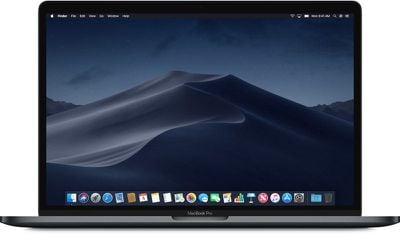
macbookprodesign
The site's tests were performed on the $2,499 13-inch MacBook Pro with Touch Bar equipped with a 2.7GHz quad-core 8th-generation Core i7 processor, 16GB RAM, Intel Iris Plus 655, and a 512GB SSD.

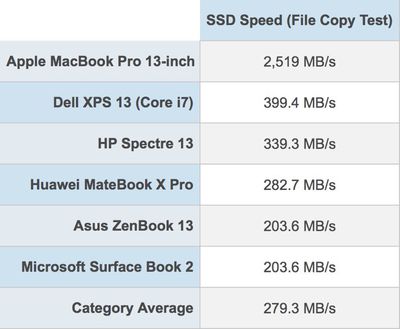
A file copy test of the SSD in the new MacBook Pro, which Apple says supports sequential read speeds of up to 3.2GB/s and sequential write speeds up to 2.2GB/s, led Laptop Mag to declare the SSD in the MacBook Pro "the fastest ever" in a laptop. Higher capacity SSDs may see even faster speeds on disk speeds tests. A BlackMagic Disk Speed test was also conducted, resulting in an average write speed of 2,682 MB/s.
macbookprossdtest

I had to do a double take when I saw how quickly the new 13-inch MacBook Pro duplicated 4.9GB worth of data. It took 2 seconds, which comes out to a rate of 2,519 megabytes per second. That's insane.

So we also ran the BlackMagic Disk Speed test for macOS, and the system returned an average write speed of 2,682 MBps.

To be fair, Apple’s relatively new APFS file system is designed to speed up file copies using a technology Apple calls Instant Cloning. But a win is a win.

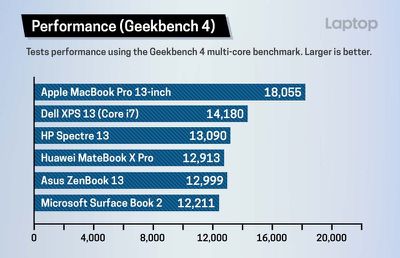
On a Geekbench 4 CPU benchmark, the 13-inch MacBook Pro earned a score of 18,055 on the multi-core test, outperforming 13-inch machines from companies like Dell, HP, Asus, and Microsoft. That score beats out all 2017 MacBook Pro models and is faster than some iMac configurations. 15-inch MacBook Pro models with 6-core 8th-generation Intel chips will show even more impressive speeds.
macbookprogeekbenchperformance
The MacBook Pro took 16:57 minutes to transcode a 4K video clip to 1080p using Handbrake, faster than most competing machines and two and a half minutes faster than the 2017 13-inch MacBook Pro. It didn't win at an Excel VLOOKUP macro matching 65,000 names to corresponding addresses, but at 1 minute 16 seconds to complete the task, it was competitive with the Dell XPS 13 and Asus Zenbook, while beating out the Surface Book 2 and the Huawei MateBook X Pro.

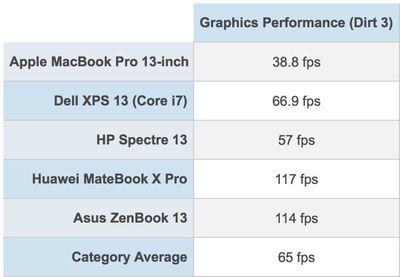
One area where the MacBook Pro didn't quite measure up to other machines with similar specs was GPU performance. The 13-inch 2018 MacBook Pro uses Intel's Iris Plus Graphics 655 with 128MB of embedded DRAM and was unable to compete in a Dirt 3 graphics test, getting only 38.8 frames per second. All Windows-based machines tested offered much better performance.
macbookprographicsperformance
Apple did team up with Blackmagic to offer a Blackmagic eGPU for gaming purposes and system intensive creative tasks, but the device is priced at $700. It does, however, offer super fast performance with a built-in Radeon Pro 580 GPU.

Additional benchmarks and details about the 2018 MacBook Pro models will surface over the course of the next few days as orders arrive and retail stores begin stocking the machines.

The new 2018 models can be purchased from the Apple online store, with prices on the 13-inch machine starting at $1,799 and prices on the 15-inch machine starting at $2,399.


Related Roundup: MacBook Pro
Buyer's Guide: MacBook Pro (Buy Now)
Related Forum: MacBook Pro

Popular Stories

iOS 26

iOS 26.4 Adds Two New Features to CarPlay

Tuesday March 24, 2026 1:55 pm PDT by
iOS 26.4 was released today, and it includes a couple of new features for CarPlay: an Ambient Music widget and support for voice-based chatbot apps. To update your iPhone 11 or newer to iOS 26.4, open the Settings app and tap on General → Software Update. CarPlay will automatically offer the new features so long as the iPhone connected to your vehicle is running iOS 26.4 or later....
Apple Business hero

Apple Unveils 'Apple Business' All-in-One Platform

Tuesday March 24, 2026 8:53 am PDT by
Apple today announced Apple Business, a new all-in-one platform that unifies device management, productivity tools, and customer outreach features. The service is designed to be a consolidated replacement for several of Apple's existing business-focused offerings, including Apple Business Essentials, Apple Business Manager, and Apple Business Connect. It provides organizations with a single...
AirPods Pro Firmware Feature

Apple Releases New Firmware for AirPods Pro 3, AirPods Pro 2 and AirPods 4

Tuesday March 24, 2026 12:31 pm PDT by
Apple today released new firmware for the AirPods Pro 2, AirPods Pro 3, and the AirPods 4. The firmware has a version number of 8B39, up from 8B34 on the AirPods Pro 3, 8B28 on the AirPods Pro 2, and 8B21 on the AirPods 4. There is no word on what's included in the firmware, but Apple has a support document with limited notes. Most updates are limited to bug fixes and performance...

Top Rated Comments

826317 Avatar
101 months ago
These are the type of things Apple haters / Windows PC fanboys overlook when determining the true value of an Apple device.
Score: 40 Votes (Like | Disagree)
101 months ago
With the file copy so much ridiculously faster, could that have something to do with the APFS file system? I kind of remember reading that it doesn't actually copy the file or something like that. Like there's just one file that appears to be in two places? Maybe someone knows more about it than I do.
Score: 29 Votes (Like | Disagree)
101 months ago
What do you need the GPU for?
Are you serious?
Score: 26 Votes (Like | Disagree)
101 months ago
As others speculate these results are not really indicative of anything, due to how APFS influences these results.

When using APFS and duplicating a file, the file isn't actually stored twice on disk but only once, and both locations store a reference to the actual file on disk. Hence the high speed.

Changing even 1 byte in the duplicated file is what actually triggers a full copy of the file on disk. This is what they should've measured. Presenting it in the current way is deeply flawed.
Score: 23 Votes (Like | Disagree)
SvP Avatar
101 months ago
Isn’t APFS the cause of these speeds?
Score: 20 Votes (Like | Disagree)
101 months ago
So many insane comments here.

You need the GPU for almost anything, most of the stuff somebody who buys an MBP will include heavy GPU intensive work.

And no, there will be no dedicated GPU in the 13 inch MBP. It makes absolutely no sense whatsoever. That computer, just like literally any other that is comparable in size (or even larger) does not have dedicated GPUs. Nor the thermal performance of these GPUs, nor their power consumptions are compatible with the size of a 13 inch ultrabook. This has been like that for years.

I would argue that a good eGPU case is a much better solution, as any dedicated mobile GPU will be soldered to the MB, will be a dumbed down version of a desktop one, eat the battery and will act as a personal lap radiator. Also, GPUs get obsolete at a lot faster rate than CPUs.
Score: 16 Votes (Like | Disagree)















