
Apple Pay Now Available at Nearly 16,000 Cardless Chase ATMs

Chase, one of the major banks in the United States, today announced that customers can now use Apple Pay and other mobile wallet services at nearly all of the company's 16,000 ATMs, which have been upgraded with card-free access.

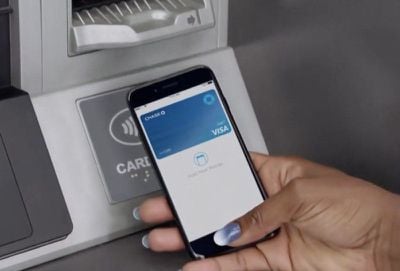
To access an ATM and withdraw money, customers no longer need a physical debit card or access code for authentication, with the contactless ATMs supporting a "tap" from a smartphone to use the ATM.
applepaychaseatms2
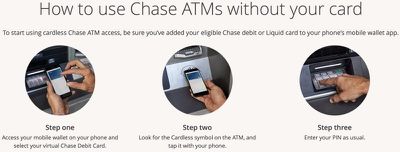
On its website, Chase walks users through the steps necessary to use the new ATM functionality.

For iPhone users, after adding a Chase card to the Wallet app on the iPhone, at an ATM, customers will need to open up the Wallet app, select the virtual Chase debit card and tap the iPhone on the "Cardless" symbol on the ATM, authenticating via Face ID or Touch ID.
applepaychaseatms1
A PIN code will need to be entered for verification purposes, so it's not quite as simple as a standard payment with Apple Pay, but it does prevent Chase card users from needing to pull out a physical card.

Chase says that cardless ATM access is available to all customers with a Chase debit or Liquid card that's been added to Apple Pay, Google Pay, or Samsung Pay. All Chase ATMs with the Cardless symbol support Apple Pay.

Chase first announced plans to update its ATMs with contactless money withdrawals in 2016, and has since then been rolling out the technology. Today's update suggests the rollout is nearly complete and available to most Chase customers.

Both Wells Fargo and Bank of America, Chase competitors, have also been rolling out card-free Apple Pay access to ATMs. Wells Fargo added Apple Pay support to over 5,000 ATMs last year, while Bank of America began implementing the feature in 2016.


Related Roundup: Apple Pay

Popular Stories

Apple Logo Zoomed

Tim Cook Teases Plans for Apple's Upcoming 50th Anniversary

Thursday February 5, 2026 12:54 pm PST by
Apple turns 50 this year, and its CEO Tim Cook has promised to celebrate the milestone. The big day falls on April 1, 2026. "I've been unusually reflective lately about Apple because we have been working on what do we do to mark this moment," Cook told employees today, according to Bloomberg's Mark Gurman. "When you really stop and pause and think about the last 50 years, it makes your heart ...
wwdc sans text feature

Apple Rumored to Announce New Product on February 19

Thursday February 5, 2026 12:22 pm PST by
Apple plans to announce the iPhone 17e on Thursday, February 19, according to Macwelt, the German equivalent of Macworld. The report, citing industry sources, is available in English on Macworld. Apple announced the iPhone 16e on Wednesday, February 19 last year, so the iPhone 17e would be unveiled exactly one year later if this rumor is accurate. It is quite uncommon for Apple to unveil...
Finder Siri Feature

Why Apple's iOS 26.4 Siri Upgrade Will Be Bigger Than Originally Promised

Friday February 6, 2026 3:06 pm PST by
In the iOS 26.4 update that's coming this spring, Apple will introduce a new version of Siri that's going to overhaul how we interact with the personal assistant and what it's able to do. The iOS 26.4 version of Siri won't work like ChatGPT or Claude, but it will rely on large language models (LLMs) and has been updated from the ground up. Upgraded Architecture The next-generation...
iOS 26

iOS 26.3 and iOS 26.4 Will Add These New Features to Your iPhone

Tuesday February 3, 2026 7:47 am PST by
While the iOS 26.3 Release Candidate is now available ahead of a public release, the first iOS 26.4 beta is likely still at least a week away. Following beta testing, iOS 26.4 will likely be released to the general public in March or April. Below, we have recapped known or rumored iOS 26.3 and iOS 26.4 features so far. iOS 26.3 iPhone to Android Transfer Tool iOS 26.3 makes it easier...
iphone 17 pro dark blue 1

iPhone 18 Pro Max Rumored to Deliver Next-Level Battery Life

Friday February 6, 2026 5:14 am PST by
The iPhone 18 Pro Max will feature a bigger battery for continued best-in-class battery life, according to a known Weibo leaker. Citing supply chain information, the Weibo user known as "Digital Chat Station" said that the iPhone 18 Pro Max will have a battery capacity of 5,100 to 5,200 mAh. Combined with the efficiency improvements of the A20 Pro chip, made with TSMC's 2nm process, the...

Top Rated Comments

MyMacintosh Avatar
98 months ago
Was literally at my Chase atm the other day wondering when this would be a thing. Thank God!
Score: 7 Votes (Like | Disagree)
Braderunner Avatar
98 months ago
We need more Apple Pay!
Score: 7 Votes (Like | Disagree)
McTaste Avatar
98 months ago
I can't even remember the last time I used an ATM. If I get birthday money that small amount is more than enough to last me the entire year for cash only purchases.
We need to get you buying more weed.
Score: 6 Votes (Like | Disagree)
Azkylinegtr Avatar
98 months ago

[LIST=1]
* Take out Debit Card
* Slide card into slot in ATM
* Enter pin #

vs.

[LIST=1]
* Take out iPhone
* Unlock (if you don't have FaceID
* Find app & launch it
* Scroll/select Chase Debit Card
* Tap Phone on ATM machine pad
* Enter pin #


I guess I'm not seeing an advantage here...
You can double tap power button on the iPhone X or double click the home button to bring up the wallet from the home screen. Doing this instant authenticates me as I do it.
Score: 5 Votes (Like | Disagree)
tooloud10 Avatar
98 months ago

[LIST=1]
* Take out Debit Card
* Slide card into slot in ATM
* Enter pin #

vs.

[LIST=1]
* Take out iPhone
* Unlock (if you don't have FaceID
* Find app & launch it
* Scroll/select Chase Debit Card
* Tap Phone on ATM machine pad
* Enter pin #


I guess I'm not seeing an advantage here...
The advantage is that you don't have to carry or babysit a card anymore. Your instructions are a bit biased towards the card though--I'd argue that carrying/retrieving a card that is located in a wallet that is possibly located in a bag has at least as many steps as using your iPhone.

My instructions for card use would look like this:

1) Take out bag to retrieve wallet
2) Remove card from wallet
3) Slide card into slot in ATM
4) Enter PIN
5) Conduct transaction
6) Remove card from slot in ATM
7) Replace card in wallet
8) Replace wallet in bag

And for anyone that uses an Apple Watch and has their Chase card set as the default payment, it's literally as easy as pressing the watch's side button twice and holding it to the pad. This is how I do all of my ApplePay transactions--there's no way it's easier to use a card.
Score: 4 Votes (Like | Disagree)
I7guy Avatar
98 months ago
Apple is on a roll with Apple Pay. I wish my bank would enable Apple Pay withdrawals.
Score: 4 Votes (Like | Disagree)















