
Transit App Expands Real-Time Crowdsourced Data to 175 Cities - MacRumors
Skip to Content

Transit App Expands Real-Time Crowdsourced Data to 175 Cities

by

The developers of the Transit app this week announced the expansion of real-time crowdsourced data for buses, trains, streetcars, ferries, and so forth to 175 cities across the United States, Canada, and Europe.
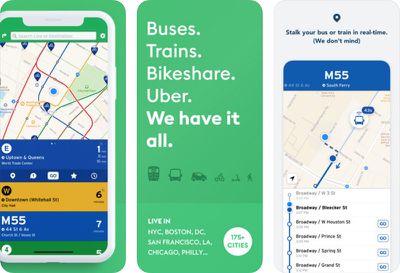
transit app trio
Normally, the locations of public transportation vehicles are pulled from a transit agency's data feed, which can take anywhere from 10 seconds to five minutes to update. This can result in the app showing a bus approaching a certain stop, for example, when in reality it has already passed by—without you on it.

To solve this problem, the Transit app has turned to crowdsourced data from opted-in users of GO, its step-by-step navigation feature.

GO itself isn't new. The feature automatically tracks your transit vehicle, walking speed, and location in real time, notifying you exactly when to leave to catch your ride, and when to disembark. The feature can also reroute you and provide adjusted ETAs when unforeseen changes or delays arise.

Now, when users enable GO, they will also be helping others. Once a rider opts into GO on a bus or train, for example, the Transit app will start broadcasting the vehicle's real-time location, second-by-second, to riders down the line. In general, this greatly improves the location of a vehicle versus agency data.
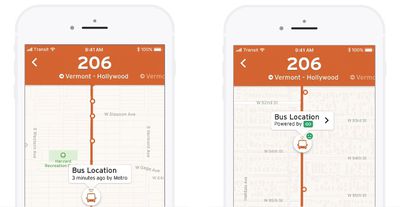
transit crowdsourced
This means you can watch your vehicle approach—in actual, second-by-second real-time—on the map, whenever someone on that vehicle is using GO.

The team behind Transit has been testing real-time crowdsourced data for nearly two years. Over that time, they've generated data for "millions of trips," starting in the Canadian cities of Montréal and Victoria. Other test regions have included New York City and Los Angeles. The tests are said to have "went well."

For those with privacy concerns, the Transit team ensures that your location is completely anonymous. Data is only shared with its servers while GO is active and you are actually on board the vehicle. As soon as you disembark, GO shuts off, and your vehicle's location stops being sent, according to the app's FAQ.

It's unclear if there's a way to continue using the GO navigation helper without opting in to the real-time crowdsourced data sharing aspect, so if you do not wish to participate, it may be best to keep the feature disabled entirely.

Transit also notes that the location sharing feature relies on extended GPS use, which can use up to five percent of battery life on a 20-minute ride, assuming the rider is actively using the device during the trip. In terms of data, though, Transit says GO uses only about 100 kilobytes on a 20-minute trip.

Despite this, the Transit team is hoping that many riders will opt into the feature. They've even added some gamification features to the app as an incentive. GO users will now see a smile face in the top-left corner of the map, for example, indicating how many nearby riders they are helping out.
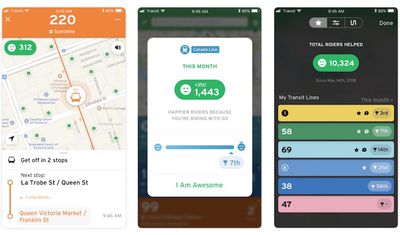
transit gamification trio
The app also shows GO users how many nearby riders they've helped on a monthly basis, and provides a "helpfulness" rank compared to other GO users. Transit is hoping that a little bit of competition will motivative riders to participate.

Transit bills itself as a real-time urban travel companion. The app is especially popular in Canada, making navigation via public transit easier with real-time data, trip planning and comparisons, step-by-step navigation, service disruption notifications, departure and stop reminders, and much more.

Transit works with not only buses, commuter trains, and subways, but streetcars, ferries, ride-sharing, bike-sharing, scooter-sharing, and more. The app is free to download on the App Store for iPhone and Google Play for Android.


Top Rated Comments

107 months ago
Great, but the main value of the Transit app to me was in its Apple Watch app, which they oddly discontinued. They said then that they planned to release a new one, but that was many months ago. The Apple Watch app needs to be a priority!
Score: 7 Votes (Like | Disagree)
FelixDerKater Avatar
107 months ago
Time to buy it, Apple.
Score: 3 Votes (Like | Disagree)
107 months ago
This functionality has returned. Along with the "Go" feature.
- if you just select the bus you wish to board, it'll alert you based on the walking time it takes to get to the bus with about 1-2mins to spare.
- if you enter your destination, the bus and alternatives are presented and alerted to you on the Watch.

The previous version of this app from 2017 began to drop in accuracy and usefulness significantly enough for me to delete it.

Tried this out last night at 2:40AM to goto the gym, as in Toronto not only are there NO set/scheduled bus times (in a city of 2.6mil its atrocious: unionized workers), I didn't get any GO rider data. However the bus time was accurate under 40 seconds which is refreshing! I prefer the MoveIt app layout since Transits bombardment of nearby buses where I live a pain to view in huge BLOCKS.

Looking forward to using this app more.

PS: the GO feature can be disabled/opt-out yet I want to be certain that an analytical organization can confirm that claim.
I'm not trying to disparage the app's new features, but the "functionality" I was referring to was the Apple Watch app. It would show on a single screen my few favorite train/bus lines with the number of minutes to the next arrival. This was essential functionality for me and it has not returned. Yes, I can still open up the phone app to see that information, but having this quick information on my wrist as I race to catch a bus/train was incredible.

The new stuff is great, no doubt. I just want a basic watch app that displays the relevant information as cleanly and accurately as the prior Transit watch app did. (That it looked great was also a plus.)

[doublepost=1534786970][/doublepost]
I find the interface of Transit a bit fiddly for planning trips.

But here in NYC the subway and bus countdown timers are really awesome. As long as the MTA data is correct (that varies, but on my line it seems accurate to me ~80% of the time), I can time my walk to the subway and minimize time spent hanging out on the platform.

I've also tried it in a couple of other cities like Portland and Montréal. Generally, you just open the app and without missing a beat it tells you what the nearest bus/train/tram/ferry is and how long till the next one.
Same here in Chicago. I almost never use it to plan a trip -- I know where the train lines are already. What I need is quick information about arrival timing.
Score: 2 Votes (Like | Disagree)
DeepIn2U Avatar
107 months ago
Great, but the main value of the Transit app to me was in its Apple Watch app, which they oddly discontinued. They said then that they planned to release a new one, but that was many months ago. The Apple Watch app needs to be a priority!


This functionality has returned. Along with the "Go" feature.
- if you just select the bus you wish to board, it'll alert you based on the walking time it takes to get to the bus with about 1-2mins to spare.
- if you enter your destination, the bus and alternatives are presented and alerted to you on the Watch.

The previous version of this app from 2017 began to drop in accuracy and usefulness significantly enough for me to delete it.

Tried this out last night at 2:40AM to goto the gym, as in Toronto not only are there NO set/scheduled bus times (in a city of 2.6mil its atrocious: unionized workers), I didn't get any GO rider data. However the bus time was accurate under 40 seconds which is refreshing! I prefer the MoveIt app layout since Transits bombardment of nearby buses where I live a pain to view in huge BLOCKS.

Looking forward to using this app more.

PS: the GO feature can be disabled/opt-out yet I want to be certain that an analytical organization can confirm that claim.
Score: 2 Votes (Like | Disagree)
107 months ago
Yeah, that's where it gets fiddly for me too. You have to drag that weird map around manually until it's centered on or near where you are, and the way that's designed is pretty awkward.

I don't tend to use in IN the subway that often since most of the time there's an MTA countdown clock somewhere (if it's working correctly).
I have to do the same thing. I mostly use the widget to check times of whatever subway I'm in. That's pretty reliable about where you are assuming you entered the station from outside and not a transfer.
Score: 1 Votes (Like | Disagree)
107 months ago
I find the interface of Transit a bit fiddly for planning trips.

But here in NYC the subway and bus countdown timers are really awesome. As long as the MTA data is correct (that varies, but on my line it seems accurate to me ~80% of the time), I can time my walk to the subway and minimize time spent hanging out on the platform.

I've also tried it in a couple of other cities like Portland and Montréal. Generally, you just open the app and without missing a beat it tells you what the nearest bus/train/tram/ferry is and how long till the next one.
I've also found the real time from the app is mostly accurate. What I have found ever since an iOS update in maybe 2017, the GPS feature in the subway doesn't work much anymore so it can never get an accurate read as to where I am. That never used to be a problem before but now it is.
Score: 1 Votes (Like | Disagree)

Popular Stories

M5 MacBook Pro

RIP, MacBook Ultra

Monday October 19, 2026 9:37 am PDT by
Apple today sent out invites for an experience in Los Angeles on Wednesday, October 28, and the "Pro and tell" tagline on the invitation likely means that the rumored MacBook models with touch-enabled OLED displays will stick with MacBook Pro branding instead of the once-rumored "MacBook Ultra" name. The long-rumored "iPhone Ultra" ended up being named iPhone Duo, so speculation that Apple...
iPhone Duo Trio

Here's What Apple's Apps Look Like on the iPhone Duo

Tuesday October 20, 2026 11:12 am PDT by
With just three days to go until the iPhone Duo is released, Apple is getting ready for the launch. Behind the scenes, the App Store now has screenshots of Apple's built-in apps running on the Duo. We've seen some apps in marketing materials, but images of the ones we haven't seen give us an idea of what it will be like using the iPhone Duo day to day. Many apps are shown in landscape...
apple pro tell logo

Apple Announcing New Products Next Week: 'Pro and Tell'

Monday October 19, 2026 9:05 am PDT by
Apple's Greg Joswiak today hinted at new product announcements coming next week, sharing a social media post that says "Can't wait to pro and tell next week." Rumors suggest Apple is planning to debut the new MacBook Pro with an OLED touchscreen display, an M6 entry-level MacBook Pro, an M6 iMac, an iPad mini with an OLED display. Can't wait to pro and tell next week....
Latest Stories
Apple Updates More Apps With iPhone Duo Support
23 minutes ago
Apple Will Label Apps 'Made for iPhone Duo' in App Store
3 hours ago
Amazon Takes $49 Off iPad With Prices Starting at $399.99
4 hours ago
F1 on Apple TV Now Available in Dolby Atmos
4 hours ago
Apple Reveals More Than 50 Apps That Will Be Updated for iPhone Duo
5 hours ago
Apple Blocks Certificates That Could Help Attackers Fake Websites
6 hours ago
Giant iPhone Duo Installations Spotted at Apple Fifth Avenue
7 hours ago
iPhone Duo 2 Prototypes Include Under-Display Face ID
7 hours ago
Tesla App Gains iPad and iPhone Duo Support
11 hours ago
Apple Reportedly Boosts iPhone Duo Orders by 44%
12 hours ago
Fortnite Returning to Australian App Store After Court Ruling
12 hours ago
Apple Ordered to Open iPhone to Rival App Stores in Australia
12 hours ago
Apple Suppliers Face Hurdles Cutting Circuit Board Emissions
13 hours ago
Things Updated for iPhone Duo With Adaptive Layout
13 hours ago
Simplicity and Siri AI Are HomeView's Killer Features, Apple Says
13 hours ago
iPhone Duo Reviewers Really Miss Face ID
18 hours ago
Does the iPhone Duo Run Hot? Here's What Reviews Found
20 hours ago
Apple Music's New Look is Now Live on Apple's Website
21 hours ago
Anthropic Launches Claude Duet, a Proactive AI Agent
21 hours ago
What 32,000 Folds Did to the iPhone Duo's Hinge
22 hours ago
iPhone Duo's Hidden FaceTime Camera Takes 'Trash' Photos
23 hours ago
iPhone Duo Has 'Edge Light' Feature That Debuted on Macs Last Year
1 day ago
Apple Support App Updated for iPhone Duo's Larger Display
1 day ago
Amazon Sweetens the Deal on Entry-Level 16-Inch MacBook Pro With $570 Off
1 day ago
iPhone Duo Tips Over on MagSafe Stands When Unfolded
1 day ago
Apple Music's New Look Officially Announced
1 day ago
iPhone Duo Supports Apple Pencil Starting With iOS 27.2
1 day ago
iPhone Duo Accessories Roundup: Cases and Screen Protectors From OtterBox, ZAGG, and More
1 day ago
Apple Stores Will Have 'Limited' Availability of iPhone Duo for Walk-In Customers
1 day ago
iPhone Duo Reviews Explain Why Device is Both 'Fun' and 'Frustrating'
1 day ago








































