
Apple Seeds Ninth Beta of macOS Mojave to Developers

Apple today seeded the ninth beta of an upcoming macOS Mojave update to developers for testing purposes, one week after releasing the eighth beta and more than two months after introducing the software at the Worldwide Developers Conference.

macOS Mojave introduces a new method of installing software updates, so after you've installed the initial beta using the appropriate profile from the Developer Center, additional betas can be downloaded through opening up System Preferences and choosing the "Software Update" icon.


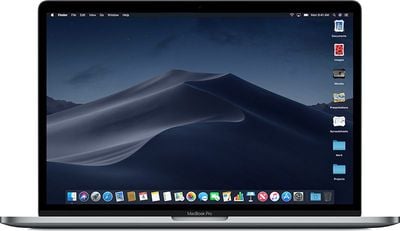
Apple's macOS Mojave update introduces a systemwide Dark Mode, with Mojave users able to choose between a light theme or the new dark theme, which changes the color of the dock, menu bar, apps, and other elements. Dark Mode is accompanied by Dynamic Desktops, aka wallpapers that subtly change throughout the day. Additional wallpapers were introduced in the fourth and fifth betas.

Stacks, a new desktop organization system, keeps all of your desktop files neat and organized, while Finder has been enhanced with a Gallery View, a Sidebar, a revamped Quick Look option and Quick Actions, so you can do more in the Finder window than ever before.

Screenshots can now be edited using Markup tools and a new management options that also allow for easy screen recording, while Continuity camera, a new feature, allows you to import photos and document scans directly from an iPhone or iPad to the Mac.
macosmojavestacks
The Apple News, Stocks, Home, and Voice Memos apps have been ported from iOS to macOS as part of a multiyear project Apple is working on to make it easier to bring iOS apps to Macs, and Apple has introduced several new privacy protections to keep your data safer than ever.

Apple is also making it harder for websites to track you with a range of new Safari tools, and it's also easier to make and store secure, hard-to-guess passwords for each and every website.

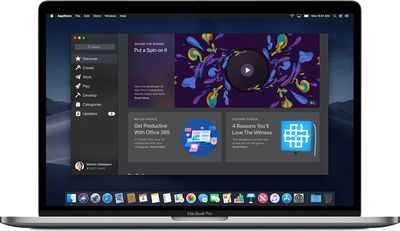
Apple has added an entirely revamped Mac App Store to macOS Mojave that makes it easier to discover apps with a featured section and specific categories for games, creative apps, productivity apps, apps for developers, and more.
macosmojavemacappstore
macOS Mojave was initially supposed to include a Group FaceTime feature that includes support for chatting with up to 32 people at one time, but it was removed in macOS Mojave beta 7 and the feature won't be available until later in the year.

macOS Mojave is available to developers and public beta testers to work out bugs and other issues ahead of an upcoming fall public release.


Related Forum: macOS Mojave

Popular Stories

Apple Logo Zoomed

Tim Cook Teases Plans for Apple's Upcoming 50th Anniversary

Thursday February 5, 2026 12:54 pm PST by
Apple turns 50 this year, and its CEO Tim Cook has promised to celebrate the milestone. The big day falls on April 1, 2026. "I've been unusually reflective lately about Apple because we have been working on what do we do to mark this moment," Cook told employees today, according to Bloomberg's Mark Gurman. "When you really stop and pause and think about the last 50 years, it makes your heart ...
wwdc sans text feature

Apple Rumored to Announce New Product on February 19

Thursday February 5, 2026 12:22 pm PST by
Apple plans to announce the iPhone 17e on Thursday, February 19, according to Macwelt, the German equivalent of Macworld. The report, citing industry sources, is available in English on Macworld. Apple announced the iPhone 16e on Wednesday, February 19 last year, so the iPhone 17e would be unveiled exactly one year later if this rumor is accurate. It is quite uncommon for Apple to unveil...
Finder Siri Feature

Why Apple's iOS 26.4 Siri Upgrade Will Be Bigger Than Originally Promised

Friday February 6, 2026 3:06 pm PST by
In the iOS 26.4 update that's coming this spring, Apple will introduce a new version of Siri that's going to overhaul how we interact with the personal assistant and what it's able to do. The iOS 26.4 version of Siri won't work like ChatGPT or Claude, but it will rely on large language models (LLMs) and has been updated from the ground up. Upgraded Architecture The next-generation...
iOS 26

iOS 26.3 and iOS 26.4 Will Add These New Features to Your iPhone

Tuesday February 3, 2026 7:47 am PST by
While the iOS 26.3 Release Candidate is now available ahead of a public release, the first iOS 26.4 beta is likely still at least a week away. Following beta testing, iOS 26.4 will likely be released to the general public in March or April. Below, we have recapped known or rumored iOS 26.3 and iOS 26.4 features so far. iOS 26.3 iPhone to Android Transfer Tool iOS 26.3 makes it easier...
maxresdefault

Apple Shows Off a Key Reason to Upgrade to the iPhone 17

Saturday February 7, 2026 9:26 am PST by
Apple today shared an ad that shows how the upgraded Center Stage front camera on the latest iPhones improves the process of taking a group selfie. "Watch how the new front facing camera on iPhone 17 Pro takes group selfies that automatically expand and rotate as more people come into frame," says Apple. While the ad is focused on the iPhone 17 Pro and iPhone 17 Pro Max, the regular iPhone...

Top Rated Comments

Chris The Bipolarbear Avatar
97 months ago
Dark mode is awesome
Dark mode is a personal matter of preference like any other background, wallpaper.
Score: 12 Votes (Like | Disagree)
uneeko1ne Avatar
97 months ago
Dark mode is awesome
Score: 11 Votes (Like | Disagree)
dan9700 Avatar
97 months ago
Anyone using Mojave on a space grey 12” MacBook? I just wondered how the dark mode mixed with the space grey looks:)

Also those that have downloaded it, how are you finding dark mode? It’s something I’m looking forward to.
dark mode is over rated its to dark it just looks odd trust me
Score: 8 Votes (Like | Disagree)
albebaubles Avatar
97 months ago
Anyone using Mojave on a space grey 12” MacBook? I just wondered how the dark mode mixed with the space grey looks:)

Also those that have downloaded it, how are you finding dark mode? It’s something I’m looking forward to.
DM is so much better on my old eyes...
Score: 8 Votes (Like | Disagree)
nortonandreev Avatar
97 months ago
Anyone using Mojave on a space grey 12” MacBook? I just wondered how the dark mode mixed with the space grey looks:)

Also those that have downloaded it, how are you finding dark mode? It’s something I’m looking forward to.
Dark mode is fine, I've been using it all of the time since the latest several beta versions.
Score: 7 Votes (Like | Disagree)
nortonandreev Avatar
97 months ago
Even if the Dark Mode is the major new feature, the performance gain is something which shouldn't be neglected as well.
Score: 6 Votes (Like | Disagree)














