

There's just a day to go until Apple holds its annual iPhone-centric event to introduce new iPhone models, with this year's event expected to see the debut of the 5.8-inch OLED iPhone Xs, the 6.5-inch OLED iPhone Xs Max, and the 6.1-inch LCD iPhone, which could be called the iPhone Xr.
We're also expecting to see new Apple Watch Series 4 models with larger displays thanks to reduced bezels and more accurate ECG-based heart monitoring technology. Other surprises could be in the works too, such as the launch of new second-generation AirPods and the debut of the long-awaited AirPower.

Apple's event will kick off on September 12 at 10:00 a.m. Pacific Time at the Steve Jobs Theater on the new Apple Park campus, with Apple set to live stream the event on the Apple TV and on the events website. Check out the list below to see when the event takes place in your time zone, and read on to see just how to watch.
- Honolulu, Hawaii -- 7:00 a.m. HAST
- Anchorage, Alaska -- 9:00 a.m. AKDT
- Cupertino, California -- 10:00 a.m. PDT
- Phoenix, Arizona -- 10:00 a.m. MST
- Vancouver, Canada -- 10:00 a.m. PDT
- Denver, Colorado -- 11:00 a.m. MDT
- Dallas, Texas -- 12:00 noon CDT
- New York, New York -- 1:00 p.m. EDT
- Raleigh, North Carolina -- 1:00 p.m. EDT
- Toronto, Canada -- 1:00 p.m. EDT
- Halifax, Canada -- 2:00 p.m. ADT
- Rio de Janeiro, Brazil -- 2:00 p.m. BRT
- London, United Kingdom -- 6:00 p.m. BST
- Berlin, Germany -- 7:00 p.m. CEST
- Paris, France -- 7:00 p.m. CEST
- Cape Town, South Africa -- 7:00 p.m. SAST
- Moscow, Russia -- 8:00 p.m. MSK
- Helsinki, Finland -- 8:00 p.m. EEST
- Istanbul, Turkey -- 8:00 p.m. TRT
- Dubai, United Arab Emirates -- 9:00 p.m. GST
- Delhi, India -- 10:30 p.m. IST
- Jakarta, Indonesia -- 12:00 a.m. WIB (9/13)
- Shanghai, China -- 1:00 a.m. CST (9/13)
- Singapore -- 1:00 a.m. SGT (9/13)
- Perth, Australia -- 1:00 a.m. AWST (9/13)
- Hong Kong -- 1:00 a.m. HKT (9/13)
- Seoul, South Korea -- 2:00 a.m. KST (9/13)
- Tokyo, Japan -- 2:00 a.m. JST (9/13)
- Adelaide, Australia -- 2:30 a.m. (9/13)
- Sydney, Australia -- 3:00 a.m. (9/13)
- Auckland, New Zealand -- 5:00 a.m. NZST (9/13)
How to Watch Live on Apple TV
On the fourth and fifth-generation Apple TV models, Apple has an Events app that can be downloaded from the tvOS App Store.
- Open the App Store.
- Use Siri or the Search field to search for "Apple Events."
- Select the "Get" button to download the app.
- Choose the Events app from the Apple TV home screen.
Prior to 10:00 a.m. on September 12, the Events app will display instructions letting you know to come back at the proper time to watch the live stream. Once the event begins, the app will open right up into a live broadcast straight from Apple Park.
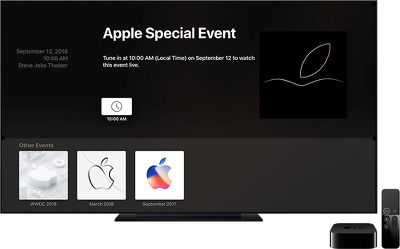
On the older Apple TV models, there's no need to install an Events app because it's a pre-existing channel. Simply select the "Events" option at the proper time to watch Apple's live stream on a second or third-generation Apple TV.
How to Watch Live on Mac, iPad, and iPhone
For those who do not have an Apple TV and would prefer to watch the event on a Mac or iOS device, all you need is the Safari web browser.
Apple has a dedicated Apple Special Event website where the live stream will be hosted. All you need to do is open the link using the Safari browser on a Mac, iPad, iPod touch, or iPhone to watch live when the event begins.
iOS 10 or later is required, as is macOS Sierra or later.
How to Watch on Windows
If you don't have an iOS device or a Mac handy to watch the event, you can do so on a Windows machine by visiting the Apple Special Event website using the Microsoft Edge browser.
Live Twitter Coverage
Apple is planning to provide a live stream of the event on Twitter as well as on the Apple TV and website, so those interested in viewing the stream via the social network can do so.
Join us September 12 at 10 a.m. PDT to watch the #AppleEvent live on Twitter. Tap ❤️ below and we’ll send you updates on event day. pic.twitter.com/i9mGHTKhvu — Apple (@Apple) September 10, 2018
MacRumors Coverage
For MacRumors readers who are not able to watch the event live, we will be offering live coverage of everything Apple announces both here on MacRumors.com and on the MacRumorsLive Twitter account, so make sure to follow us on Twitter and tune in to the website in the morning if you don't want to miss anything.
We'll have extensive coverage of all of the new announcements throughout the week as well, so make sure to keep an eye on the site.
If you want to get a sneak peek at everything Apple plans to announce on Wednesday, make sure to check out our What to Expect article, and for full details on all of the new iPhone features we're expecting to see, visit our dedicated iPhone Xs roundup.





















Top Rated Comments