
Apple Seeds Eleventh Beta of macOS Mojave to Developers - MacRumors
Skip to Content

Apple Seeds Eleventh Beta of macOS Mojave to Developers

Apple today seeded the eleventh beta of an upcoming macOS Mojave update to developers for testing purposes, two weeks after releasing the tenth beta and more than two months after introducing the software at the Worldwide Developers Conference.

macOS Mojave introduces a new method of installing software updates, so after the initial beta has been installed using the appropriate profile from the Developer Center, additional betas can be downloaded through opening up System Preferences and choosing the "Software Update" option.


Apple's macOS Mojave update introduces a systemwide Dark Mode, with Mojave users able to choose between a light theme or the new dark theme, which changes the color of the dock, menu bar, apps, and other elements. Dark Mode is accompanied by Dynamic Desktops, aka wallpapers that subtly change throughout the day.

Stacks, a new desktop organization system, keeps all of your desktop files neat and organized, while Finder has been enhanced with a Gallery View, a Sidebar, a revamped Quick Look option and Quick Actions, so you can do more in the Finder window than ever before.

Screenshots can now be edited using Markup tools and a new management options that also allow for easy screen recording, while Continuity camera, a new feature, allows you to import photos and document scans directly from an iPhone or iPad to the Mac.
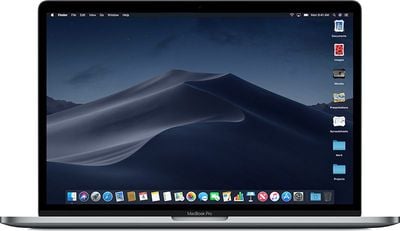
macosmojavestacks
The Apple News, Stocks, Home, and Voice Memos apps have been ported from iOS to macOS as part of a multiyear project Apple is working on to make it easier to bring iOS apps to Macs, and Apple has introduced several new privacy protections to keep your data safer than ever.

Apple is also making it harder for websites to track you with a range of new Safari tools, and it's also easier to make and store secure, hard-to-guess passwords for each and every website.

Apple has added an entirely revamped Mac App Store to macOS Mojave that makes it easier to discover apps with a featured section and specific categories for games, creative apps, productivity apps, apps for developers, and more.
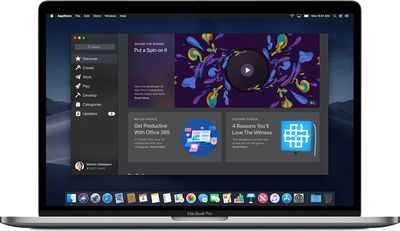
macosmojavemacappstore
macOS Mojave was initially supposed to include a Group FaceTime feature that includes support for chatting with up to 32 people at one time, but it was removed in macOS Mojave beta 7 and the feature won't be available until later in the year.

macOS Mojave is available to developers and public beta testers to work out bugs and other issues ahead of an upcoming public release on September 24.


Related Forum: macOS Mojave

Popular Stories

iOS 26

iOS 26.4 Adds Two New Features to CarPlay

Tuesday March 24, 2026 1:55 pm PDT by
iOS 26.4 was released today, and it includes a couple of new features for CarPlay: an Ambient Music widget and support for voice-based chatbot apps. To update your iPhone 11 or newer to iOS 26.4, open the Settings app and tap on General → Software Update. CarPlay will automatically offer the new features so long as the iPhone connected to your vehicle is running iOS 26.4 or later....
Apple Business hero

Apple Unveils 'Apple Business' All-in-One Platform

Tuesday March 24, 2026 8:53 am PDT by
Apple today announced Apple Business, a new all-in-one platform that unifies device management, productivity tools, and customer outreach features. The service is designed to be a consolidated replacement for several of Apple's existing business-focused offerings, including Apple Business Essentials, Apple Business Manager, and Apple Business Connect. It provides organizations with a single...
AirPods Pro Firmware Feature

Apple Releases New Firmware for AirPods Pro 3, AirPods Pro 2 and AirPods 4

Tuesday March 24, 2026 12:31 pm PDT by
Apple today released new firmware for the AirPods Pro 2, AirPods Pro 3, and the AirPods 4. The firmware has a version number of 8B39, up from 8B34 on the AirPods Pro 3, 8B28 on the AirPods Pro 2, and 8B21 on the AirPods 4. There is no word on what's included in the firmware, but Apple has a support document with limited notes. Most updates are limited to bug fixes and performance...

Top Rated Comments

Chris The Bipolarbear Avatar
98 months ago
Upper screen shot Beta 10 Lower Beta 11 Note the removal of the word BETA I would say this is a GM candidate!!

Attachment Image

Attachment Image
Score: 3 Votes (Like | Disagree)
98 months ago
tried that and it downloaded the installer for beta 10 again. then after installing had to update back to beta 11
[doublepost=1536792582][/doublepost]Slightly of topic, but anyone trying Mojave but may want to revert back to High Sierra make sure they download the full installer for HS before 24th as once Mojave comes out HS will probably be removed from App Store and OS’s are no longer included in your purchase section in the App Store.
If you had trouble getting the full installer for beta 11 you can try installinstallmacos.py

Here is what it provides me with:


and so option 4 will download the full installer for beta 11.

I put more thorough instructions here: https://forums.macrumors.com/threads/apple-releases-macos-high-sierra-10-13-6-with-airplay-2-multi-room-audio-support-for-itunes.2126709/page-7#post-26243593

Attachment Image
Score: 2 Votes (Like | Disagree)
Chris The Bipolarbear Avatar
98 months ago
What about Xcode 10? Is it also released as a non beta?
On the Developer Site there is Xcode 10 GM seed build 10A254a
Score: 2 Votes (Like | Disagree)
Chris The Bipolarbear Avatar
98 months ago
I would guess with no Updates out by now the well have to wait Till Monday for the final product, Probably on Tuesday we will get macOS 10.14.1 beta 1. Once 10.14 is officially released if YOU DO NOT WANT to continue receiving the ".~ " updates then make sure you set your machine NOT to receive further beta Updates. Set it to Restore Defaults. "Public Beta would be the same but instead of Developer it would State Public Beta"

Attachment Image
Score: 1 Votes (Like | Disagree)
98 months ago
I thought the recycle stuff was really more for marketing to the tree huggers. Telling them to go ahead and buy a new iPhone and don't feel guilty as their old iphone won't go to the landfill. With that Apple has a bigger excuse not to support old devices which will sell more phones.
Score: 1 Votes (Like | Disagree)
JosephAW Avatar
98 months ago
I finally watched the keynote in the Steve Jobs theater. When they were talking about how they want everyone to get the most out of their iOS devices and then hand them to Apple and they would repurposed or recycle them.
The thought came to mind they Apple does not do this with macOS. If they were so inclined to let everyone get the most out of their devices and save the environment then they should release Mojave for all their computers starting with the first Intel desktops and laptops.
Some of us have accomplished this in El Captain using help from Piker file. But I thought how easy it would be for Apple to provide a kernel that would be compatible with all their desktops. Sure we would understand that performance would slower on older units but it would allow all desktops and laptops to get the maximum life and then hand it in to Apple when the device fails for recycling.
Score: 1 Votes (Like | Disagree)















