
Hands-On With the New Depth Control Feature in iPhone XS and XS Max

Apple's iPhone XS, XS Max, and upcoming XR come equipped with a new Depth Control feature enabled through camera upgrades that include a new image signal processor, an improved sensor, and the A12 Bionic chip with next-generation Neural Engine.

Depth Control, which we've featured in the video below, lets you adjust the amount of blurring in the background of your Portrait Mode images, giving you more control over how your images come out.


Depth Control can be accessed after you take a Portrait Mode image by tapping on the "Edit" button of a Portrait Mode photo in the Photos app. At the bottom of the editing interface, you'll see a new Depth slider, which is what you use to adjust the blurring or depth of field of the image.
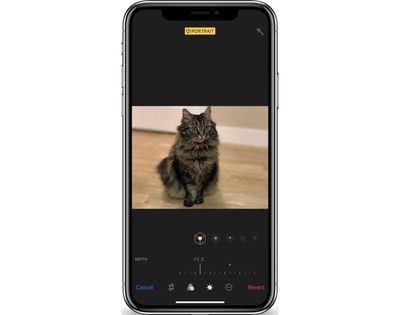
depthcontroloptions
In a traditional camera, a larger aperture means more background blur and a shallower depth of field, while a smaller aperture results in less background blurring. This system is what Apple is mimicking with Depth Control.

depthcontrolnone

No background blurring with Depth Control set at f/16

If you're new to photography, it's a bit confusing, but a larger aperture is represented by a smaller number, while a smaller aperture is represented by a larger number. So in the Depth Control slider, which ranges from f/1.4 to f/16, f/1.4 is the maximum amount of blur while f/16 essentially eliminates all background blur for an image that's sharp throughout.

depthcontroldefault

Default/medium Portrait Mode background blurring with Depth Control set at f/4.5

By default, all Portrait Mode images on iPhone XS and XS Max start at f/4.5, and from there, you can move the slider along the bottom to the left or the right to add more or less background blur. Being able to adjust the depth of field is useful because you can tweak exactly what you want blurred, and it can save some photos that otherwise would have had key details (like the edges of hair or fur) blurred out by Apple's Portrait Mode software.

depthcontrolfull

Maximum background blurring with Depth Control set at f/1.4

Depth Control is limited to Portrait Mode images taken with the front or rear-facing cameras because there needs to be blur to adjust in the image. Right now, editing the depth of a photo is limited to images that have already been captured, but starting in iOS 12.1, it will work in real time too.

In the iOS 12.1 beta, when capturing a Portrait Mode image with the front or rear facing camera, you can tap on the little "F" in the upper right hand corner of the display to access the Depth Control slider to see how more or less background blur looks in real time before taking an image. The camera app will also remember your preferred Depth Control settings from photo to photo, so you can always set it at the depth of field that you like best.
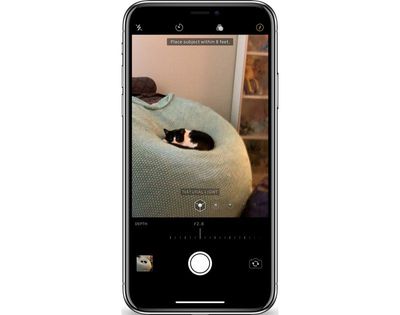
depthcontrollive
Live Depth Control lets you get the perfect angle and the perfect amount of depth for the portrait that you want to capture so you can make all of your real-time adjustments before snapping the photo.

What do you think of the Depth Control feature in the iPhone XS and XS Max? Let us know in the comments.


Related Forum: iPhone

Popular Stories

Apple Logo Zoomed

Tim Cook Teases Plans for Apple's Upcoming 50th Anniversary

Thursday February 5, 2026 12:54 pm PST by
Apple turns 50 this year, and its CEO Tim Cook has promised to celebrate the milestone. The big day falls on April 1, 2026. "I've been unusually reflective lately about Apple because we have been working on what do we do to mark this moment," Cook told employees today, according to Bloomberg's Mark Gurman. "When you really stop and pause and think about the last 50 years, it makes your heart ...
wwdc sans text feature

Apple Rumored to Announce New Product on February 19

Thursday February 5, 2026 12:22 pm PST by
Apple plans to announce the iPhone 17e on Thursday, February 19, according to Macwelt, the German equivalent of Macworld. The report, citing industry sources, is available in English on Macworld. Apple announced the iPhone 16e on Wednesday, February 19 last year, so the iPhone 17e would be unveiled exactly one year later if this rumor is accurate. It is quite uncommon for Apple to unveil...
Finder Siri Feature

Why Apple's iOS 26.4 Siri Upgrade Will Be Bigger Than Originally Promised

Friday February 6, 2026 3:06 pm PST by
In the iOS 26.4 update that's coming this spring, Apple will introduce a new version of Siri that's going to overhaul how we interact with the personal assistant and what it's able to do. The iOS 26.4 version of Siri won't work like ChatGPT or Claude, but it will rely on large language models (LLMs) and has been updated from the ground up. Upgraded Architecture The next-generation...
iOS 26

iOS 26.3 and iOS 26.4 Will Add These New Features to Your iPhone

Tuesday February 3, 2026 7:47 am PST by
While the iOS 26.3 Release Candidate is now available ahead of a public release, the first iOS 26.4 beta is likely still at least a week away. Following beta testing, iOS 26.4 will likely be released to the general public in March or April. Below, we have recapped known or rumored iOS 26.3 and iOS 26.4 features so far. iOS 26.3 iPhone to Android Transfer Tool iOS 26.3 makes it easier...
iphone 17 pro dark blue 1

iPhone 18 Pro Max Rumored to Deliver Next-Level Battery Life

Friday February 6, 2026 5:14 am PST by
The iPhone 18 Pro Max will feature a bigger battery for continued best-in-class battery life, according to a known Weibo leaker. Citing supply chain information, the Weibo user known as "Digital Chat Station" said that the iPhone 18 Pro Max will have a battery capacity of 5,100 to 5,200 mAh. Combined with the efficiency improvements of the A20 Pro chip, made with TSMC's 2nm process, the...

Top Rated Comments

AvisDeene Avatar
96 months ago
I want to pet that marvellously fluffy cat.
Score: 31 Votes (Like | Disagree)
FX120 Avatar
96 months ago
It looks awful.
Score: 26 Votes (Like | Disagree)
routine_analyst Avatar
96 months ago
Still looks like fake bokeh or someone with really gimp photoshop skillz.
Score: 14 Votes (Like | Disagree)
bigcstyle4 Avatar
96 months ago
How is this any different from what Focos already does on the X?
Score: 14 Votes (Like | Disagree)
MacWorld78 Avatar
96 months ago
Apple, i find really hard to believe that you need to upgrad Iphone Xs or MAX in order to get this feature Depth Control, where i could do so easily using this app called "FOCOS" that will do the trick as well...

This can be done mostly software based not the hardware.
Score: 12 Votes (Like | Disagree)
WilliamG Avatar
96 months ago
It seems to me that the effect was done with software algorithmically after the images were capture. Look at the hair around the edges. It is not the same as true optical depth of field achieved by opening/closing the lens aperture.

If that’s the case, I consider this as a gimmick. Any serious photographer will snicker at it.
I'm a serious photographer, and I don't snicker at it. Nobody is saying it's a replacement for a nice wide lens, but it definitely does an acceptable job - and at times can look excellent.
Score: 11 Votes (Like | Disagree)















