
Hands-On With the New Depth Control Feature in iPhone XS and XS Max - GeekWebGuides
Skip to Content

Hands-On With the New Depth Control Feature in iPhone XS and XS Max

Apple's iPhone XS, XS Max, and upcoming XR come equipped with a new Depth Control feature enabled through camera upgrades that include a new image signal processor, an improved sensor, and the A12 Bionic chip with next-generation Neural Engine.

Depth Control, which we've featured in the video below, lets you adjust the amount of blurring in the background of your Portrait Mode images, giving you more control over how your images come out.


Depth Control can be accessed after you take a Portrait Mode image by tapping on the "Edit" button of a Portrait Mode photo in the Photos app. At the bottom of the editing interface, you'll see a new Depth slider, which is what you use to adjust the blurring or depth of field of the image.
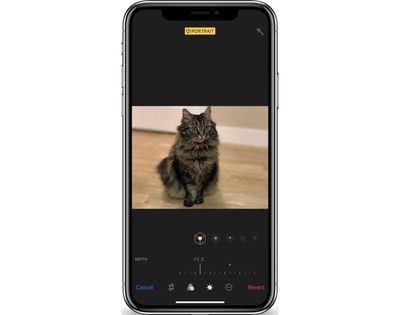
depthcontroloptions
In a traditional camera, a larger aperture means more background blur and a shallower depth of field, while a smaller aperture results in less background blurring. This system is what Apple is mimicking with Depth Control.

depthcontrolnone

No background blurring with Depth Control set at f/16

If you're new to photography, it's a bit confusing, but a larger aperture is represented by a smaller number, while a smaller aperture is represented by a larger number. So in the Depth Control slider, which ranges from f/1.4 to f/16, f/1.4 is the maximum amount of blur while f/16 essentially eliminates all background blur for an image that's sharp throughout.

depthcontroldefault

Default/medium Portrait Mode background blurring with Depth Control set at f/4.5

By default, all Portrait Mode images on iPhone XS and XS Max start at f/4.5, and from there, you can move the slider along the bottom to the left or the right to add more or less background blur. Being able to adjust the depth of field is useful because you can tweak exactly what you want blurred, and it can save some photos that otherwise would have had key details (like the edges of hair or fur) blurred out by Apple's Portrait Mode software.

depthcontrolfull

Maximum background blurring with Depth Control set at f/1.4

Depth Control is limited to Portrait Mode images taken with the front or rear-facing cameras because there needs to be blur to adjust in the image. Right now, editing the depth of a photo is limited to images that have already been captured, but starting in iOS 12.1, it will work in real time too.

In the iOS 12.1 beta, when capturing a Portrait Mode image with the front or rear facing camera, you can tap on the little "F" in the upper right hand corner of the display to access the Depth Control slider to see how more or less background blur looks in real time before taking an image. The camera app will also remember your preferred Depth Control settings from photo to photo, so you can always set it at the depth of field that you like best.
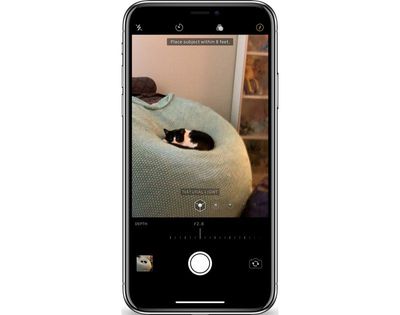
depthcontrollive
Live Depth Control lets you get the perfect angle and the perfect amount of depth for the portrait that you want to capture so you can make all of your real-time adjustments before snapping the photo.

What do you think of the Depth Control feature in the iPhone XS and XS Max? Let us know in the comments.


Related Forum: iPhone

Popular Stories

M5 MacBook Pro

RIP, MacBook Ultra

Monday October 19, 2026 9:37 am PDT by
Apple today sent out invites for an experience in Los Angeles on Wednesday, October 28, and the "Pro and tell" tagline on the invitation likely means that the rumored MacBook models with touch-enabled OLED displays will stick with MacBook Pro branding instead of the once-rumored "MacBook Ultra" name. The long-rumored "iPhone Ultra" ended up being named iPhone Duo, so speculation that Apple...
iPhone Duo Trio

Here's What Apple's Apps Look Like on the iPhone Duo

Tuesday October 20, 2026 11:12 am PDT by
With just three days to go until the iPhone Duo is released, Apple is getting ready for the launch. Behind the scenes, the App Store now has screenshots of Apple's built-in apps running on the Duo. We've seen some apps in marketing materials, but images of the ones we haven't seen give us an idea of what it will be like using the iPhone Duo day to day. Many apps are shown in landscape...
apple pro tell logo

Apple Announcing New Products Next Week: 'Pro and Tell'

Monday October 19, 2026 9:05 am PDT by
Apple's Greg Joswiak today hinted at new product announcements coming next week, sharing a social media post that says "Can't wait to pro and tell next week." Rumors suggest Apple is planning to debut the new MacBook Pro with an OLED touchscreen display, an M6 entry-level MacBook Pro, an M6 iMac, an iPad mini with an OLED display. Can't wait to pro and tell next week....

Top Rated Comments

AvisDeene Avatar
105 months ago
I want to pet that marvellously fluffy cat.
Score: 31 Votes (Like | Disagree)
FX120 Avatar
105 months ago
It looks awful.
Score: 26 Votes (Like | Disagree)
routine_analyst Avatar
105 months ago
Still looks like fake bokeh or someone with really gimp photoshop skillz.
Score: 14 Votes (Like | Disagree)
105 months ago
How is this any different from what Focos already does on the X?
Score: 14 Votes (Like | Disagree)
MacWorld78 Avatar
105 months ago
Apple, i find really hard to believe that you need to upgrad Iphone Xs or MAX in order to get this feature Depth Control, where i could do so easily using this app called "FOCOS" that will do the trick as well...

This can be done mostly software based not the hardware.
Score: 12 Votes (Like | Disagree)
105 months ago
It seems to me that the effect was done with software algorithmically after the images were capture. Look at the hair around the edges. It is not the same as true optical depth of field achieved by opening/closing the lens aperture.


If that’s the case, I consider this as a gimmick. Any serious photographer will snicker at it.
I'm a serious photographer, and I don't snicker at it. Nobody is saying it's a replacement for a nice wide lens, but it definitely does an acceptable job - and at times can look excellent.
Score: 11 Votes (Like | Disagree)
Latest Stories
Apple Updates More Apps With iPhone Duo Support
19 minutes ago
Apple Will Label Apps 'Made for iPhone Duo' in App Store
3 hours ago
Amazon Takes $49 Off iPad With Prices Starting at $399.99
4 hours ago
F1 on Apple TV Now Available in Dolby Atmos
4 hours ago
Apple Reveals More Than 50 Apps That Will Be Updated for iPhone Duo
5 hours ago
Apple Blocks Certificates That Could Help Attackers Fake Websites
6 hours ago
Giant iPhone Duo Installations Spotted at Apple Fifth Avenue
7 hours ago
iPhone Duo 2 Prototypes Include Under-Display Face ID
7 hours ago
Tesla App Gains iPad and iPhone Duo Support
11 hours ago
Apple Reportedly Boosts iPhone Duo Orders by 44%
11 hours ago
Fortnite Returning to Australian App Store After Court Ruling
12 hours ago
Apple Ordered to Open iPhone to Rival App Stores in Australia
12 hours ago
Apple Suppliers Face Hurdles Cutting Circuit Board Emissions
13 hours ago
Things Updated for iPhone Duo With Adaptive Layout
13 hours ago
Simplicity and Siri AI Are HomeView's Killer Features, Apple Says
13 hours ago
iPhone Duo Reviewers Really Miss Face ID
18 hours ago
Does the iPhone Duo Run Hot? Here's What Reviews Found
20 hours ago
Apple Music's New Look is Now Live on Apple's Website
20 hours ago
Anthropic Launches Claude Duet, a Proactive AI Agent
21 hours ago
What 32,000 Folds Did to the iPhone Duo's Hinge
22 hours ago
iPhone Duo's Hidden FaceTime Camera Takes 'Trash' Photos
23 hours ago
iPhone Duo Has 'Edge Light' Feature That Debuted on Macs Last Year
1 day ago
Apple Support App Updated for iPhone Duo's Larger Display
1 day ago
Amazon Sweetens the Deal on Entry-Level 16-Inch MacBook Pro With $570 Off
1 day ago
iPhone Duo Tips Over on MagSafe Stands When Unfolded
1 day ago
Apple Music's New Look Officially Announced
1 day ago
iPhone Duo Supports Apple Pencil Starting With iOS 27.2
1 day ago
iPhone Duo Accessories Roundup: Cases and Screen Protectors From OtterBox, ZAGG, and More
1 day ago
Apple Stores Will Have 'Limited' Availability of iPhone Duo for Walk-In Customers
1 day ago
iPhone Duo Reviews Explain Why Device is Both 'Fun' and 'Frustrating'
1 day ago









































