Once the proper configuration profile has been installed from the Apple Developer Center, the new watchOS beta can be downloaded through the dedicated Apple Watch app on the iPhone by going to General --> Software update.
To install the update, the Apple Watch needs to have at least 50 percent battery, it must be placed on the charger, and it has to be in range of the iPhone.
watchOS 5.1 includes support for Group FaceTime, with Group FaceTime calls able to be answered in an audio-only capacity on the Apple Watch. Group FaceTime allows you to chat with up to 32 people at one time.
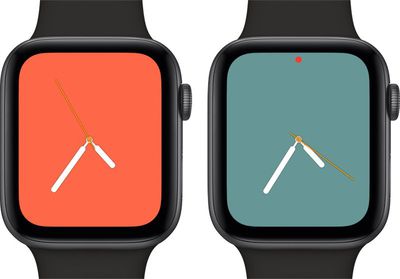
The watchOS 5.1 update also brings a full-screen new "Color" watch face option for the Apple Watch Series 4, with users able to choose between multiple shades. There's also a filled-in circular color option for older Apple Watch models that joins the standard Color clock face.
Should additional new features be found in the second beta of watchOS 5.1, we'll update this post.
iOS 26.4 was released today, and it includes a couple of new features for CarPlay: an Ambient Music widget and support for voice-based chatbot apps.
To update your iPhone 11 or newer to iOS 26.4, open the Settings app and tap on General → Software Update. CarPlay will automatically offer the new features so long as the iPhone connected to your vehicle is running iOS 26.4 or later....
Apple today announced Apple Business, a new all-in-one platform that unifies device management, productivity tools, and customer outreach features.
The service is designed to be a consolidated replacement for several of Apple's existing business-focused offerings, including Apple Business Essentials, Apple Business Manager, and Apple Business Connect. It provides organizations with a single...
Tuesday March 24, 2026 12:31 pm PDT by Juli Clover
Apple today released new firmware for the AirPods Pro 2, AirPods Pro 3, and the AirPods 4. The firmware has a version number of 8B39, up from 8B34 on the AirPods Pro 3, 8B28 on the AirPods Pro 2, and 8B21 on the AirPods 4.
There is no word on what's included in the firmware, but Apple has a support document with limited notes. Most updates are limited to bug fixes and performance...
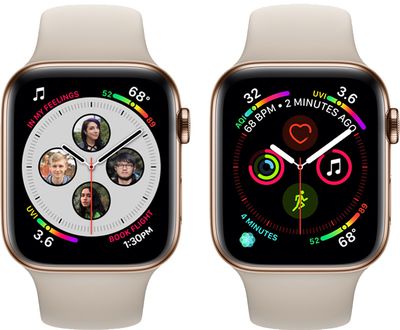
The new “Infograph” and “Infograph Modular” Watch Series 4 faces which support the having the highest number complications at once — also have the smallest selection of complications that can be displayed on those faces... thereby making them useless for me. Many of the native complications on the Watch cannot be displayed anywhere on those faces.
Even if they’re just icons to launch the apps, “Messages” and “Now Playing” (among other native complications) are indispensable for me on my watch face.
Why does Apple limit which complications I can put on which faces? I am far from alone in this disappointment.
I don't understand why the new infograph watch faces on my Series 4 allow you to have shortcuts to Music, Exercise, Weather, Walkie Talkie, etc but don't let you shortcut to Messages, Radio, Apple TV Remote, HomeKit, etc. It's bizarre. A lot of third party apps don't work with them either, but for some reason work with the older faces.
The specific reason is that those complications on the new watch faces are actually DIFFERENT than the ones available before S4 and watchOS 5. Third party developers have to port their old ones to that new format. Some have, some will do it eventually.
The issue is, when will Apple? watchOS 5.1? watchOS5.2? watchOS 6?
It's very frustrating that they did not do it out of the gate.