
For this week's giveaway, we've once again teamed up with Fuse to offer MacRumors readers a chance to win a Side Winder cable wrangler, designed to let you quickly and easily wind up your MacBook Air or MacBook Pro's charger cord.


The reel-style construction of the Side Winder keeps your power adapter, cord, and attached extension cable in a neat, compact package with zero tangles and no hassle. It's perfect for use at home or work and it's great for when you need to travel because it makes it so quick to pack up.
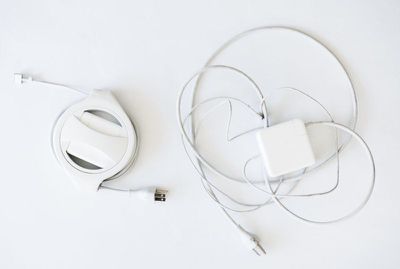
sidewindermessycable
When traveling with a traditional Power Adapter and cable setup in a bag or backpack, winding the cord and the extension cable is an exercise in futility because it constantly comes unwrapped, leading to a messy, knotted tangle of cable. That cable tangle is the problem the Side Winder solves.

sidewinderdesign
Side Winder works by enclosing the Power Adapter of your MacBook with a reel that holds the cable. When you need to wind extra cable, a simple twist of the top piece pulls it in. When more cable is needed while the MacBook is in use, you can pull out as much cable as you need to reach a power outlet.
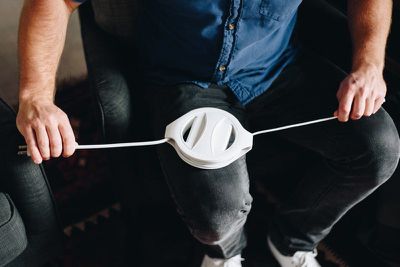
sidewinderunwinding
Fuse says that it takes less than six seconds to fully wind a cable using the Side Winder, and the design of the device provides protection against cable damage and fraying by preventing stress at weak points.
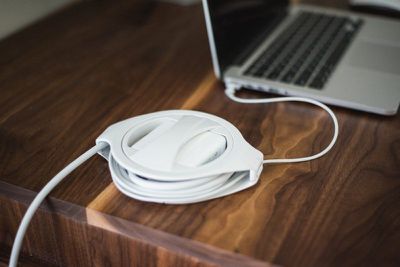
sidewindermacbook
Side Winder is compatible with all 45W, 60W, 61W, 85W, and 87W MacBook Pro and Air chargers, with both MagSafe 1 and 2 and USB-C versions available. The MagSafe versions are available for $29.99, while the USB-C version is $33.99. The USB-C model includes a USB-C cord, but neither model includes a power adapter or extension cable.

sidewindertable
In addition to offering Side Winders to MacRumors readers in our giveaway, Fuse is also providing a 20 percent discount on all Side Winder purchases. To buy one at a discount, just use this link.

We have 20 Side Winders to give away to MacRumors readers. To enter to win our giveaway, use the Rafflecopter widget below and enter an email address. Email addresses will be used solely for contact purposes to reach the winners and send the prizes. You can earn additional entries by subscribing to our weekly newsletter, subscribing to our YouTube channel, following us on Twitter, following us on Instagram, or visiting the MacRumors Facebook page.

Due to the complexities of international laws regarding giveaways, only U.S. residents who are 18 years or older and Canadian residents (excluding Quebec) who have reached the age of majority in their province or territory are eligible to enter. To offer feedback or get more information on the giveaway restrictions, please refer to our Site Feedback section, as that is where discussion of the rules will be redirected.

The contest will run from today (October 26) at 11:00 a.m. Pacific Time through 11:00 a.m. Pacific Time on November 2. The winners will be chosen randomly on November 2 and will be contacted by email. The winners will have 48 hours to respond and provide a shipping address before new winners are chosen.



Top Rated Comments

Spectrum Avatar
95 months ago
And why exactly did Apple remove the super useful ears in the first place? I've been using them for over a decade without any issue. Their absence is a real pain in the new MacBook models.
Score: 4 Votes (Like | Disagree)
Spectrum Avatar
95 months ago
Why? Because it no longer has a permanently attached (captive) output cable. Those wrapping hooks were for "cable management", so there would not be a long cable dangling in a bag or carrying case. A discrete USB PD cable is much easier to manage alone, than a dangling captive cable. ('https://forums.macrumors.com/threads/why-doesnt-the-new-macbook-pro-come-with-those-two-clips-on-the-power-brick-to-wrap-the-cable.2036592/#post-24386622')

Those wrapping hooks were terrible all along. Not super useful. Thank goodness and good riddance. If you want your power brick and USB PD cable to be bosom buddies, then 'use a rubber band or something' ('https://forums.macrumors.com/goto/post?id=24386739#post-24386739').
So how do you wrap up the separate USB cable now? The new design is clearly inferior. No one was forcing anyone to use the hooks. I did because I found them to work really well.
Indeed, for me, the wrapping hooks worked excellently on every Apple notebook I've owned - I think they were even there on the Power Books too. Simple, tidy, tiny, helpful, features.
Like magsafe...
And the charging indicator light...
And the battery charge indicator light...
[And replaceable HD/SSD...
And upgradeable RAM...
And a USB-A port...
And an HDMI port...
And an SD card slot...]
Score: 4 Votes (Like | Disagree)
ghostface147 Avatar
95 months ago
Oooh, this is nice. That's one thing I miss from my older MacBook Pro, those little ears that would pop out of the adapter.
Score: 3 Votes (Like | Disagree)
NoIdentity Avatar
95 months ago
Never used the ears and always been carefull when packing the charger. If you ‘coil’ the cables as they should be you won’t create any tears, creases, kinks or curls. But this appies to any cable. Unfortunately most people have no clue how to properly store cables. This product doesn’t necessarily mitigate the issue. It might help, but it creates a more bulkier package.
Anyways, this chargers are on their way out.

I am much happier with the new design. The replacable ibs-c cable makes the replacing of damaged connectors way cheaper. Which is where most of my old chargers had problems, the magsafe was the one bit that recieved most stress. Due to bends to reach the other side of the computer or accidental puls and intentional ones to disconnect the charger.
But yeah. Now I disconnect the usb-c coil it so it doesn’t have any stress on it and store the brick separately. And if the usb-c cable dies on me, I will just by the new one.

The ears in my view were a bad design from the start, since they promote bad habits in taking care of your cables.
Score: 2 Votes (Like | Disagree)
7thson Avatar
95 months ago
Man o’ man, this is exactly what I need. I ordered using the discount code which negated the shipping. I’ll come back with my thoughts on it after I’ve tried it out a bit.
Score: 1 Votes (Like | Disagree)
7thson Avatar
95 months ago
Following up to share my thoughts on this. I really appreciate what it does for organizing the brick and cord adapter. I prefer to use this configuration but have been put off by the bulk of the cord and how to keep it together with the brick without it being a mess waiting to happen. It works very well and doesn't feel cheap, however I'm not going to drop it repeatedly to see how long it takes to break either. Does it make for a very large charging solution? Yes it does. Just look at the photos. That's an iPad mini 4 it's sitting on in the second pic.

Yeah it's huge. However I don't see any way to avoid this mass if you want to keep your cord with the brick. So that's my take away, if you prefer this configuration for your usage, this is a great solution. If you rarely use the cord, then this thing will seem absurd and impractical. As an side, I ordered the model for the 85watt magsafe2 and the box seems to have adapters for every model of Apple charging bricks.

Attachment Image

Attachment Image
Score: 1 Votes (Like | Disagree)

Popular Stories

Apple Logo Zoomed

Tim Cook Teases Plans for Apple's Upcoming 50th Anniversary

Thursday February 5, 2026 12:54 pm PST by
Apple turns 50 this year, and its CEO Tim Cook has promised to celebrate the milestone. The big day falls on April 1, 2026. "I've been unusually reflective lately about Apple because we have been working on what do we do to mark this moment," Cook told employees today, according to Bloomberg's Mark Gurman. "When you really stop and pause and think about the last 50 years, it makes your heart ...
wwdc sans text feature

Apple Rumored to Announce New Product on February 19

Thursday February 5, 2026 12:22 pm PST by
Apple plans to announce the iPhone 17e on Thursday, February 19, according to Macwelt, the German equivalent of Macworld. The report, citing industry sources, is available in English on Macworld. Apple announced the iPhone 16e on Wednesday, February 19 last year, so the iPhone 17e would be unveiled exactly one year later if this rumor is accurate. It is quite uncommon for Apple to unveil...
Finder Siri Feature

Why Apple's iOS 26.4 Siri Upgrade Will Be Bigger Than Originally Promised

Friday February 6, 2026 3:06 pm PST by
In the iOS 26.4 update that's coming this spring, Apple will introduce a new version of Siri that's going to overhaul how we interact with the personal assistant and what it's able to do. The iOS 26.4 version of Siri won't work like ChatGPT or Claude, but it will rely on large language models (LLMs) and has been updated from the ground up. Upgraded Architecture The next-generation...
maxresdefault

Apple Shows Off a Key Reason to Upgrade to the iPhone 17

Saturday February 7, 2026 9:26 am PST by
Apple today shared an ad that shows how the upgraded Center Stage front camera on the latest iPhones improves the process of taking a group selfie. "Watch how the new front facing camera on iPhone 17 Pro takes group selfies that automatically expand and rotate as more people come into frame," says Apple. While the ad is focused on the iPhone 17 Pro and iPhone 17 Pro Max, the regular iPhone...
iOS 26

iOS 26.3 and iOS 26.4 Will Add These New Features to Your iPhone

Tuesday February 3, 2026 7:47 am PST by
While the iOS 26.3 Release Candidate is now available ahead of a public release, the first iOS 26.4 beta is likely still at least a week away. Following beta testing, iOS 26.4 will likely be released to the general public in March or April. Below, we have recapped known or rumored iOS 26.3 and iOS 26.4 features so far. iOS 26.3 iPhone to Android Transfer Tool iOS 26.3 makes it easier...













