
Enthusiasts Detail RAM Upgrade Process for the 2018 Mac mini

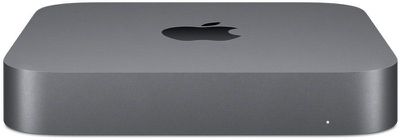
RAM replacement guides for the new 2018 Mac mini have appeared online, detailing what's involved if users choose to go against Apple's advice and upgrade the removable memory modules themselves.
macmini2018
Apple's official line is that it doesn't consider the new Space Gray Mac mini to be user-configurable, therefore the company recommends that later memory upgrades be performed by a certified Apple service provider.

However, going down that route increases costs significantly, because users need to factor in the relatively high price of Apple-supplied RAM as well as the additional labor charge for installing said modules.

On the other hand, while upgrading the memory yourself can save money, it also carries inherent risks.


For one, any damage done to the Mac mini during installation isn't covered under warranty, and even if the internals remain unscathed, Apple service staff will likely refuse to repair a 2018 Mac mini under warranty if they see third-party RAM modules have been inserted.

Having said that, experienced upgrade enthusiasts will be happy to learn that the process of opening up the 2018 Mac mini isn't too dissimilar to the 2014 Mac Mini (although that model had the much-maligned soldered-on RAM).

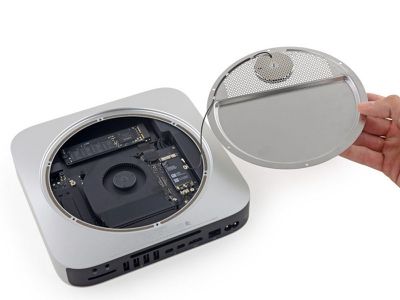
YouTuber Brandon Geekabit has uploaded a video detailing the process. And with help from MacRumors forum readers, Rod Bland has posted steps of the procedure on the iFixit website, along with the recommended opening tools, which include a TR6 Torx Security screwdriver, a T9 Torx screwdriver, and a Pentalobe screwdriver (also used to open the Retina MacBook Air and Pro). The entire process is said to take between 10 and 20 minutes.
mac mini 2018 ifixit ram upgrade
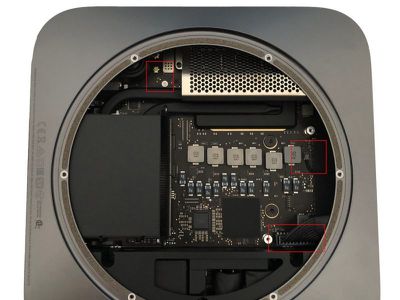
Briefly, users must pop off the bottom cover using a plastic opening tool, then unscrew and remove the antenna plate below along with its attaching cable. Next, the fan assembly is unscrewed and removed. Then the mainboard is unscrewed so it can be slid out, after which the screws holding the RAM cage are undone to reveal the RAM modules.
mac mini 2018 memory upgrade ifixit
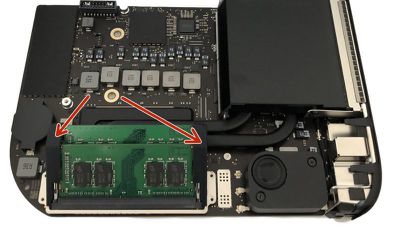
Removing the rubber stabilizers and pressing the spring clips enables careful replacement of the existing RAM modules with the new ones, after which users must work their way back through the previous steps in reverse to re-assemble the mini.
2018 mac mini ifixt ram upgrade e1541674422155
The process allows users to install up to 64GB of RAM, using any combination of 8GB, 16GB, or 32GB DDR4-2666 SODIMM RAM modules, which are available from third-party brands like Crucial, Kingston, and Corsair at prices that significantly undercut Apple-supplied RAM.

Ultimately, customers wanting more RAM must decide which route suits them best: upgrade the Mac mini themselves and accept the risks; avoid the hassle by paying Apple a premium to upgrade the base configuration at checkout; or upgrade at a later time through an Apple authorized service provider, at additional cost.


Related Roundup: Mac mini
Tag: iFixit
Buyer's Guide: Mac Mini (Neutral)
Related Forum: Mac mini

Popular Stories

Apple Logo Zoomed

Tim Cook Teases Plans for Apple's Upcoming 50th Anniversary

Thursday February 5, 2026 12:54 pm PST by
Apple turns 50 this year, and its CEO Tim Cook has promised to celebrate the milestone. The big day falls on April 1, 2026. "I've been unusually reflective lately about Apple because we have been working on what do we do to mark this moment," Cook told employees today, according to Bloomberg's Mark Gurman. "When you really stop and pause and think about the last 50 years, it makes your heart ...
wwdc sans text feature

Apple Rumored to Announce New Product on February 19

Thursday February 5, 2026 12:22 pm PST by
Apple plans to announce the iPhone 17e on Thursday, February 19, according to Macwelt, the German equivalent of Macworld. The report, citing industry sources, is available in English on Macworld. Apple announced the iPhone 16e on Wednesday, February 19 last year, so the iPhone 17e would be unveiled exactly one year later if this rumor is accurate. It is quite uncommon for Apple to unveil...
Finder Siri Feature

Why Apple's iOS 26.4 Siri Upgrade Will Be Bigger Than Originally Promised

Friday February 6, 2026 3:06 pm PST by
In the iOS 26.4 update that's coming this spring, Apple will introduce a new version of Siri that's going to overhaul how we interact with the personal assistant and what it's able to do. The iOS 26.4 version of Siri won't work like ChatGPT or Claude, but it will rely on large language models (LLMs) and has been updated from the ground up. Upgraded Architecture The next-generation...
iOS 26

iOS 26.3 and iOS 26.4 Will Add These New Features to Your iPhone

Tuesday February 3, 2026 7:47 am PST by
While the iOS 26.3 Release Candidate is now available ahead of a public release, the first iOS 26.4 beta is likely still at least a week away. Following beta testing, iOS 26.4 will likely be released to the general public in March or April. Below, we have recapped known or rumored iOS 26.3 and iOS 26.4 features so far. iOS 26.3 iPhone to Android Transfer Tool iOS 26.3 makes it easier...
iphone 17 pro dark blue 1

iPhone 18 Pro Max Rumored to Deliver Next-Level Battery Life

Friday February 6, 2026 5:14 am PST by
The iPhone 18 Pro Max will feature a bigger battery for continued best-in-class battery life, according to a known Weibo leaker. Citing supply chain information, the Weibo user known as "Digital Chat Station" said that the iPhone 18 Pro Max will have a battery capacity of 5,100 to 5,200 mAh. Combined with the efficiency improvements of the A20 Pro chip, made with TSMC's 2nm process, the...

Top Rated Comments

ChrisCW11 Avatar
95 months ago
if I were entertaining this, I would want to know how to upgrade the SSD because the 2tb SSD, Apple is charging $700 (CAD) more then Dell for the 2TB SSD option (1900 vs 1200). Not that I am going to spend $1200 on any SSD, I would just be as happy to plug in a Thunderbolt external raid for SO much cheaper, but its the same story across the entire range of option upgrades for the Mac Mini, just excessive stupid prices vs the same components options competitors are offering. And don't tell me that Apple has some special quality manufactured versions of these parts, they are raiding the same over-seas factories as ever other computer OEM these days.

I don't care if Apple is going to charge a premium for the boxes with their logos on it, that is to be expected these days, but when Apple tries to excessively profit monger off of the same off-the-shelf parts that competitors are putting into their systems, and make it user hostile to upgrade or repair them even years later, I am sorry, Apple doesn't have a right to $700 of free profit off of someone else's component by forcing people to configure a system once only in the shopping cart.
Score: 34 Votes (Like | Disagree)
Winni Avatar
95 months ago
I would do it myself but I don't want a voided warranty when the t2 chip starts having issues....
I don't know about the US, but unlike everything Apple wants you to believe, in Germany opening the case of your computer and upgrading RAM modules would not void your warranty - that's the European law.
Score: 27 Votes (Like | Disagree)
Sam_S Avatar
95 months ago
Its great that you are able to do it yourself! I would do it through Apple if they didn't charge a ridiculous premium for their RAM upgrades...
Score: 23 Votes (Like | Disagree)
czoli Avatar
95 months ago
We love (to screw) our customers, they could have designed it differently to make it easy to upgrade.

While I understand a CEO needs to please the investors by increasing revenues and margins the Tim Cook age seems to only be about taking advantage of the customers.
Score: 22 Votes (Like | Disagree)
JackLeBoul Avatar
95 months ago
Ahhh...still unnecessary complicated/difficult to change ram on a "desktop" computer.
Compare this to the "Cube" - beautiful design and easy access to all parts.

https://apple-history.com/g4cube

Even though this is better than the last version, its not good enough.
Score: 21 Votes (Like | Disagree)
michael666 Avatar
95 months ago
Next: How to replace the SSD.
Score: 19 Votes (Like | Disagree)















