
Haptic Touch Will Work With Notifications on iPhone XR in iOS 12.1.1 - MacRumors
Skip to Content

Haptic Touch Will Work With Notifications on iPhone XR in iOS 12.1.1

by

As noted by 9to5Mac, Haptic Touch can be used to expand notifications on the iPhone XR starting with iOS 12.1.1.

To use this feature, simply tap and hold a notification on the lock screen or in Notification Center for a split second. Once you feel haptic feedback from the Taptic Engine, let go and the notification will expand, providing more detailed information and contextual shortcuts, such as a reply field for iMessage conversations.
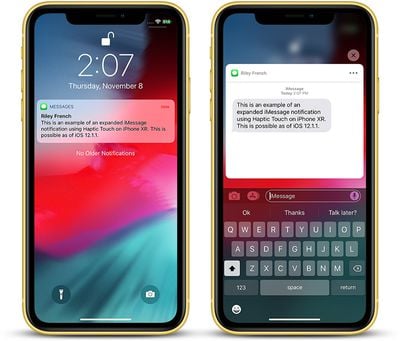
iphone xr haptic touch imessage

iMessage notification expanded with Haptic Touch on iPhone XR

Haptic Touch is simply a marketing name for a long press combined with haptic feedback from the Taptic Engine. The feature is a substitute for 3D Touch, which Apple wasn't able to include in the iPhone XR, as it had to remove the pressure-sensitive layer from the screen to achieve a nearly edge-to-edge LCD.

Haptic Touch works in only a few places, such as the flashlight and camera shortcuts on the lock screen, and in Control Center to pop open additional toggles and menus, but Apple recently confirmed it is working to bring the 3D Touch replacement to more places across iOS over time, and notifications is a start.
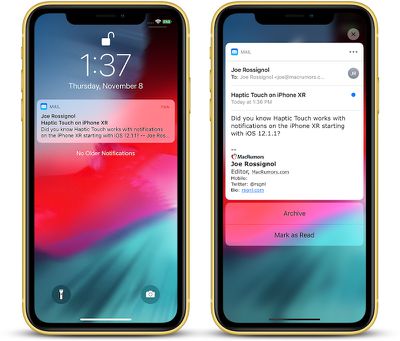
iphone xr haptic touch mail

Mail notification expanded with Haptic Touch on iPhone XR

Haptic Touch can only be implemented for actions that don't already rely on a long press. For example, long-pressing on an app icon on the home screen enables "wiggle mode," allowing apps to be deleted or rearranged on the home screen, so 3D Touch's Quick Action menus are not supported on the iPhone XR.

Haptic Touch also doesn't support Peek and Pop for previewing content such as websites and messages since the feature relies on detecting multiple levels of pressure, and the iPhone XR does not have pressure sensitivity at all.
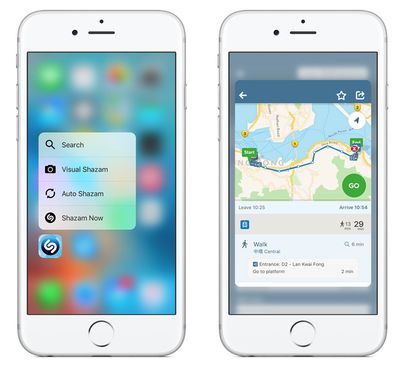
peek pop

3D Touch features on iPhone 6s: Quick Actions on left, Peek and Pop on right

On the iPhone 6 and earlier, which lack 3D Touch and Haptic Touch, a notification can be expanded by sliding it to the left and tapping View. This is still an option on the iPhone XR, but the Haptic Touch solution is more convenient.

Haptic Touch support for notifications on the iPhone XR is functional in the second beta of iOS 12.1.1, seeded to developers and users enrolled in Apple's Beta Software Program on Wednesday. The update is a relatively minor one overall, so it will likely be released to the public fairly soon.


Related Forum: iPhone

Top Rated Comments

96 months ago
I love 3D touch. Big reason why I wouldn't go for the Xr.
Score: 14 Votes (Like | Disagree)
dannyyankou Avatar
96 months ago
There’s no reason this feature couldn’t have been available for all iPhones without 3D Touch.
Score: 10 Votes (Like | Disagree)
MrGimper Avatar
96 months ago
So can someone explain why they have never put vibration/Taptic Engine in the iPads?
Score: 9 Votes (Like | Disagree)
96 months ago
Why in the world did apple regress with the Xr and 3D touch? Did they really think it would sell more XS and XS maxes that way? Most people probably didn't even realize the Xr was missing the feature until they went to use it. Now I'm sure some customers are feeling burned.
Score: 7 Votes (Like | Disagree)
AngerDanger Avatar
96 months ago
So can someone explain why they have never put vibration/Taptic Engine in the iPads?
I like this idea a lot. The iPad is significantly bigger, so to achieve even vibration, it'd probably be necessary to put in multiple engines, like one in each corner. With a little customization, unique ringtones could be assigned to contacts, so receiving a call will drive your iPad around if it's resting on a table.

tl;dr: RC iPad car: YES

Score: 6 Votes (Like | Disagree)
96 months ago
3D Touch is such an important and convenient feature for me, it makes using the phone much more enjoyable. Can't live without my 3D shortcuts, and peek and poke.
Score: 5 Votes (Like | Disagree)

Popular Stories

iOS 26

iOS 26.4 Adds Two New Features to CarPlay

Tuesday March 24, 2026 1:55 pm PDT by
iOS 26.4 was released today, and it includes a couple of new features for CarPlay: an Ambient Music widget and support for voice-based chatbot apps. To update your iPhone 11 or newer to iOS 26.4, open the Settings app and tap on General → Software Update. CarPlay will automatically offer the new features so long as the iPhone connected to your vehicle is running iOS 26.4 or later....
Apple Business hero

Apple Unveils 'Apple Business' All-in-One Platform

Tuesday March 24, 2026 8:53 am PDT by
Apple today announced Apple Business, a new all-in-one platform that unifies device management, productivity tools, and customer outreach features. The service is designed to be a consolidated replacement for several of Apple's existing business-focused offerings, including Apple Business Essentials, Apple Business Manager, and Apple Business Connect. It provides organizations with a single...
AirPods Pro Firmware Feature

Apple Releases New Firmware for AirPods Pro 3, AirPods Pro 2 and AirPods 4

Tuesday March 24, 2026 12:31 pm PDT by
Apple today released new firmware for the AirPods Pro 2, AirPods Pro 3, and the AirPods 4. The firmware has a version number of 8B39, up from 8B34 on the AirPods Pro 3, 8B28 on the AirPods Pro 2, and 8B21 on the AirPods 4. There is no word on what's included in the firmware, but Apple has a support document with limited notes. Most updates are limited to bug fixes and performance...















