Instagram Rolling Out 'Your Activity' Feature Detailing Amount of Time Spent Using the App - MacRumors
Skip to Content

Instagram Rolling Out 'Your Activity' Feature Detailing Amount of Time Spent Using the App

by

Instagram parent company Facebook said in August said that it would introduce tools to let users know how much time they're spending in the Instagram app, and as of today, that feature is rolling out to Instagram users.

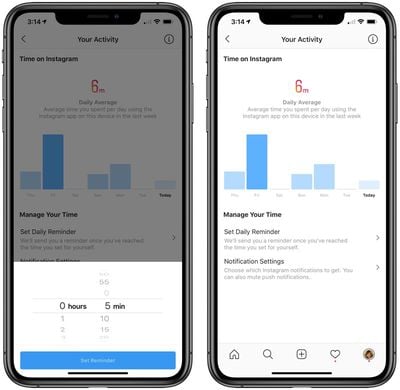
As noted by The Verge, Instagram has a new "Your Activity" section accessible by tapping the hamburger button on your profile page.
instagramactivitymonitor
"Your Activity" displays the time that you've spent in the Instagram app over the course of the last week, providing a daily average.

There are options to set a daily time limit with a reminder to be sent when that time limit is reached, useful for those who want to cut down on their social media usage. This section also allows includes controls for managing notifications, with toggles for customizing the notifications that you receive.

Apple also natively monitors time spent in various apps like Instagram through the Screen Time feature that was introduced in iOS 12. Screen Time info can be accessed in the Settings app on iPhones and iPads.

Facebook, like Instagram, is supposed to be gaining an activity monitoring feature, but it hasn't yet been introduced.


Top Rated Comments

96 months ago
I would spend less time if they switched back to chronological.
And this is why the won’t go back to that.
Score: 2 Votes (Like | Disagree)
Dj64Mk7 Avatar
96 months ago
I would spend less time if they switched back to chronological.
This is absolute truth from a statistical point of view.
Score: 1 Votes (Like | Disagree)
96 months ago
I suppose this is so Facebook won't look bad, as it's usually the biggest offender in Screen Time.
Score: 1 Votes (Like | Disagree)

Popular Stories

iOS 26

iOS 26.4 Adds Two New Features to CarPlay

Tuesday March 24, 2026 1:55 pm PDT by
iOS 26.4 was released today, and it includes a couple of new features for CarPlay: an Ambient Music widget and support for voice-based chatbot apps. To update your iPhone 11 or newer to iOS 26.4, open the Settings app and tap on General → Software Update. CarPlay will automatically offer the new features so long as the iPhone connected to your vehicle is running iOS 26.4 or later....
Apple Business hero

Apple Unveils 'Apple Business' All-in-One Platform

Tuesday March 24, 2026 8:53 am PDT by
Apple today announced Apple Business, a new all-in-one platform that unifies device management, productivity tools, and customer outreach features. The service is designed to be a consolidated replacement for several of Apple's existing business-focused offerings, including Apple Business Essentials, Apple Business Manager, and Apple Business Connect. It provides organizations with a single...
AirPods Pro Firmware Feature

Apple Releases New Firmware for AirPods Pro 3, AirPods Pro 2 and AirPods 4

Tuesday March 24, 2026 12:31 pm PDT by
Apple today released new firmware for the AirPods Pro 2, AirPods Pro 3, and the AirPods 4. The firmware has a version number of 8B39, up from 8B34 on the AirPods Pro 3, 8B28 on the AirPods Pro 2, and 8B21 on the AirPods 4. There is no word on what's included in the firmware, but Apple has a support document with limited notes. Most updates are limited to bug fixes and performance...