
Google Chrome Will Support Dark Mode in macOS Mojave by Early 2019 - MacRumors
Skip to Content

Google Chrome Will Support Dark Mode in macOS Mojave by Early 2019

Google released Chrome 71 earlier this week, but the latest version of the web browser still lacks support for Dark Mode on macOS Mojave. Fortunately, it appears that will change by early next year.
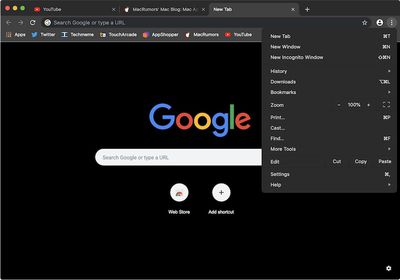
google chrome macos mojave 2

Dark Mode in Canary, a developer build of Chrome

As mentioned on Reddit, a Google developer recently submitted a code change that implements system-level Dark Mode in Chromium, the open source web browser that serves as the foundation of Chrome. The code change passed the review process and will make its way into a future release of Chrome.

For those unaware, there are several different builds of Chrome that Google uses to slowly test and roll out new features. All code changes begin in Chromium and then work their way from Canary to Chrome Dev to Chrome Beta to Chrome, the stable version released to all users roughly every six weeks.
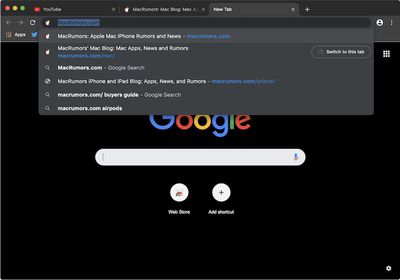
google chrome dark mode macos mojave 1

Dark Mode in Canary, a developer build of Chrome

Dark Mode in Chromium remains hidden behind feature flags, which are essentially code-level toggle switches, but we were able to run a Terminal command to force the darker appearance into action and took screenshots.

The system-level Dark Mode applies a dark appearance to much of the Chrome interface, including the omnibox, tabs, menus, bookmark bar, status bar, and dialog boxes. The startup page with Google search and shortcuts will also have a black background when the Dark appearance is enabled in System Preferences.

Most of the current Dark Mode colors in Chromium are placeholders, according to one developer working on the project, so there may be slight changes to come. One challenge the developers face is ensuring that the Dark Mode is distinguishable from Chrome's private-browsing Incognito Mode, which is also dark.
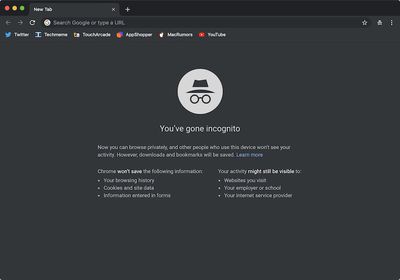
canary incognito

Incognito Mode in Canary, a developer build of Chrome

We're not entirely sure if Dark Mode will make the cut for Chrome 72, which has already been branched and will likely be released in mid-to-late January. Chrome 73 will likely follow in March, so it looks like early 2019 either way.

In the meantime, a variety of third-party dark themes are available for Chrome, but the omnibox always remains white since it is not allowed to be themed. Third-party dark themes are also available for websites such as Facebook, Google, YouTube, Gmail, Reddit, and Twitter to complete the experience.


Tags: Chrome, Google
Related Forum: macOS Mojave

Popular Stories

iOS 26

iOS 26.4 Adds Two New Features to CarPlay

Tuesday March 24, 2026 1:55 pm PDT by
iOS 26.4 was released today, and it includes a couple of new features for CarPlay: an Ambient Music widget and support for voice-based chatbot apps. To update your iPhone 11 or newer to iOS 26.4, open the Settings app and tap on General → Software Update. CarPlay will automatically offer the new features so long as the iPhone connected to your vehicle is running iOS 26.4 or later....
AirPods Pro Firmware Feature

Apple Releases New Firmware for AirPods Pro 3, AirPods Pro 2 and AirPods 4

Tuesday March 24, 2026 12:31 pm PDT by
Apple today released new firmware for the AirPods Pro 2, AirPods Pro 3, and the AirPods 4. The firmware has a version number of 8B39, up from 8B34 on the AirPods Pro 3, 8B28 on the AirPods Pro 2, and 8B21 on the AirPods 4. There is no word on what's included in the firmware, but Apple has a support document with limited notes. Most updates are limited to bug fixes and performance...
apple tv 4k new orange

tvOS 26.4 Adds These New Features to Your Apple TV

Wednesday March 25, 2026 3:33 pm PDT by
Apple this week released tvOS 26.4, and the software update includes a handful of new features and changes for the Apple TV. tvOS 26.4 is compatible with all Apple TV 4K and Apple TV HD models released since 2015. To update your Apple TV, open the Settings app on the device, navigate to System → Software Updates, and select Update Software. Below, we have recapped what is new in tvOS...

Top Rated Comments

95 months ago
The question is why would anyone install google's browser (regular or dark) on their computer to allow even more tracking?
Score: 43 Votes (Like | Disagree)
95 months ago
Cool...so where the hell is dark mode for MR????
Score: 15 Votes (Like | Disagree)
BigMcGuire Avatar
95 months ago
Think you got your tinfoil hat on too tight. Besides, I use it cause it “just works”. Can’t say the same about Safari.
A true tinfoil hat wearer would line the inside with something that doesn't hurt. When you mold tinfoil it gets sharp edges and can really hurt. Now the wifi waves can't penetrate my brain! Government will never know what I'm thinking. Ehehe :)

Chrome works but it is resource heavy. That and it's run by a company that makes $ off of what you do. I'm personally tired of companies that sell my personal data for $ so I've quit social media, Google, etc... Now, I do use Bing and Microsoft with Adguard - but not Cortana.

Do I think Google and Facebook are pure evil? Ok ok, not 100%. But close. :P
Score: 10 Votes (Like | Disagree)
Apple_Robert Avatar
95 months ago
In my opinion, Google should be treated as malware, even though it will / is enticing to many luring them to the dark side.
Score: 9 Votes (Like | Disagree)
95 months ago
Why would anyone want to use Chrome on Mac? Genuinely curious. It's non-native so it's slower. But it used the same engine (WebKit). So what would be the advantage? I could understand on Windows it's an alternative to Explorer, but on Mac we have Safari and of course there's always Firefox as well. Really don't get it.
Score: 7 Votes (Like | Disagree)
shareef777 Avatar
95 months ago
The question is why would anyone install google's browser (regular or dark) on their computer to allow even more tracking?
Think you got your tinfoil hat on too tight. Besides, I use it cause it “just works”. Can’t say the same about Safari.
Score: 6 Votes (Like | Disagree)















