

WhatsApp for iPhone Now Lets You Lock App With Face ID or Touch ID - MacRumors
Skip to Content

WhatsApp for iPhone Now Lets You Lock App With Face ID or Touch ID

by

whatsappWhatsApp has enabled a new Face ID authentication option for iPhones that support the feature, in the latest update to the messenger app (via WABetaInfo).

The Facebook-owned platform has been testing the feature for iPhone X and newer devices in its TestFlight beta releases for some weeks now, but version 2.19.20 of WhatsApp, now on the App Store, makes ‌Face ID‌ available for all users with supporting iPhones.

When enabled, users need to use ‌Face ID‌ to unlock the WhatsApp app, but they can still reply to messages from notifications and answer calls when the app is locked.

To require ‌Face ID‌ to unlock WhatsApp, tap Settings -> Account -> Privacy -> Screen Lock and toggle on the Require Face ID switch. Users with a fingerprint sensing Home button on their iPhones will see an option to Require Touch ID instead.
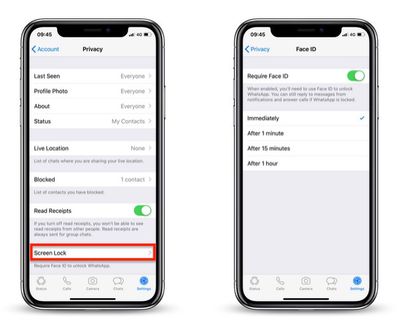
whatsapp face id
With the ‌Face ID‌/Touch ID toggle enabled, users will see some additional options appear below that allow them to activate the authentication requirement immediately, after one minute, after 15 minutes, or after one hour.

When the app is locked, if the iPhone fails to recognize a face or fingerprint, users can alternatively choose to enter their iPhone Passcode to open WhatsApp.

Elsewhere in this update, a smaller change means users can now download individual stickers in a sticker pack from the in-app sticker store, rather than having to download the whole pack. Just select a stickers pack, tap and hold the desired sticker, then tap Add to Favorites in the pop-up pane.

WhatsApp is a free download for iPhone available on the iOS ‌App Store‌. [Direct Link]

Top Rated Comments

93 months ago
I don‘t understand why Apple won‘t finally allow to password-lock any app (without the Screentime workaround).
Score: 6 Votes (Like | Disagree)
macfacts Avatar
93 months ago
I don‘t understand why Apple won‘t finally allow to password-lock any app (without the Screentime workaround).
Yes this should be built in to the OS, not each individual app.
Score: 4 Votes (Like | Disagree)
93 months ago
Now it's time for Discord and other messaging apps (does Telegram have it?) to implement this.

But I agree that implementing it system wide on iOS would be a better idea.

However, having the phone locked with Face ID or Touch ID, how can be useful to lock apps individually?
Because if somebody wanted to use your phone to control Spotify or look something up, then you can hand them your phone and still feel secure. It would also help in cases of law enforcement forcing somebody to look at their recently detained phone to unlock it, for some apps to then have another level of security.
Score: 3 Votes (Like | Disagree)
Vasilioskn Avatar
93 months ago
Doesn’t Facebook own WhatsApp? Pass.
Score: 2 Votes (Like | Disagree)
AnthonyG6 Avatar
93 months ago
This is nice and all but they should start the privacy improvements by not showing the sender name on the notification until unlocked. I think it is a serious privacy problem if anyone touching your phone screen can see who has send you a message.
This is already the case if you have a FaceID device. I have the iPhone X and when I get a Whatsapp message it only shows as a 'Whatsapp Notification', then when I look at the phone and it recognises me, it shows who the sender is. This is one of the best features of FaceID in my opinion.
Score: 2 Votes (Like | Disagree)
The Game 161 Avatar
93 months ago
I think its stupid as the message are still in full text on your lockcreen. Why not do something right and have them locked (you got a message text nothing more) when WhatsApp is locked. That's how Telegram is doing it.
You can by protecting your lock screen notifications by not being viewable until you use Face ID
Score: 1 Votes (Like | Disagree)

Popular Stories

iOS 26

iOS 26.4 Adds Two New Features to CarPlay

Tuesday March 24, 2026 1:55 pm PDT by
iOS 26.4 was released today, and it includes a couple of new features for CarPlay: an Ambient Music widget and support for voice-based chatbot apps. To update your iPhone 11 or newer to iOS 26.4, open the Settings app and tap on General → Software Update. CarPlay will automatically offer the new features so long as the iPhone connected to your vehicle is running iOS 26.4 or later....
Apple Business hero

Apple Unveils 'Apple Business' All-in-One Platform

Tuesday March 24, 2026 8:53 am PDT by
Apple today announced Apple Business, a new all-in-one platform that unifies device management, productivity tools, and customer outreach features. The service is designed to be a consolidated replacement for several of Apple's existing business-focused offerings, including Apple Business Essentials, Apple Business Manager, and Apple Business Connect. It provides organizations with a single...
AirPods Pro Firmware Feature

Apple Releases New Firmware for AirPods Pro 3, AirPods Pro 2 and AirPods 4

Tuesday March 24, 2026 12:31 pm PDT by
Apple today released new firmware for the AirPods Pro 2, AirPods Pro 3, and the AirPods 4. The firmware has a version number of 8B39, up from 8B34 on the AirPods Pro 3, 8B28 on the AirPods Pro 2, and 8B21 on the AirPods 4. There is no word on what's included in the firmware, but Apple has a support document with limited notes. Most updates are limited to bug fixes and performance...

















