The tvOS 12.2 public beta can be obtained by going to the Settings app on the Apple TV and navigating to the Software Updates section under "System." "Get Public Beta Updates" will need to be toggled on, and once it is, the Apple TV will download the beta software.
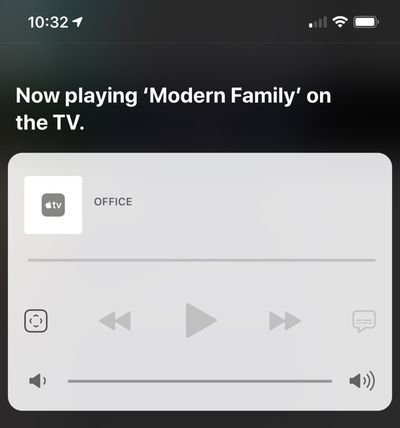
tvOS 12.2, paired with iOS 12.2, lets users ask Siri to play specific media on an Apple TV from an iOS device. You can, for example, ask Siri to play Modern Family on the TV in the living room. This works for music and TV content.
No other new features were discovered in the tvOS 12.2 beta as of yet, and it's often difficult to determine what's new because Apple does not provide release notes letting us know what's changed.
iOS 26.4 was released today, and it includes a couple of new features for CarPlay: an Ambient Music widget and support for voice-based chatbot apps.
To update your iPhone 11 or newer to iOS 26.4, open the Settings app and tap on General → Software Update. CarPlay will automatically offer the new features so long as the iPhone connected to your vehicle is running iOS 26.4 or later....
Apple today announced Apple Business, a new all-in-one platform that unifies device management, productivity tools, and customer outreach features.
The service is designed to be a consolidated replacement for several of Apple's existing business-focused offerings, including Apple Business Essentials, Apple Business Manager, and Apple Business Connect. It provides organizations with a single...
Tuesday March 24, 2026 12:31 pm PDT by Juli Clover
Apple today released new firmware for the AirPods Pro 2, AirPods Pro 3, and the AirPods 4. The firmware has a version number of 8B39, up from 8B34 on the AirPods Pro 3, 8B28 on the AirPods Pro 2, and 8B21 on the AirPods 4.
There is no word on what's included in the firmware, but Apple has a support document with limited notes. Most updates are limited to bug fixes and performance...
I didn't know our AVRs didn't already do the decoding! So it's done on the Apple TV box? I have my sound output sent to Multi-channel. Always thought my AVR did the decoding...
That's correct. At least for now/temporarily. Happened sometime around tvOS 11.3, I believe.
I'll use my receiver as an example. When I play a Dolby Atmos movie from my UHD BD player, my receiver displays "D.Atmos." Pretty straight forward; the player is passing the audio to my receiver to be decoded, which reads it as Dolby Atmos (because it's seeing the Dolby Atmos container).
The Apple TV 4K, however, does the decoding itself. It decodes Dolby Atmos first, and then sends that audio on as an uncompressed LPCM stream. As a result, my receiver displays "Multi" when I'm playing a Dolby Atmos movie from Apple TV 4K since the audio is being read as LPCM.
That's correct. At least for now/temporarily. Happened sometime around tvOS 11.3, I believe.
I'll use my receiver as an example. When I play a Dolby Atmos movie from my UHD BD player, my receiver displays "D.Atmos." Pretty straight forward; the player is passing the audio to my receiver to be decoded, which reads it as Dolby Atmos (because it's seeing the Dolby Atmos container).
The Apple TV 4K, however, does the decoding itself. It decodes Dolby Atmos first, and then sends that audio on as an uncompressed LPCM stream. As a result, my receiver displays "Multi" when I'm playing a Dolby Atmos movie from Apple TV 4K since the audio is being read as LPCM.
Hey There,
I do notice on my Yamaha receiver when playing a film with Dolby Atmos from apple tv 4k:
1)Receiver lights up with "DTHD" 2) Then " Decoder" 3)Then finally ends on "ATMOS/PCM"
I did read its some type of newer ( or older) dolby container. But yes, at the end of it: the Apple tv is doing the decoding and my Yamaha ( thank goodness ) lights up "ATMOS/PCM" and its does sound pretty damn good ( most of the time) in case anyone is interested the receiver is a YAMAHA RX-A770