Apple Introduces Quicker Way to Manage Subscriptions via App Store - MacRumors
Skip to Content

Apple Introduces Quicker Way to Manage Subscriptions via App Store

by

Apple recently introduced an easier way to manage subscriptions via the App Store, as spotted by MacStories editor-in-chief Federico Viticci.
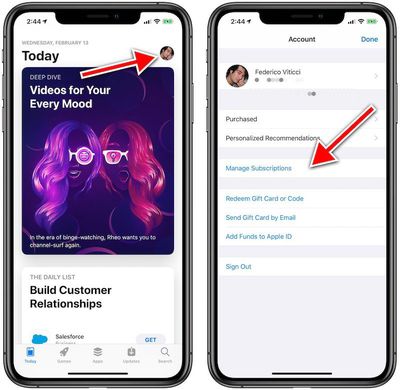
new manage subscriptions


iPhone and iPad users running iOS 12.1.4 or iOS 12.2 beta can now simply open the ‌App Store‌, tap on their profile picture in the top-right corner, and tap on Manage Subscriptions to view and edit ‌App Store‌, Apple Music, and Apple News subscriptions.

We've confirmed this Manage Subscriptions shortcut is not in earlier iOS versions.
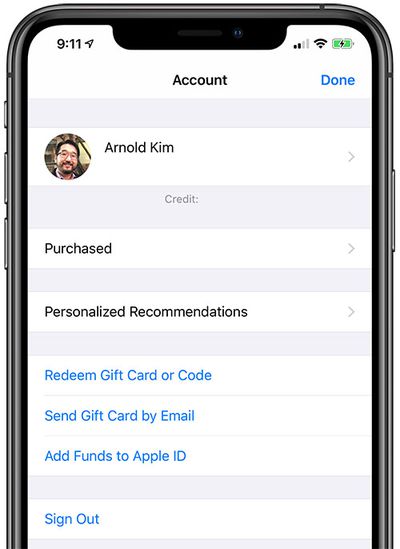
manage subscriptions

iOS 12.1.2

Managing subscriptions previously required an extra step of tapping on the box with your Apple ID name and email address via the ‌App Store‌ or Settings.

Apple will reportedly host a subscription-focused media event on Monday, March 25 at Steve Jobs Theater, where it is expected to announce its widely rumored subscription news service and perhaps its streaming movie and TV show service.

Top Rated Comments

Plutonius Avatar
95 months ago
My philosophy is that the best way to manage subscriptions is to limit the number that you have.
Score: 14 Votes (Like | Disagree)
95 months ago
I don’t have the new menu yet, but 3 steps instead of 5 is a start!
Stores need to be user friendly and easier to manage.
Score: 3 Votes (Like | Disagree)
Plutonius Avatar
95 months ago
That has nothing to do with the number of steps it takes to get to the settings to manage them though?
Less subscriptions = less time managing them.
Score: 2 Votes (Like | Disagree)
95 months ago
Hi,

I believe there’s a mistake in the article.

I’m on iOS 12.1.3 and I have this menu. It says here that only on 12.1.4 or 12.2. Which isn’t true. I think it’s also in 12.1.3.

Here’s a screenshot


Attachment Image

Attachment Image
Score: 1 Votes (Like | Disagree)
95 months ago
Thank goodness! I had to look that up every time, which should not happen on a commonly used action.
Score: 1 Votes (Like | Disagree)
gigapocket1 Avatar
95 months ago
This is great... must be because theirs something new that their coming out with. And they want people to find it easier.
Score: 1 Votes (Like | Disagree)

Popular Stories

iOS App Store General Feature Desaturated

Apple Removes Freecash App From App Store After Months of Data Harvesting

Tuesday April 14, 2026 3:54 pm PDT by
Apple removed scam app Freecash from the App Store this week after the app spent months harvesting data from iPhone users, reports TechCrunch. Freecash reached the number two spot on the U.S. App Store charts in January after being heavily marketed on TikTok. It promised users up to $35 per hour for watching TikTok content, but it was collecting swaths of user data. Back in January, Wired...
grok logo purple gradient

Apple Threatened to Pull Grok From App Store Over Sexualized Images

Wednesday April 15, 2026 7:10 am PDT by
Apple privately warned Elon Musk's xAI company in January that it would remove the Grok app from the App Store unless the company put a stop to the chatbot's nude and sexualized deepfakes, according to a letter Apple sent to U.S. senators and obtained by NBC News ($). Earlier this year, Grok's AI capabilities came under scrutiny after X users shared nonconsensual sexualized images of women...
iOS App Store General Feature Dock

Apple Quietly Tweaked the iOS App Store App – Here's What's Changed

Friday April 17, 2026 2:32 am PDT by
No, you aren't going crazy – Apple has quietly made a backend change to the App Store app in iOS that switches the location of the Updates tab and renames it to make it more prominent. In the App Store app, you can see the change by tapping your profile picture in the top-right corner. The "Apps & Purchase History" tab used to be at the top the list, but it has switched places with...