No, you aren't going crazy – Apple has quietly made a backend change to the App Store app in iOS that switches the location of the Updates tab and renames it to make it more prominent.
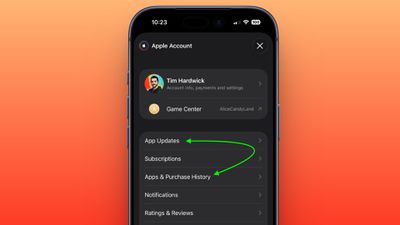
In the App Store app, you can see the change by tapping your profile picture in the top-right corner. The "Apps & Purchase History" tab used to be at the top the list, but it has switched places with "Updates," which is now called "App Updates."
The change was made by Apple without issuing a software update and is evident on both iOS 26.4.1 and the iOS 26.5 beta.
There's actually a faster way to access the App Updates page in iOS 26.4 that was recently highlighted by Daring Fireball's John Gruber: Simply long-press on the App Store app on your Home Screen and you can jump straight to it from the contextual menu.
Apple today announced that apps optimized for the iPhone Duo can now be submitted for App Store approval, ahead of the foldable device launching on Friday, October 23.
While existing App Store apps will automatically run on the iPhone Duo, only apps built with the iOS 27.1 SDK or later can dynamically resize to fill the entire space of the inner display, whereas unoptimized apps will have...
Friday October 16, 2026 3:21 pm PDT by Juli Clover
Apple today expanded its App Store moderation rules to cover AI-generated nonconsensual intimate imagery. Sexually explicit content was already banned, but now Apple says app developers must proactively prevent and remove AI-generated deepfakes from their platforms. Apple warns that apps with offending content could be removed from the App Store if developers fail to act.
The updated 1.2...
More premium games are launching on the App Store this year than last, Apple's App Store Worldwide head Carson Oliver told Polygon, including more franchises coming from PC and consoles.
Oliver said:
We've seen incredible growth of games coming to the App Store, in general, with more premium games releasing on the App Store this year than last. While many of those are indies, we're also...
And yet they had to make it an extra menu-tap away anyways to check for updates, which is really kinda annoying in the first place...
... as an aside, I really wish there was a goddamn setting to just give me app updates as they come in. I'm tired of checking for updates and finding out Apple was holding my phone back from updates 3-4 days ago from some apps.
Making updates an extra tap away was annoying enough. How about making it so I don’t have to manually refresh (with a pull down) every single time in order to see all of the available updates, instead of just some of them?
Also, when will App auto updates ever work? I feel like no matter what time of day, charging or not, I can always manually refresh and discover a lot of updates need to be downloaded.
Apple's first foldable iPhone, with a book-style design featuring a 5.4-inch outer display and a 7.6-inch inner display with a minimal crease down the middle.





/https://forums.macrumors.com/attachments/2622937/)













































