Apple Shares New 'iPhone Can Do What?' Features Page [Updated] - MacRumors
Skip to Content

Apple Shares New 'iPhone Can Do What?' Features Page [Updated]

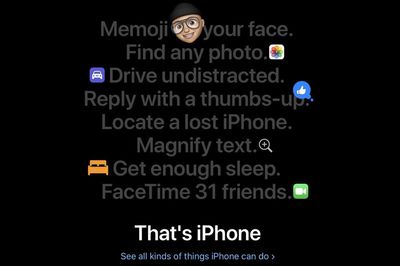
Apple recently added a new features page to its website, which offers an in-depth look at the capabilities of Apple's modern iPhones.

The site is organized into tiles, each featuring an explanation of a feature along with a short video, a photo, and a link to one of Apple's support documents.
iphonefeaturespage1
Topics covered include water resistance, privacy, AirDrop, Group FaceTime, photos search, Memoji, Do Not Disturb, Find My iPhone, Apple Pay, iMessage photo effects, and more.

iphonefeaturespage2
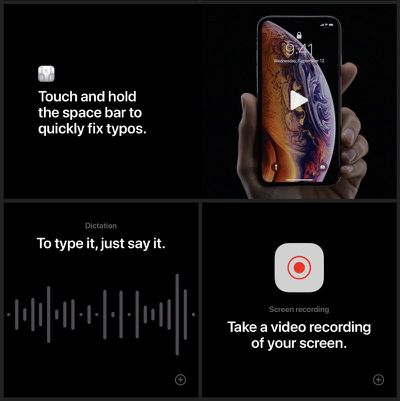
Apple includes both major features like Face ID, along with smaller hints and tips like holding the space bar to move the cursor to quickly fix a typo or double tapping the space bar while typing for a period.
iphonefeaturespage3
It's a useful site for anyone who isn't super familiar with the feature set on the iPhone, and it's also useful for more advanced users because it also has lesser known options that some people might not know about.

iphonefeaturespage4
Apple has a whole range of support documents on every topic you might think of, but doesn't often link to them on its main site, which makes the features page unique. Apple is highlighting the new features page on its main Apple.com homepage.

Update: Apple has shared several of the videos featured on its "iPhone Can Do What?" on YouTube. Each video is about 15 seconds in length and highlights a specific iPhone feature.


Popular Stories

iOS 26

iOS 26.4 Adds Two New Features to CarPlay

Tuesday March 24, 2026 1:55 pm PDT by
iOS 26.4 was released today, and it includes a couple of new features for CarPlay: an Ambient Music widget and support for voice-based chatbot apps. To update your iPhone 11 or newer to iOS 26.4, open the Settings app and tap on General → Software Update. CarPlay will automatically offer the new features so long as the iPhone connected to your vehicle is running iOS 26.4 or later....
Apple Business hero

Apple Unveils 'Apple Business' All-in-One Platform

Tuesday March 24, 2026 8:53 am PDT by
Apple today announced Apple Business, a new all-in-one platform that unifies device management, productivity tools, and customer outreach features. The service is designed to be a consolidated replacement for several of Apple's existing business-focused offerings, including Apple Business Essentials, Apple Business Manager, and Apple Business Connect. It provides organizations with a single...
AirPods Pro Firmware Feature

Apple Releases New Firmware for AirPods Pro 3, AirPods Pro 2 and AirPods 4

Tuesday March 24, 2026 12:31 pm PDT by
Apple today released new firmware for the AirPods Pro 2, AirPods Pro 3, and the AirPods 4. The firmware has a version number of 8B39, up from 8B34 on the AirPods Pro 3, 8B28 on the AirPods Pro 2, and 8B21 on the AirPods 4. There is no word on what's included in the firmware, but Apple has a support document with limited notes. Most updates are limited to bug fixes and performance...

Top Rated Comments

TimUSCA Avatar
92 months ago
Apple is seriously—in 2019—advertising shake to undo as one of the top iPhone features? It's one of the least intuitive features and an example of bad UX design. Every time I have to do it in bed it wakes up my wife.
Well quit pleasuring yourself in bed and blaming it on undo.
Score: 13 Votes (Like | Disagree)
macduke Avatar
92 months ago
iPhone text selection is awful. So many times I'm trying to grab a snippet and it skips to the top and selects one character, or gets stuck only letting me select one line, or it snaps to the whole paragraph and won't let me select text inside of it. Sometimes it doesn't work at all, and other times it doesn't let you grab punctuation or it takes several attempts. The keyboard touchpad for text selection was a nice addition, but they really need to overhaul however the text selection engine works because it sucks. It was fine many years ago but it's 2019 and it should be better by now.

I would also say that finding any photo is quite the stretch. It works for me maybe half the time and I have to do a lot of skimming and swiping around before I find what I'm looking for.
Score: 13 Votes (Like | Disagree)
Naraxus Avatar
92 months ago
“Memoji Your Face” is the first one listed.....

And people wonder why people think Apple has lost its way...
Score: 11 Votes (Like | Disagree)
macduke Avatar
92 months ago
Apple is seriously—in 2019—advertising shake to undo as one of the top iPhone features? It's one of the least intuitive features and an example of bad UX design. Every time I have to do it in bed it wakes up my wife.
Score: 10 Votes (Like | Disagree)
otternonsense Avatar
92 months ago
Apple is seriously—in 2019—advertising shake to undo as one of the top iPhone features? It's one of the least intuitive features and an example of bad UX design.
It's not like they've worked on a ton of exciting iOS features in the last few years, other than iMessage effects, stickers and ani-me-mojis.

Also, waterproofing? It's not worthy advertising something every manufacturer already has.

In order to advertise something you kinda have to make it happen first. I wish they took the ecosystem angle. Airdrop, universal pasting, Watch seamlessness, these are truly impressive features with the added upsell potential
Score: 9 Votes (Like | Disagree)
92 months ago
I would like for the iPhone to be able to take photos in low light like the Pixel 1/2/3 with Night Sight and the other Android phones. It's very embarassing that Apple can't release this, especially since Google released for all generations of Pixel.

https://www.phonearena.com/news/Galaxy-S10-vs-Pixel-3-vs-iPhone-XS-NIGHT-camera-comparison_id114131

Score: 4 Votes (Like | Disagree)