
MacStories Shares Useful Collection of 150 Custom iOS Shortcuts - MacRumors
Skip to Content

MacStories Shares Useful Collection of 150 Custom iOS Shortcuts

by

Apple in iOS 12 introduced a new Shortcuts app, built on the Workflow app that it acquired in 2017. Shortcuts lets you automate tasks, simplifying everything from calculating a tip to sharing an Apple Music song.

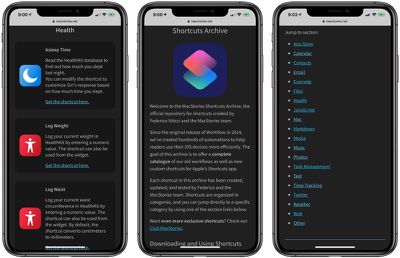
Shortcuts can do an endless number of things, but it can be tough to find useful new Shortcuts if you're not well versed in building them yourself. MacStories' Federico Viticci, known for creating useful Shortcuts, this morning announced a collection of Shortcuts that he's created over the years.
macstoriesshortcutsarchive
The MacStories Shortcuts archive includes 150 shortcuts at launch, but Viticci plans to add more over time. The archive is neatly organized into various categories, and everything is available for free. MacStories says that anyone is free to download, modify, and redistribute shortcuts from the archive to meet their needs.

Viticci updated and adapted all of the shortcuts that he's been using in the Workflow app for years, so this is a robust collection filled with automations for developers, writers, and the average iPhone user.

There are shortcuts for copying App Store release notes, saving screenshots, getting affiliate links, and more, and that's just in the ‌App Store‌ section.

Other useful shortcuts include a file downloader for iCloud Drive, a PDF creation tool, an option for zipping a collection of files, logging weight in the Health app, calculating average heart rate for the last two weeks, adding frames to screenshots from Apple products, getting images from a webpage, and many more.

If you want additional shortcuts, the Shortcuts subreddit on Reddit is also an excellent resource for finding new content in addition to the MacStories archive.


Top Rated Comments

92 months ago
Can someone enlighten me as to why you need some of these shortcuts? It seems to me the functionality is already built in for a lot of these. I've seen some very complicated shortcuts for very specific use cases, but many of these seem too simple to need. For example, one of the shortcuts listed gives the weather forecast for the day. "Hey Siri, what's the weather for today" does the same thing. Why do I need a shortcut?
Score: 6 Votes (Like | Disagree)
AngerDanger Avatar
92 months ago
Seems like there are a lot of ways this one could go wrong…


@keysofanxiety, this might be up your alley. ;)

Attachment Image
Score: 4 Votes (Like | Disagree)
keysofanxiety Avatar
92 months ago
Seems like there are a lot of ways this one could go wrong…


@keysofanxiety, this might be up your alley. ;)
Oh boy. There’s a strong possibility you’ll be receiving a few more of my mirror pictures in weird and wonderful poses. Ever seen an oiled man flexing next to a television remote?

Sorry in advance AD.
Score: 3 Votes (Like | Disagree)
Capeto Avatar
92 months ago
I'm looking for a shortcut to go to the App Store and automatically install all available app updates. Having to do this manually every day is a pain. Any ideas?
This literally takes 3 presses: Open App Store, Press Updates tab, Press “Update All”

Alternatively: Settings > iTunes & App Stores > Toggle “Updates” under “Automatic Downloads” to on
Score: 1 Votes (Like | Disagree)
92 months ago
The most useful one I’ve found so far is sending a mass text without forming a group chat.
Score: 1 Votes (Like | Disagree)

Popular Stories

iOS 26

iOS 26.4 Adds Two New Features to CarPlay

Tuesday March 24, 2026 1:55 pm PDT by
iOS 26.4 was released today, and it includes a couple of new features for CarPlay: an Ambient Music widget and support for voice-based chatbot apps. To update your iPhone 11 or newer to iOS 26.4, open the Settings app and tap on General → Software Update. CarPlay will automatically offer the new features so long as the iPhone connected to your vehicle is running iOS 26.4 or later....
Apple Business hero

Apple Unveils 'Apple Business' All-in-One Platform

Tuesday March 24, 2026 8:53 am PDT by
Apple today announced Apple Business, a new all-in-one platform that unifies device management, productivity tools, and customer outreach features. The service is designed to be a consolidated replacement for several of Apple's existing business-focused offerings, including Apple Business Essentials, Apple Business Manager, and Apple Business Connect. It provides organizations with a single...
AirPods Pro Firmware Feature

Apple Releases New Firmware for AirPods Pro 3, AirPods Pro 2 and AirPods 4

Tuesday March 24, 2026 12:31 pm PDT by
Apple today released new firmware for the AirPods Pro 2, AirPods Pro 3, and the AirPods 4. The firmware has a version number of 8B39, up from 8B34 on the AirPods Pro 3, 8B28 on the AirPods Pro 2, and 8B21 on the AirPods 4. There is no word on what's included in the firmware, but Apple has a support document with limited notes. Most updates are limited to bug fixes and performance...















