
Popular Mac drag-and-drop app Yoink received a substantial update on Monday, adding a number of new features, as well as many smaller improvements.
yoink mac
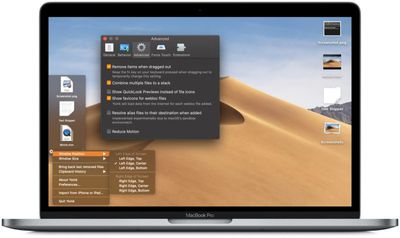
For those unfamiliar with the app, Yoink aims to simplify the action of dragging and dropping files and app-content on the macOS desktop by providing a temporary place for files to be dragged to. Yoink fades in when you start a drag - either with files from Finder or app-content, like an image from a website - offering you a temporary place for your dragged files.

With your files temporarily docked in the Yoink pane and the mouse free, you can more easily navigate to the intended destination of files, which is especially helpful when moving and copying files between different windows, Spaces or (fullscreen) apps.

Today's update takes the app to version 3.5.3 and introduces Continuity Camera support, so you can now save photos and documents from your iPhone or iPad right in Yoink. Yoink's position on the screen can be adjusted more easily, too. Previously you had to click the cog icon and select from a location from a menu of options, but now you can just drag the Yoink shelf window itself.

Also in this release, a "Save as" option has been added to the contextual menu when you right-click a file, allowing you to not only move or copy a file this way, but also rename it. Additionally, when Yoink is the active app, you can now use the keyboard to navigate the app (arrow up, down, select all, Quick Look).

Another couple of useful modifiers have been added, such as holding down the function (fn) key to keep a file in Yoink wile dragging it out, and holding the same key down to temporarily disable Yoink when dragging a file. It's also now possible to double-press the keyboard shortcut (by default, F5) to quickly add your clipboard contents to Yoink.

Meanwhile, improvements include better drag recognition, more efficient CPU usage, intelligent ignoring of drags that occur when playing games, and better compatibility with Transmit, DevonThink, and Apple's Remote Desktop app. Several bug fixes have also been implemented in this version, including some strange behaviors when using Yoink with Handoff.

Yoink for Mac is currently available for $5.99 (usually $7.99) on the Mac App Store. Yoink is also part of Eternal Storms' Software Bundle, together with ScreenFloat and Transloader, which reduces the apps' individual cost by 25 percent. A free 15-day trial version of Yoink is available on the developer's website.


Top Rated Comments

martyjmclean Avatar
89 months ago
Yoink is one of those apps you don't think will be useful because there's "nothing wrong with my current workflow" - and then you're quickly proven wrong.
Score: 3 Votes (Like | Disagree)
rodpascoe Avatar
89 months ago
I guess if people don't know how to use the OS properly someone will try and make a profit from it.
You've clearly never used this app. It *extends* what the OS provides. Try using something before slating it.
Score: 3 Votes (Like | Disagree)
ignatius345 Avatar
89 months ago
Yoink is one of those apps you don't think will be useful because there's "nothing wrong with my current workflow" - and then you're quickly proven wrong.
Yep. It's one of the first few things I put on a new Mac -- makes full-screen apps SO much easier to use.
Score: 2 Votes (Like | Disagree)

Popular Stories

Apple Logo Zoomed

Tim Cook Teases Plans for Apple's Upcoming 50th Anniversary

Thursday February 5, 2026 12:54 pm PST by
Apple turns 50 this year, and its CEO Tim Cook has promised to celebrate the milestone. The big day falls on April 1, 2026. "I've been unusually reflective lately about Apple because we have been working on what do we do to mark this moment," Cook told employees today, according to Bloomberg's Mark Gurman. "When you really stop and pause and think about the last 50 years, it makes your heart ...
wwdc sans text feature

Apple Rumored to Announce New Product on February 19

Thursday February 5, 2026 12:22 pm PST by
Apple plans to announce the iPhone 17e on Thursday, February 19, according to Macwelt, the German equivalent of Macworld. The report, citing industry sources, is available in English on Macworld. Apple announced the iPhone 16e on Wednesday, February 19 last year, so the iPhone 17e would be unveiled exactly one year later if this rumor is accurate. It is quite uncommon for Apple to unveil...
Finder Siri Feature

Why Apple's iOS 26.4 Siri Upgrade Will Be Bigger Than Originally Promised

Friday February 6, 2026 3:06 pm PST by
In the iOS 26.4 update that's coming this spring, Apple will introduce a new version of Siri that's going to overhaul how we interact with the personal assistant and what it's able to do. The iOS 26.4 version of Siri won't work like ChatGPT or Claude, but it will rely on large language models (LLMs) and has been updated from the ground up. Upgraded Architecture The next-generation...
iOS 26

iOS 26.3 and iOS 26.4 Will Add These New Features to Your iPhone

Tuesday February 3, 2026 7:47 am PST by
While the iOS 26.3 Release Candidate is now available ahead of a public release, the first iOS 26.4 beta is likely still at least a week away. Following beta testing, iOS 26.4 will likely be released to the general public in March or April. Below, we have recapped known or rumored iOS 26.3 and iOS 26.4 features so far. iOS 26.3 iPhone to Android Transfer Tool iOS 26.3 makes it easier...
iphone 17 pro dark blue 1

iPhone 18 Pro Max Rumored to Deliver Next-Level Battery Life

Friday February 6, 2026 5:14 am PST by
The iPhone 18 Pro Max will feature a bigger battery for continued best-in-class battery life, according to a known Weibo leaker. Citing supply chain information, the Weibo user known as "Digital Chat Station" said that the iPhone 18 Pro Max will have a battery capacity of 5,100 to 5,200 mAh. Combined with the efficiency improvements of the A20 Pro chip, made with TSMC's 2nm process, the...















