
Apple today unveiled iPadOS, a new version of iOS that's designed to take advantage of the larger screens in the iPad family. iPadOS will incorporate several features that recognize the tablet's function as a computer replacement, including a new Home screen, an updated Split View to enhance multitasking, improved Apple Pencil support, and additional keyboard shortcuts for use with physical keyboards.
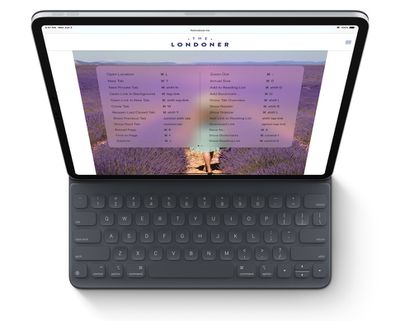
Screenshot
During its WWDC keynote, Apple revealed that Safari for iPadOS will include about 30 additional shortcuts, including the following:

  • Use default font size in Reader (Command + 0)
  • Open link in background (Command + tap)
  • Toggle downloads (Command + Alt/Option)
  • Open link in new window (Command + Alt + tap)
  • Use selection for Find (Command + E)
  • Email this page (Command + I)
  • Open link in new tab (Command + Shift + tap)
  • Decrease Reader text size (Command + -)
  • Zoom in (Command + +)
  • Zoom out (Command + -)
  • Save webpage (Command + S)
  • Change focused element (Alt/Option + tab)
  • Focus Smart Search field (Command + Alt/Option + F)
  • Dismiss web view in app (Command + W)
  • Increase Reader text size (Command + +)
  • Download linked file (Alt + tap)
  • Add link to Reading List (Shift + tap)
  • Close other tabs (Command + Alt/Option + W)
  • Scroll around screen (arrow keys)
  • Paste without formatting (Command + Shift + Alt/Option + V)
  • New Private tab (Command + Shift + N)
  • Actual size (Command + 0)
  • Open search result (Command + Return)
  • Toggle bookmarks (Command + Alt/Option + 1)

The keyboard shortcuts will work with Apple's Smart Keyboard or any third-party Bluetooth connected keyboard, which should make web browsing and managing files even easier on an ‌iPad‌.

In addition, iPadOS automatically presents the desktop version of a website, scaled appropriately for the ‌iPad‌ display, and optimizes it for touch. Safari for iPadOS also comes with a download manager and enhancements to tab management.

Due to be released in the fall, iPadOS will be compatible with the iPad Air 2 and later, all iPad Pro devices, the fifth-generation ‌iPad‌ and later, and the iPad mini 4 and later.

Top Rated Comments

techpr Avatar
87 months ago
Now it needs multi user option and the iPad will be complete.
Score: 11 Votes (Like | Disagree)
itsamacthing Avatar
87 months ago
Hope this is the change that makes my iPad less of an iPad and more of a laptop replacement
Score: 3 Votes (Like | Disagree)
currentinterest Avatar
87 months ago
Mouse support is available via Accessibility in settings.
Score: 2 Votes (Like | Disagree)
mikehoopes Avatar
87 months ago
Mouse, please. I’m a big fan of the stylus, despite it’s stunted functionality compared to 2009’s PC state-of-the-art. However, until the iPad gets a self-cleaning screen and/or allows your arms to relax, it ain’t a laptop replacement.

[edit]: I scrolled a couple more inches down, and saw that mouse support was going to be offered as an “accessibility” option.

Well, count me among the differently-abled when it comes to “smeary-finger-oil-that-even-creates-stylus-friction-on-my-display-but-is-inevitable-due-to-the-zen-ish-buttonless-simplicity-of-the-Apple-Pencil-aversion”!
Score: 1 Votes (Like | Disagree)
SoSickSadNslOw Avatar
87 months ago
I think I’ll be using my iPad Pro more often now. Can’t wait to test this out!
Score: 1 Votes (Like | Disagree)

Popular Stories

wwdc sans text feature

Apple Rumored to Announce New Product on February 19

Thursday February 5, 2026 12:22 pm PST by
Apple plans to announce the iPhone 17e on Thursday, February 19, according to Macwelt, the German equivalent of Macworld. The report, citing industry sources, is available in English on Macworld. Apple announced the iPhone 16e on Wednesday, February 19 last year, so the iPhone 17e would be unveiled exactly one year later if this rumor is accurate. It is quite uncommon for Apple to unveil...
Apple Logo Zoomed

Tim Cook Teases Plans for Apple's Upcoming 50th Anniversary

Thursday February 5, 2026 12:54 pm PST by
Apple turns 50 this year, and its CEO Tim Cook has promised to celebrate the milestone. The big day falls on April 1, 2026. "I've been unusually reflective lately about Apple because we have been working on what do we do to mark this moment," Cook told employees today, according to Bloomberg's Mark Gurman. "When you really stop and pause and think about the last 50 years, it makes your heart ...
maxresdefault

Apple Shows Off a Key Reason to Upgrade to the iPhone 17

Saturday February 7, 2026 9:26 am PST by
Apple today shared an ad that shows how the upgraded Center Stage front camera on the latest iPhones improves the process of taking a group selfie. "Watch how the new front facing camera on iPhone 17 Pro takes group selfies that automatically expand and rotate as more people come into frame," says Apple. While the ad is focused on the iPhone 17 Pro and iPhone 17 Pro Max, the regular iPhone...
Finder Siri Feature

Why Apple's iOS 26.4 Siri Upgrade Will Be Bigger Than Originally Promised

Friday February 6, 2026 3:06 pm PST by
In the iOS 26.4 update that's coming this spring, Apple will introduce a new version of Siri that's going to overhaul how we interact with the personal assistant and what it's able to do. The iOS 26.4 version of Siri won't work like ChatGPT or Claude, but it will rely on large language models (LLMs) and has been updated from the ground up. Upgraded Architecture The next-generation...
iOS 26

iOS 26.3 and iOS 26.4 Will Add These New Features to Your iPhone

Tuesday February 3, 2026 7:47 am PST by
While the iOS 26.3 Release Candidate is now available ahead of a public release, the first iOS 26.4 beta is likely still at least a week away. Following beta testing, iOS 26.4 will likely be released to the general public in March or April. Below, we have recapped known or rumored iOS 26.3 and iOS 26.4 features so far. iOS 26.3 iPhone to Android Transfer Tool iOS 26.3 makes it easier...
















