
Apple Maps in iOS 13: Collections, Favorites, Look Around, and More

There are quite a few changes coming to the Maps app in iOS 13, which gives Apple Maps a feature set that more closely mirrors some of the tools and functionality available in more robust mapping apps like Google Maps.

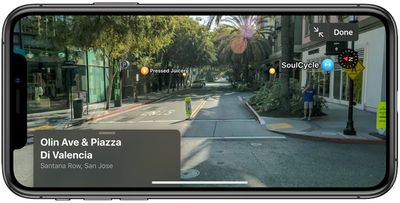
The most interesting and notable change in Maps is the new Look Around feature, which is Apple's answer to Google's Street View function. Look Around lets you get a street level look at what's around you (or what you search for) in the Maps app.

lookaround1
Look Around leverages all of the Maps-related data collection that Apple has been doing, which has ranged from in-car data gathering for many months to data collecting on foot in select cities.
lookaround2
Look Around in the main ‌Apple Maps‌ view can be used wherever a pair of binoculars are shown. Tapping that delves into a close-up street level view of the location in a little card, which you can tap again to use the feature full screen.
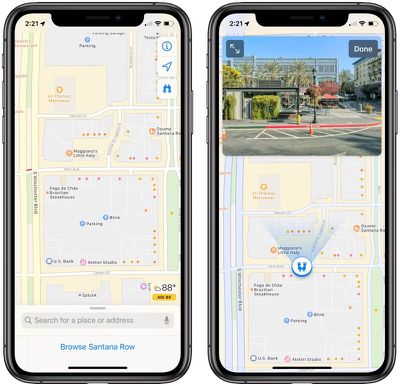
mapslookaroundbinoculars
Tapping around on the display lets you move through the Look Around area, and tapping on an area far in the distance does a neat zooming maneuver that's fun to watch. Notable points of interest, such as restaurants and businesses, are highlighted with identifying icons.


Look Around is limited to areas where a car can go because it's using data captured from a 360 degree camera on a vehicle. That means you can't zoom into areas like parks or beaches, for example, but Apple could add this function in the future since the company is collecting data on foot too.
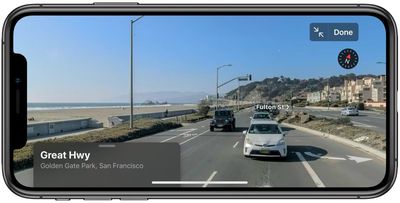
mapslookaroundbeach
As with Google Maps, personal information like license places and faces is blurred out to protect people's privacy.

Right now, Look Around is limited to select areas in the United States such as parts of California and Nevada, but Apple plans to expand availability after iOS 13 is released. It is expected to be available across the United States in 2019, and other countries in 2020.

Maps in iOS 13 has a "Favorites" option, which lets you search for specific locations and add them to a favorites list. Favorites are Home and Work by default, but you can add any location.
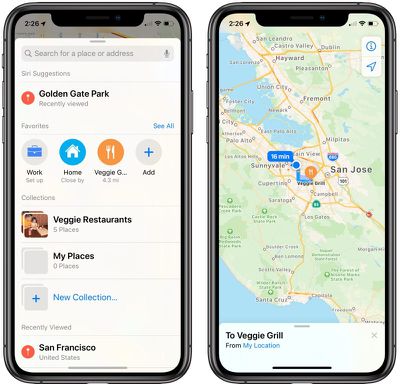
mapsfavorites
Tapping one of your favorite options brings up directions to that spot straight away, making the Favorites list the best place for the places that you travel to on a regular basis. Siri Suggestions is also used here to suggest places that you visit a lot that you might want to add.

There's also a new "Collections" feature where you can aggregate different locations, such as restaurants you want to try or places that you might want to visit.
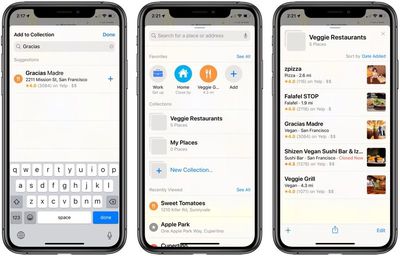
mapscollections
All of your Collection lists can be shared, so you can make up lists of places for friends and family visiting you in your city and then share it with them, for example.
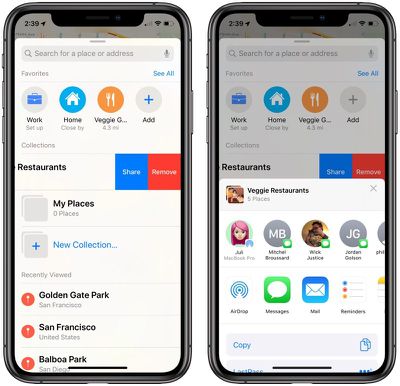
mapssharelocations
Apple on stage mentioned a revamped Maps interface in iOS 13, but this appears to have been largely referring to changes that the company already started implementing in iOS 12.

There are, however, some noticeable changes to the main Maps interface even in areas where updated iOS 12 maps have already rolled out, such as a view of road hazards and traffic conditions that are normally only visible when turn-by-turn directions have been inputted. Traffic in iOS 13 is visible on the main map.
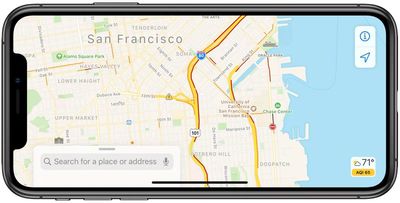
mapsoverviewtrafficroadconditions
Apple's iOS 13 website specifically mentions more realistic details for roads, beaches, parks, buildings, and more, but it's not entirely clear if all of this is new.

Both Collections and Favorites are nice additions to ‌Apple Maps‌ that make it more useful, and Look Around is a fantastic new tool for getting a close look at what's nearby.


Related Forum: iOS 13

Popular Stories

maxresdefault

Apple Shows Off a Key Reason to Upgrade to the iPhone 17

Saturday February 7, 2026 9:26 am PST by
Apple today shared an ad that shows how the upgraded Center Stage front camera on the latest iPhones improves the process of taking a group selfie. "Watch how the new front facing camera on iPhone 17 Pro takes group selfies that automatically expand and rotate as more people come into frame," says Apple. While the ad is focused on the iPhone 17 Pro and iPhone 17 Pro Max, the regular iPhone...
Finder Siri Feature

Why Apple's iOS 26.4 Siri Upgrade Will Be Bigger Than Originally Promised

Friday February 6, 2026 3:06 pm PST by
In the iOS 26.4 update that's coming this spring, Apple will introduce a new version of Siri that's going to overhaul how we interact with the personal assistant and what it's able to do. The iOS 26.4 version of Siri won't work like ChatGPT or Claude, but it will rely on large language models (LLMs) and has been updated from the ground up. Upgraded Architecture The next-generation...
wwdc sans text feature

Apple Rumored to Announce New Product on February 19

Thursday February 5, 2026 12:22 pm PST by
Apple plans to announce the iPhone 17e on Thursday, February 19, according to Macwelt, the German equivalent of Macworld. The report, citing industry sources, is available in English on Macworld. Apple announced the iPhone 16e on Wednesday, February 19 last year, so the iPhone 17e would be unveiled exactly one year later if this rumor is accurate. It is quite uncommon for Apple to unveil...
apple wallet drivers license feature iPhone 15 pro

Apple Says These 7 U.S. States Plan to Offer iPhone Driver's Licenses

Monday February 9, 2026 6:24 am PST by
In select U.S. states, residents can add their driver's license or state ID to the Apple Wallet app on the iPhone and Apple Watch, and then use it to display proof of identity or age at select airports and businesses, and in select apps. The feature is currently available in 13 U.S. states and Puerto Rico, and it is expected to launch in at least seven more in the future. To set up the...
14 inch MacBook Pro Keyboard

New MacBook Pros Could Now Arrive in March

Sunday February 8, 2026 6:02 am PST by
New MacBook Pro models with the M5 Pro and M5 Max chips could arrive as soon as Monday, March 2, according to Bloomberg's Mark Gurman. In today's "Power On" newsletter, Gurman said that the release of new MacBook Pro models is tied to the release of macOS Tahoe 26.3. The launch is said to be slated for as early as the week of March 2. He added that the M4 Pro and M4 Max models on sale today...

Top Rated Comments

mrr Avatar
87 months ago
Thank you Apple! Street View was the only reason for me to use Google Maps. Can’t wait.
Score: 14 Votes (Like | Disagree)
BootsWalking Avatar
87 months ago
They should incorporate AR into Look Around - we can take vacation selfies without ever leaving the house.
Score: 10 Votes (Like | Disagree)
nutmac Avatar
87 months ago
Look Around (Apple's Street View) is insanely great. There's just so much more details than Google Street View. I can read all the street signs, including parking hours. And the UI for driving around is also more elegant, although haptic feedback gets a bit old.
Score: 7 Votes (Like | Disagree)
ATC Avatar
87 months ago
I cannot wait till Apple rolls out the new map for Canada, I can then finally rid myself of the only google product I still use.
Score: 7 Votes (Like | Disagree)
FutureTech100 Avatar
87 months ago
I have personally steered clear of Apple Maps as at the beginning it wasn't accurate.

I am thinking about giving it another go as I'd like to distance myself from Google as much as possible....

What's your honest opinion of Apple Maps vs Google Maps?
I have been using Apple Maps only for the past couple years ditching google maps when google maps became confusing for me to use driving in the changed way they made the view. Then for some reason google multiple times in a row had me running in circles for directions I put in, never happened before with google maps and was the pushing point for me to put time in and try the switch to Apple Maps completely erasing google maps from my phone.

So far everything has been working great and I’ve came really accustom to how Apple maps works and handles functionality. I think Apple is sufficient in handling businesses, restaurants, gas stations, etc nearby or searches to be useable but could definitely improve on that feature section, being behind competition. Other than that I’ve never had a problem with accuracy and Apple maps always gives me more than one route to chose from when I type the address in then hit search. This is nice because if I know an area gets busy at a certain time I want to bypass, know of a wreck somewhere ,want to take a more scenic route, has different shops I want to hit on my route once looking at it or even to decide the best route for work on taking the most efficient option to take care of my customers. Another thing I really like is Apple maps tells you the weather and air index right on it, then also tells you what the speed limit is where you’re exactly at. This is nice because looking at the maps for directions, I miss speed signs and then guess what I should be going but now I always know the speed I should be going; which I think has saved me from tickets. I have a customer base that is very off the grid way back in on back roads in the country with a customer base that is also in bigger areas like towns and cities, Apple Maps has never let me down and has always got me to where I want to go; so far. Speaking of this another plus I like about Apple maps is these back in off the grid customers are in dead zones no cellular service areas and all I need for Apple maps to work, is enough service to load my route and hit go; after that I don’t need service ever again and it’ll get me there perfectly fine. No I don’t know what Google maps has and does now to compare but those are some stand out things I enjoy from using Apple maps now. The one feature I truly missed was street view though and was something I just managed without, but in my excitement it looks like Apple Maps is going to improve and give its users a missing sought after feature!
Score: 6 Votes (Like | Disagree)
theapplehead Avatar
87 months ago
How about offline maps? That would be an awesome feature for Apple to implement into Maps. Maybe they will in the future.....
Score: 5 Votes (Like | Disagree)















