

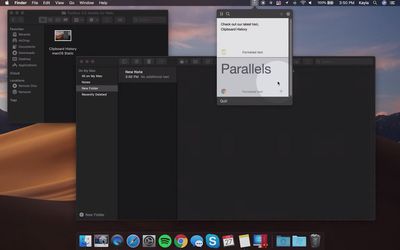
Parallels Toolbox for Mac has been updated to version 3.5 with a handful of new one-click shortcuts, including clipboard history, a sleep timer, an energy saver tool, and the ability to hide some menu bar icons.
From the press release:
New Tools in Parallels Toolbox 3.5 for Mac:
- Clipboard History: Captures what's copied to the Mac clipboard, including plain and formatted text. It also offers full text search, favorites and settings to collect content for up to 30 days. You can also pause the collection or exclude applications, allowing users to further customize the tool.
- Hide Menu Icons: Allows users to hide some icons from the Mac menu bar by creating two sets of menu-bar icons, visible and invisible. Less important icons only become visible when the user clicks the tool's control in the Mac menu bar. Hidden icons automatically hide when the user goes back to working with applications from the control menu.
- Energy Saver: Activates several settings, including hidden ones that reduce system-resources usage and increase battery life, saving up to eight percent in power consumption. It automatically detects your computer's state when it's running on battery and activates options for users to enable or disable.
- Sleep Timer: Allows you to set a timer for the computer to either go to sleep or shut down from the moment you press "Start," helping you save energy. Time options range from 15 minutes to six hours.
New Enhanced Versions of Existing Tools in Parallels Toolbox for Mac:
- Clean Drive: Users can now see files that will be deleted, with the ability to find them in Finder for improved transparency.
- Find Duplicates: Ability to mass-select multiple duplicates for better total-size representation and simplified sorting options.
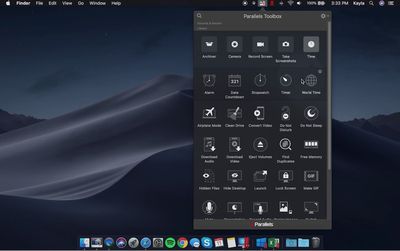
Parallels Toolbox adds a dropdown menu to the macOS menu bar with a collection of tools and shortcuts that simplify common tasks to just a click or two, such as taking screenshots, resizing images, hiding the desktop, recording audio, switching resolutions, creating password-protected archives of files, and more.
Parallels Toolbox for Mac is priced at $19.99 per year for new users. The annual subscription includes free updates with new and enhanced tools as they become available over time, such as this version 3.5 update.
Note that while Parallels is best known for its virtualization software that allows for Windows and Linux to run within macOS, its Toolbox software can be used natively on any compatible Mac or Windows PC.



















Top Rated Comments
As to Parallels Access which I installed voluntarily, it had limited functionality and extremely slow. And it would never work with my Desktop even after I set it up to never sleep. Basically I could never access my files on the go as Parallels Access could not wake up the computer.
Anyway, all that to say that they should focus on Parallels Desktop and forget the rest. And stop prompting me to install these other tools.