Apple Releases tvOS 13 With Multi User Support, Control Center, Ocean Screensavers and More - MacRumors
Skip to Content

Apple Releases tvOS 13 With Multi User Support, Control Center, Ocean Screensavers and More

Apple today released tvOS 13, the latest operating system designed for the fourth and fifth-generation Apple TV models. tvOS 13 comes after several months of beta testing.

tvOS 13 can be downloaded over the air through the Settings app on the ‌Apple TV‌ by going to System -> Software Update. ‌Apple TV‌ owners who have automatic software updates turned on will be upgraded to tvOS 13 automatically. Apple has also released an ‌Apple TV‌ Software 7.4 update (actually version 8.4.3) for the third-generation ‌Apple TV‌.

tvos13
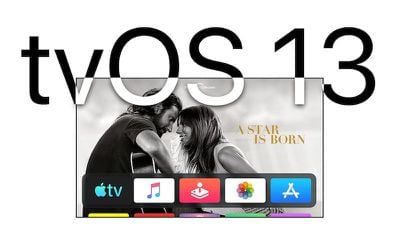
The tvOS 13 update brings an updated Home screen aimed at making it easier to discover new content. Apps are now able to play full-screen video previews on the Home screen, similar to Netflix, once developers have implemented support.

Multiple users are supported for the first time, letting more than one profile exist on the ‌Apple TV‌ so each family member can have their own customized ‌Apple TV‌ interface with separate recommendations, music playlists, and Watch Now lists.

Switching between profiles can be done with the new Control Center, which offers up profiles, the time and date, search, a Now Playing widget, AirPlay controls, and a sleep option.
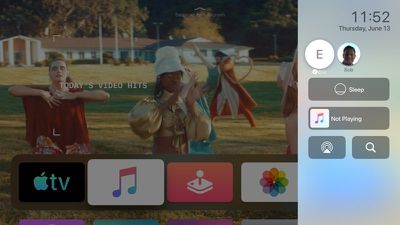
tvos13controlcenter
tvOS 13 brings Apple Arcade, Apple's new gaming service that's already available for the iPhone. ‌Apple Arcade‌ will offer unlimited access to more than 60 new and exclusive games, for one $4.99 per month subscription fee.
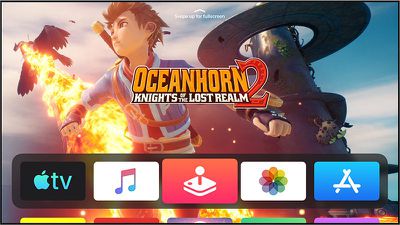
tvos13applearcade
For ‌Apple Arcade‌, Apple has implemented support for the Xbox Wireless Bluetooth Controller and the PlayStation DualShock 4 Controller, both of which can be connected to an ‌Apple TV‌ over Bluetooth.

game controllers ps4 xbox
Sign in with Apple, a feature also available on the iPhone, iPad, and coming to Macs, is included in tvOS 13. With tvOS 13, apps that support Sign in with Apple will let you sign in with your Apple ID rather than requiring you to create a user name and password.
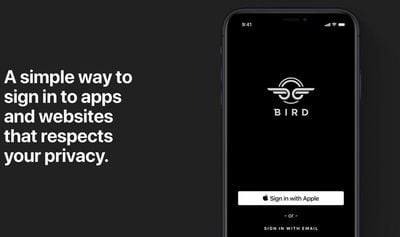
signinwithapple
Apple can even obscure your real email address and provide a fake one, which keeps your data and information safer than ever.

There are new under the sea themed screensavers created in partnership with the BBC Natural History Unit, which also created "Blue Planet."

tvos 13 underwater
With a new Picture-in-Picture feature, you can continue to watch TV shows or movies while using a different app, adjusting settings, or otherwise navigating through the tvOS 13 operating system.

For more on what's new in the tvOS 13 update, make sure to check out our tvOS 13 roundup.

Related Roundup: Apple TV
Buyer's Guide: Apple TV (Don't Buy)

Popular Stories

iOS 26

iOS 26.4 Adds Two New Features to CarPlay

Tuesday March 24, 2026 1:55 pm PDT by
iOS 26.4 was released today, and it includes a couple of new features for CarPlay: an Ambient Music widget and support for voice-based chatbot apps. To update your iPhone 11 or newer to iOS 26.4, open the Settings app and tap on General → Software Update. CarPlay will automatically offer the new features so long as the iPhone connected to your vehicle is running iOS 26.4 or later....
Apple Business hero

Apple Unveils 'Apple Business' All-in-One Platform

Tuesday March 24, 2026 8:53 am PDT by
Apple today announced Apple Business, a new all-in-one platform that unifies device management, productivity tools, and customer outreach features. The service is designed to be a consolidated replacement for several of Apple's existing business-focused offerings, including Apple Business Essentials, Apple Business Manager, and Apple Business Connect. It provides organizations with a single...
AirPods Pro Firmware Feature

Apple Releases New Firmware for AirPods Pro 3, AirPods Pro 2 and AirPods 4

Tuesday March 24, 2026 12:31 pm PDT by
Apple today released new firmware for the AirPods Pro 2, AirPods Pro 3, and the AirPods 4. The firmware has a version number of 8B39, up from 8B34 on the AirPods Pro 3, 8B28 on the AirPods Pro 2, and 8B21 on the AirPods 4. There is no word on what's included in the firmware, but Apple has a support document with limited notes. Most updates are limited to bug fixes and performance...

Top Rated Comments

pooryou Avatar
85 months ago
I don’t want “Netflix-like” forced video previews!

Sure hope we can disable that nonsense.
Score: 16 Votes (Like | Disagree)
Solomani Avatar
85 months ago
Xbox and DualShock controller support for Apple TV! A step in the right direction, Apple.
Score: 8 Votes (Like | Disagree)
85 months ago

Did you check under Accessibility? Sometimes they hide stuff like that there.
You, Sir, are a genius. ;) Under Accessibility/Motion the video previews can be turned off. The apps still rotate through still images, but that’s less annoying.
Score: 7 Votes (Like | Disagree)
85 months ago
Just updated one of my ATVs and encountered the first UI annoyance already: in the previous version, the "top shelf" of the TV app on the home screen would show the first few entries of may watch list. Now it shows some random movie poster fullscreen in the background (essentially an ad), so I can no longer directly jump to an item on the watchlist. Is there any way to configure this? Not a fan of the new home screen so far.
Score: 6 Votes (Like | Disagree)
unfunfionn Avatar
85 months ago
I've been on the public beta for a couple of months. When I first saw the top shelf ads, I thought it can't be serious, but surely they'll make it optional by the GM. Turns out they were serious and they didn't listen. I'm sure some users will like this feature, but there is an ethical concern that makes me a little worried. This is a €200 device, the premium device in this market, and they're putting advertisements on the home screen. As long as that content is stuff you have to spend additional money on, they're ads. I was already annoyed that my Samsung TV makes it impossible to remove TV Plus (and keeps pinning it to my Home menu no matter how often I remove it), but it mostly stays out of the way. The tvOS ads are far worse.

But honestly it annoys me with the Music app more than the TV app. The TV app was barely useful to begin with. Its only useful feature for me was Up Next in the top shelf. Now it can just go into a folder and die. But I use Music heavily and instead of having a shortcut into albums I deliberately added to my library, I get video previews for Taylor Swift, the Jonas Brothers and Ariana Grande. I don't listen to any of those artists and have no intention to. They're not recommendations based on my listening behaviour either.

It's business goals being brute-forced onto a paying customer base. Yes, worse things can happen in an OS update, but this approach feels quite concerning.
Score: 5 Votes (Like | Disagree)
tonywalker23 Avatar
85 months ago

Did you check under Accessibility? Sometimes they hide stuff like that there.
Would there be a way to disable the preview completely (video AND still image)? I updated yesterday, in my church office, and you can imagine the quickness I rearranged icons when the top half of my tv was a lady in a silver outfit (obviously I don't keep up with new music stars:)
Score: 4 Votes (Like | Disagree)