
Microsoft Office Apps for iOS Gain Dark Mode Support - MacRumors
Skip to Content

Microsoft Office Apps for iOS Gain Dark Mode Support

by

Update: As spotted by WCCFTech, Microsoft has now updated all of its Office apps – Word, Excel, PowerPoint, OneNote and Outlook – to support Dark Mode.


Microsoft OneNote received an update on iOS today that brings much-awaited ‌Dark Mode‌ support to the popular note-taking app.
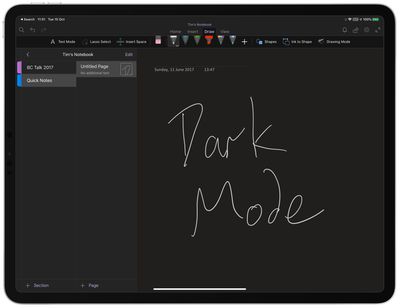
onenote dark mode ipad
OneNote is usually a particularly bright app because of the large white scrollable canvases and pale menus, so this update should be a welcome one for users who work with it long into the night.

Apart from supporting the new system-wide ‌Dark Mode‌ in iOS 13 and iPadOS, version 16.30 of OneNote makes no other changes to the app, as per the release notes:

Go easy on your eyes with Dark Mode: Switch to Dark Mode in low light environments or whenever you want to increase the legibility of the OneNote user interface and the readability of your notes.

Thanks for using OneNote! We listened to your feedback and updated the application with optimizations to help improve your note taking experience.

Microsoft has been adding ‌Dark Mode‌ support to a range of its apps. A Sticky Notes beta gained a dark mode earlier this month, while the rest of the Office iOS apps including Word, PowerPoint, and Excel already sport the twilight look in insider builds and are expected to go live with it any day now.


Top Rated Comments

84 months ago
Do SKYPE fro Business Already!!!!!!
Score: 1 Votes (Like | Disagree)
williamwoneill Avatar
84 months ago
I really like this app but I hate it in Dark Mode. The highlighter is garbage in this mode along with the other complaints above. I wish the would give me a way to turn it off for this app. The handwritten preview to this side also sucks. This is a step backwards for an app that I love.
Score: 1 Votes (Like | Disagree)
84 months ago
I think these are probably the few apps I wouldn’t use in dark mode, with the exception of outlook. I like to see what my documents would look like on a white background.

I am already having issues copy and pasting out of Notes into third party apps, as it pastes the white font colour onto a white background.
Score: 1 Votes (Like | Disagree)

Popular Stories

iOS 26

iOS 26.4 Adds Two New Features to CarPlay

Tuesday March 24, 2026 1:55 pm PDT by
iOS 26.4 was released today, and it includes a couple of new features for CarPlay: an Ambient Music widget and support for voice-based chatbot apps. To update your iPhone 11 or newer to iOS 26.4, open the Settings app and tap on General → Software Update. CarPlay will automatically offer the new features so long as the iPhone connected to your vehicle is running iOS 26.4 or later....
Apple Business hero

Apple Unveils 'Apple Business' All-in-One Platform

Tuesday March 24, 2026 8:53 am PDT by
Apple today announced Apple Business, a new all-in-one platform that unifies device management, productivity tools, and customer outreach features. The service is designed to be a consolidated replacement for several of Apple's existing business-focused offerings, including Apple Business Essentials, Apple Business Manager, and Apple Business Connect. It provides organizations with a single...
AirPods Pro Firmware Feature

Apple Releases New Firmware for AirPods Pro 3, AirPods Pro 2 and AirPods 4

Tuesday March 24, 2026 12:31 pm PDT by
Apple today released new firmware for the AirPods Pro 2, AirPods Pro 3, and the AirPods 4. The firmware has a version number of 8B39, up from 8B34 on the AirPods Pro 3, 8B28 on the AirPods Pro 2, and 8B21 on the AirPods 4. There is no word on what's included in the firmware, but Apple has a support document with limited notes. Most updates are limited to bug fixes and performance...















