Google Brings Incognito Mode to Google Maps App for iOS - MacRumors
Skip to Content

Google Brings Incognito Mode to Google Maps App for iOS

by

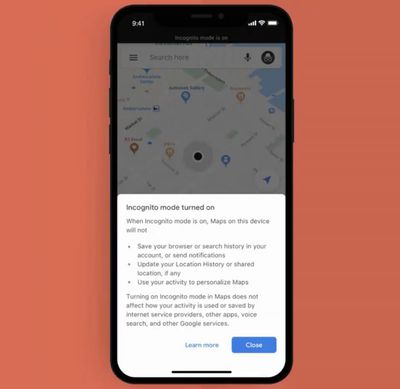
Google today announced that it is extending Incognito mode to Google Maps on iOS devices, allowing users to look for directions privately without that information being saved to a Google Account.

Google introduced Incognito mode for Android devices earlier this year as part of a 2019 focus on making it easier to control, manage, and delete Location History information.
googlemapsincognito
When you make a search in Google Maps while logged in to your Google Account, the places that you search for are saved to power features like restaurant recommendations and are added to your Location History.

When searching for a location in Google Maps in Incognito mode, the iPhone will not update Location History so places visited will not be saved to the Timeline, nor will personalization features in Maps be available.

Google Maps is also gaining a new bulk delete option for the Timeline, which uses Location History to help users remember the places and routes they've visited. With the bulk delete option, it's easier to find and delete multiple places from Timeline and Location History all at once.


Top Rated Comments

82 months ago
This is a great day for strip clubs and sleazy motels
Score: 8 Votes (Like | Disagree)
82 months ago
don't fool yourselves. When it comes to using Google products, there's no hiding
Score: 2 Votes (Like | Disagree)
82 months ago
The first and only ‘open’ incognito mode!!
Score: 1 Votes (Like | Disagree)
Mike MA Avatar
82 months ago
Surely there will be several backdoors available to still feed most of Goggle’s analytical services.
Score: 1 Votes (Like | Disagree)
cmaus Avatar
82 months ago
Incognito but no dark mode? Dislike. Pooh!
Score: 1 Votes (Like | Disagree)

Popular Stories

iOS 26

iOS 26.4 Adds Two New Features to CarPlay

Tuesday March 24, 2026 1:55 pm PDT by
iOS 26.4 was released today, and it includes a couple of new features for CarPlay: an Ambient Music widget and support for voice-based chatbot apps. To update your iPhone 11 or newer to iOS 26.4, open the Settings app and tap on General → Software Update. CarPlay will automatically offer the new features so long as the iPhone connected to your vehicle is running iOS 26.4 or later....
Apple Business hero

Apple Unveils 'Apple Business' All-in-One Platform

Tuesday March 24, 2026 8:53 am PDT by
Apple today announced Apple Business, a new all-in-one platform that unifies device management, productivity tools, and customer outreach features. The service is designed to be a consolidated replacement for several of Apple's existing business-focused offerings, including Apple Business Essentials, Apple Business Manager, and Apple Business Connect. It provides organizations with a single...
AirPods Pro Firmware Feature

Apple Releases New Firmware for AirPods Pro 3, AirPods Pro 2 and AirPods 4

Tuesday March 24, 2026 12:31 pm PDT by
Apple today released new firmware for the AirPods Pro 2, AirPods Pro 3, and the AirPods 4. The firmware has a version number of 8B39, up from 8B34 on the AirPods Pro 3, 8B28 on the AirPods Pro 2, and 8B21 on the AirPods 4. There is no word on what's included in the firmware, but Apple has a support document with limited notes. Most updates are limited to bug fixes and performance...