
Latest iOS 13.3.1 Beta Includes Toggle for Disabling U1 Ultra Wideband Chip - MacRumors
Skip to Content

Latest iOS 13.3.1 Beta Includes Toggle for Disabling U1 Ultra Wideband Chip

The second beta of iOS 13.3.1, released earlier this month, includes a toggle for disabling the Ultra Wideband chip in the device.

Found by Twitter user Brandon Butch (via 9to5Mac), the toggle can be found by opening up the Settings app, selecting Privacy, choosing Location Services, selecting System Services, and then toggling off the "Networking & Wireless" option.
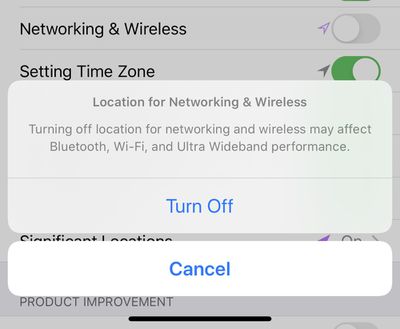
appleu1chiptoggleios1331
Disabling this feature warns that Bluetooth, Wi-Fi, and Ultra Wideband performance will be affected.

Apple added this toggle in the beta after it was discovered that the iPhone 11, 11 Pro, and 11 Pro Max continue to track user location even when location services toggles are disabled.

Apple said that this was expected behavior due to the Ultra Wideband chip and that the iPhone was operating as designed explaining that location data needed to be used because there are international regulatory requirements that mandate the U1 chip be disabled in certain locations.

Ultra wideband technology is an industry standard technology and is subject to international regulatory requirements that require it to be turned off in certain locations. iOS uses Location Services to help determine if ‌iPhone‌ is in these prohibited locations in order to disable ultra wideband and comply with regulations.

The management of ultra wideband compliance and its use of location data is done entirely on the device and Apple is not collecting user location data.

Apple at the time promised to add a toggle to allow customers to disable the U1 chip entirely, and that toggle will be available to everyone after the release of iOS 13.3.1.


Related Forum: iOS 13

Popular Stories

iOS 26

iOS 26.4 Adds Two New Features to CarPlay

Tuesday March 24, 2026 1:55 pm PDT by
iOS 26.4 was released today, and it includes a couple of new features for CarPlay: an Ambient Music widget and support for voice-based chatbot apps. To update your iPhone 11 or newer to iOS 26.4, open the Settings app and tap on General → Software Update. CarPlay will automatically offer the new features so long as the iPhone connected to your vehicle is running iOS 26.4 or later....
Apple Business hero

Apple Unveils 'Apple Business' All-in-One Platform

Tuesday March 24, 2026 8:53 am PDT by
Apple today announced Apple Business, a new all-in-one platform that unifies device management, productivity tools, and customer outreach features. The service is designed to be a consolidated replacement for several of Apple's existing business-focused offerings, including Apple Business Essentials, Apple Business Manager, and Apple Business Connect. It provides organizations with a single...
AirPods Pro Firmware Feature

Apple Releases New Firmware for AirPods Pro 3, AirPods Pro 2 and AirPods 4

Tuesday March 24, 2026 12:31 pm PDT by
Apple today released new firmware for the AirPods Pro 2, AirPods Pro 3, and the AirPods 4. The firmware has a version number of 8B39, up from 8B34 on the AirPods Pro 3, 8B28 on the AirPods Pro 2, and 8B21 on the AirPods 4. There is no word on what's included in the firmware, but Apple has a support document with limited notes. Most updates are limited to bug fixes and performance...

Top Rated Comments

69Mustang Avatar
81 months ago

Yeah except when Apple Services is using location services it stays on device. Just saying, there's a reason I'm not as anxious to restrict location access for all of iOS as I am for third-party apps and services.
Whether or not the location data stays on the device or gets sent to Apple is not the point of contention. If a user disables location services, they have every expectation to believe that disable location services means exactly that, disable location services. It clearly didn't and that was the point of contention. Caveats, if there are any, should be clearly explained. This issue itself is trivial imo, but the "discovery" of the UWB exception and the subsequent explanation and toggle solution makes it look worse than it is.

The ounce of prevention (acknowledgement of the UWB exception beforehand ) would have been better than the pound of cure (explanation of why it does what it does afterwards and toggle solution).
Score: 17 Votes (Like | Disagree)
81 months ago
Science Rules!
Score: 10 Votes (Like | Disagree)
SDJim Avatar
81 months ago
Yeah except when Apple Services is using location services it stays on device. Just saying, there's a reason I'm not as anxious to restrict location access for all of iOS as I am for third-party apps and services.
Score: 10 Votes (Like | Disagree)
Duane Martin Avatar
81 months ago

I don’t want to use this chip and I appreciate that they are letting us turn it off. I wish the neural engine were also a chip that I could turn off. Every time I see that it’s been snooping around in my pictures again, I want to open my phone, find the little beast, and gouge its eyes out with a sharp object. I think it’s strange that Apple forces face recognition and other artificial intelligence intrusions upon us. It’s an invasion on my privacy, even if it’s only phycological.
First, use the default spell check. Second, if you don’t want a smartphone, don’t buy a smartphone. All of this is done on your phone, it doesn’t leave your phone, so how is it possibly an invasion of privacy? If you have psychological issues with this, get help. How could Apple, or anyone, possibly anticipate every possible psychological issue?

And this is such a non-issue. The claim that this particular use of location services drains your battery in any significant way is unsubstantiated; seriously, show me this one function makes more than 1 second difference in a day and I would be shocked. The fact the location information doesn’t leave your phone makes the invasion of privacy argument moot. And the argument that Apple should have explained this to everyone in the first place ignores the fact it is a complete non-issue that, despite being now explained in full, a significant number of MR readers still can’t grasp the basics.

PLEASE STOP demanding that Apple anticipate every paranoid delusion.
Score: 9 Votes (Like | Disagree)
69Mustang Avatar
81 months ago
Since Apple controls the hardware and software stack, I think it would be neat if you could ask Siri about processes on your phone. Something like: "Siri, has my GPS been in use within the last xx timeframe?" If the answer is yes, Siri lets you know when and by what app or process. Seems like something that's within the realm of possibility.

/resists urge to make Siri joke
Score: 8 Votes (Like | Disagree)
81 months ago
Why is it that it always takes an Internet tech blogger to identify some hidden, undocumented, sneaky behavior in the iPhone (iOS 10 battery throttling etc) and then apple suddenly coming to the rescue to fix the "intended behavior" once they're found out?
Score: 8 Votes (Like | Disagree)















