
PCMag Tests Apple's Pro Display XDR Color Accuracy and Brightness, Says It 'Does Exactly What It Sets Out To' - MacRumors
Skip to Content

PCMag Tests Apple's Pro Display XDR Color Accuracy and Brightness, Says It 'Does Exactly What It Sets Out To'

Apple's Pro Display XDR, priced at $4,999 without a stand, is designed for professionals who need a reference monitor. It may seem expensive, but comparative to other reference monitors, it's an affordable choice.

PCMag this week published its full review of the Pro Display XDR, doing a deep dive into its color accuracy and HDR capabilities.
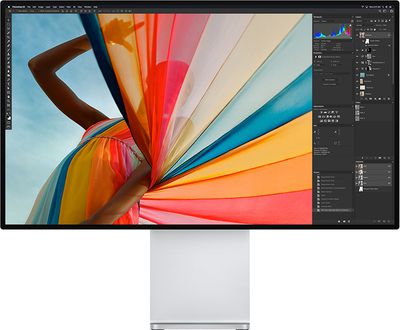
prodisplayxdrworkflow
The Pro Display XDR is meant to be used by creative professionals such as photographers and videographers, which means factors like color accuracy, gamut coverage, and sustained brightness are important.

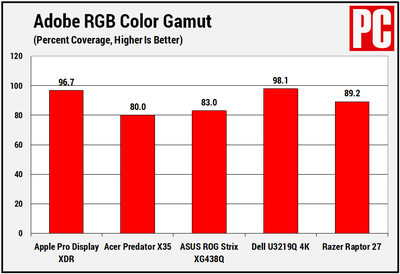
In Adobe RGB color gamut testing, relevant for content creation tasks, the Pro Display XDR had what PCMag says is an "excellent" result of 96.7 percent coverage. Comparatively, the Pro Display XDR beat out the Acer Predator X35, the ASUS Rog Strix XG438Q, the Dell U3219Q 4K, and the Razer Raptor 27, which are other displays PCMag has tested, but that's not a surprising result as these comparison displays are more affordable gaming-focused monitors.
prodisplayxdradobergbcolorgamut
The Pro Display XDR didn't fare quite as well in sRGB gamut testing, where monitors normally get close to 100 percent coverage, but it still hit a respectable 94.3 coverage. sRGB is not a focus of the pro community, which makes this result fairly inconsequential.

In a DCI-P3 color gamut test, which highlights how well a monitor is able to display movie and tv content in editing apps, the Pro Display XDR saw 98.7 percent coverage, beating out all other monitors including the Alienware 55, which scored the second-highest in PCMag's testing at 96.5 percent.

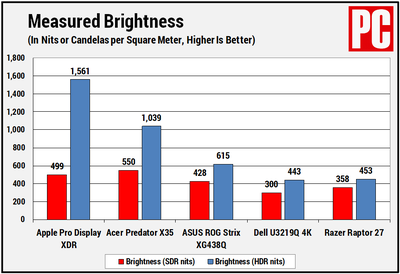
When it comes to brightness testing, with a DisplayHDR 1600 test, the XDR was able to display content at a peak burst of 1,561 nits, just under Apple's 1,600-nit rating. SDR brightness reached 499 nits, and the black levels were super low, at 0.04. PCMag says that's the lowest it has seen outside of OLED displays.
prodisplayxdrbrightness
In color accuracy tests, the Pro Display XDR also excelled. Color accuracy is measured using delta E (dE) and a lower number is better, representing an accurate representation of the color it's aiming to produce. Monitors under 1.0 are "top tier" monitors, but the Pro Display XDR scored below that.

More records broken. In the industry of content creation, any monitor that scores below a 1.0 dE is considered top-tier, but the Pro Display XDR isn't content with just winning here, it has to command the lead. In these tests, which I ran through all three color-space presets we tested above (sRGB, Adobe RGB, and DCI-P3), the lowest score achieved was just 0.68 dE--and that, achieved with no calibration required.

There were some downsides to the Pro Display XDR. There's no option for changing color capabilities on the monitor itself, and using it requires macOS, so there's no way to use it without a Mac. There's also no way to calibrate the colors, but Apple says that calibration options are coming sometime in the future.

The site was impressed with the add-on $999 stand for the Mac Pro given its nice, shiny look and its smooth counter-balanced arm, but ultimately felt that it was a bit over-engineered and overpriced, saying that it "didn't need to be" so far ahead of a typical (and much less expensive) monitor stand.

In a nutshell, PCMag believes that the Pro Display XDR successfully does what it was meant to do, offer up "reference-quality production capabilities" to those who work on Macs. "The Pro Display XDR is a beautifully made, well-designed, hyper-accurate content creation monitor that--say it with me now--'just works,'" reads the review.

For those considering a purchase of the Pro Display XDR, PCMag's full review is well worth checking out.


Related Roundup: Studio Display
Buyer's Guide: Displays (Buy Now)
Related Forum: Mac Accessories

Popular Stories

iOS 26

iOS 26.4 Adds Two New Features to CarPlay

Tuesday March 24, 2026 1:55 pm PDT by
iOS 26.4 was released today, and it includes a couple of new features for CarPlay: an Ambient Music widget and support for voice-based chatbot apps. To update your iPhone 11 or newer to iOS 26.4, open the Settings app and tap on General → Software Update. CarPlay will automatically offer the new features so long as the iPhone connected to your vehicle is running iOS 26.4 or later....
Apple Business hero

Apple Unveils 'Apple Business' All-in-One Platform

Tuesday March 24, 2026 8:53 am PDT by
Apple today announced Apple Business, a new all-in-one platform that unifies device management, productivity tools, and customer outreach features. The service is designed to be a consolidated replacement for several of Apple's existing business-focused offerings, including Apple Business Essentials, Apple Business Manager, and Apple Business Connect. It provides organizations with a single...
AirPods Pro Firmware Feature

Apple Releases New Firmware for AirPods Pro 3, AirPods Pro 2 and AirPods 4

Tuesday March 24, 2026 12:31 pm PDT by
Apple today released new firmware for the AirPods Pro 2, AirPods Pro 3, and the AirPods 4. The firmware has a version number of 8B39, up from 8B34 on the AirPods Pro 3, 8B28 on the AirPods Pro 2, and 8B21 on the AirPods 4. There is no word on what's included in the firmware, but Apple has a support document with limited notes. Most updates are limited to bug fixes and performance...

Top Rated Comments

80 months ago
Not even 120hz. Useless for real professional work like overwatch.
Score: 23 Votes (Like | Disagree)
80 months ago

Haven't seen any reports of display defects yet, which is great. Apple has had a history of display defects (probably not their fault entirely, mostly the factories of the manufacturer) such as yellowing, pink hue, uneven backlight, left/right fade and so on.

If there were such issue on this product it would probably be known by now considering its target market. Hopefully this level of QC is carried over to their lesser displays.
For its price, the non-uniform of backlight to me is a defect. That is suppose to be a grey background.


Attachment Image
Score: 15 Votes (Like | Disagree)
80 months ago
PCMag believes that the Pro Display XDR successfully does what it was meant to do

Which of course is to separate people from $6k of their money.
Score: 12 Votes (Like | Disagree)
80 months ago
Not too sure how PC Mag explain that as "Does Exactly What It Sets Out To"

Not Really the "Reference" Monitor most people or video professionals refers to. Honestly I dont think anyone even expect it to be, but many expect it to be close, and it is not. But still a damn good Monitor.

Edit: ( Images not mine )


Attachment Image
Score: 11 Votes (Like | Disagree)
80 months ago
From the graphic posted, it doesn't look like the Pro Display XDR beat the Dell U3219Q 4K in the Adobe RGB color gamut testing.
Score: 10 Votes (Like | Disagree)
69Mustang Avatar
80 months ago

It seems it’s a step below what’s required for mastering. I’m not in the industry, but I know mastering monitors are very expensive. How much would you have to pay for a 30+ inch mastering monitor?

And a related question, are there uses for a very accurate monitor that’s not mastering quality, and sells for $5 to 7K? That will determine the success of this monitor. I know there are uses outside the film/video industry, but I’d be interested in hearing your take as someone in that industry. If it misses the mark and isn’t something pros want/need, that’s not good.
Seems the XDR would be perfect for those who aren't mastering the video, but reviewing mastered content. There are people who need to view the content but don't need to view it on a $30K monitor. If 10 people need to see the product as it's making it's way down the assembly line, but don't have a hand in the mastering process, 10 XDR's make a lot more sense than 10 $30K monitors. Those 10 people still get the benefit of a high quality color accurate monitor that can double as a standard monitor for their everyday uses.
Score: 9 Votes (Like | Disagree)















