Apple Card Now Supports Exporting Transactions in OFX File Format
Apple Card users are now able to export their transaction data in an OFX file format for use with third-party financial apps such as Quicken and Mint, as noted by Kyle Seth Gray. The option shows up when a monthly statement is available.
The exporting feature first rolled out last month, but only with CSV file support.
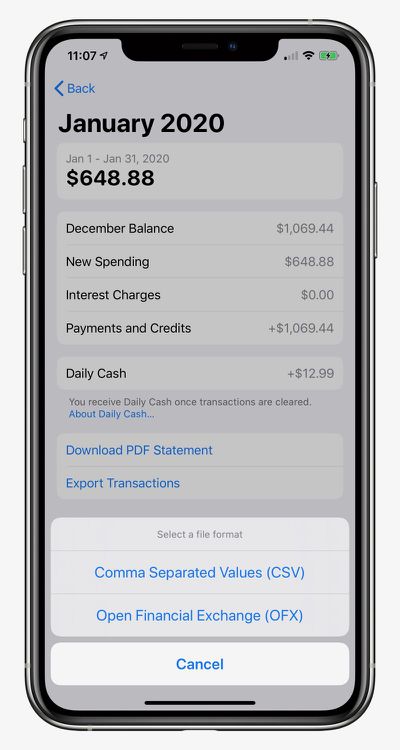
How to Export and Download Apple Card Transactions
- Open the Wallet app on your iPhone and tap on Apple Card.
- Tap on Card Balance.
- Under Statements, tap on the statement you want to export.
- Tap on Export Transactions and choose CSV or OFX.
Apple launched its credit card in the United States in August. Key features include color-coded spending summaries in the Wallet app, no fees beyond any applicable interest, and up to three percent cashback on purchases paid out daily.
To apply for an Apple Card, simply open the Wallet app on an iPhone running iOS 12.4 or later, tap the plus button in the top-right corner, and follow the on-screen steps. The process takes just a few minutes, and if approved, your digital Apple Card will be ready for purchases immediately. A physical titanium-based Apple Card is also available for use at retail stores that do not accept contactless payments.
Popular Stories
iOS 26.4 was released today, and it includes a couple of new features for CarPlay: an Ambient Music widget and support for voice-based chatbot apps.
To update your iPhone 11 or newer to iOS 26.4, open the Settings app and tap on General → Software Update. CarPlay will automatically offer the new features so long as the iPhone connected to your vehicle is running iOS 26.4 or later....
Apple today announced Apple Business, a new all-in-one platform that unifies device management, productivity tools, and customer outreach features.
The service is designed to be a consolidated replacement for several of Apple's existing business-focused offerings, including Apple Business Essentials, Apple Business Manager, and Apple Business Connect. It provides organizations with a single...
Apple today released new firmware for the AirPods Pro 2, AirPods Pro 3, and the AirPods 4. The firmware has a version number of 8B39, up from 8B34 on the AirPods Pro 3, 8B28 on the AirPods Pro 2, and 8B21 on the AirPods 4.
There is no word on what's included in the firmware, but Apple has a support document with limited notes. Most updates are limited to bug fixes and performance...
























