
Microsoft Office App Released for iPhone, Combines Word, Excel, and PowerPoint - MacRumors
Skip to Content

Microsoft Office App Released for iPhone, Combines Word, Excel, and PowerPoint

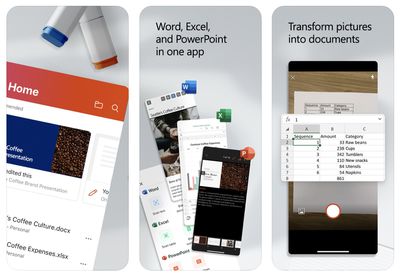
Following beta testing, Microsoft today released its new Office app for iPhone, bringing together Word, Excel, and PowerPoint in a single app.
microsoft office app 2020
The main benefit of the unified Office app is that it requires only a single download with a much smaller file size, but it does have a few unique features, including camera integration for easily converting photos of documents and tables into Word and Excel files. The app also has a new Actions pane that supports a number of common tasks like signing PDFs and scanning QR codes.

Microsoft explains some of the benefits of the new Office app in a blog post:

The Office app delivers several key benefits including:

- Combining Word, Excel, and PowerPoint in a way that simplifies the experience with fewer apps to download or switch between. It requires far less phone storage than installing individual apps while maintaining virtually all the capabilities of the existing mobile apps people already know and use.

- Integrating our Lens technology to unlock the power of the camera with capabilities like converting images into editable Word and Excel documents, scanning PDFs, and capturing whiteboards with automatic digital enhancements to make the content easier to read.

- Adding new functionality for common tasks people often encounter when working on a phone—things like making quick notes, signing PDFs, scanning QR codes, and transferring files between devices.

The new Microsoft Office app is available on the App Store for the iPhone and on the Google Play Store for Android. Microsoft says the app will be optimized to support the iPad soon. The app is free to use, even without signing in, but an Office 365 subscription starting at $6.99 per month is required to unlock premium features.


Microsoft's standalone Word, Excel, and PowerPoint apps remain available and were recently updated with a simplified three-tab layout.

(Thanks, Michaël!)

Popular Stories

iOS 26

iOS 26.4 Adds Two New Features to CarPlay

Tuesday March 24, 2026 1:55 pm PDT by
iOS 26.4 was released today, and it includes a couple of new features for CarPlay: an Ambient Music widget and support for voice-based chatbot apps. To update your iPhone 11 or newer to iOS 26.4, open the Settings app and tap on General → Software Update. CarPlay will automatically offer the new features so long as the iPhone connected to your vehicle is running iOS 26.4 or later....
Apple Business hero

Apple Unveils 'Apple Business' All-in-One Platform

Tuesday March 24, 2026 8:53 am PDT by
Apple today announced Apple Business, a new all-in-one platform that unifies device management, productivity tools, and customer outreach features. The service is designed to be a consolidated replacement for several of Apple's existing business-focused offerings, including Apple Business Essentials, Apple Business Manager, and Apple Business Connect. It provides organizations with a single...
AirPods Pro Firmware Feature

Apple Releases New Firmware for AirPods Pro 3, AirPods Pro 2 and AirPods 4

Tuesday March 24, 2026 12:31 pm PDT by
Apple today released new firmware for the AirPods Pro 2, AirPods Pro 3, and the AirPods 4. The firmware has a version number of 8B39, up from 8B34 on the AirPods Pro 3, 8B28 on the AirPods Pro 2, and 8B21 on the AirPods 4. There is no word on what's included in the firmware, but Apple has a support document with limited notes. Most updates are limited to bug fixes and performance...

Top Rated Comments

melgross Avatar
80 months ago
So Apple has to split iTunes into several apps because people complain it’s too complex, and Microsoft combines several apps into one to make it less complex?
Score: 8 Votes (Like | Disagree)
80 months ago
So if both versions remain available, which one is better to use for doc creation? Which is better if you're read-only?
Score: 8 Votes (Like | Disagree)
TwoBytes Avatar
80 months ago

What's interesting to me is that Office used to be available through a single app, and Microsoft broke it into individual apps a few years ago. You don't often see a company - especially one this size - make a change like that only to later change back. I wonder what they saw in their internal data to prompt this? It can't all be about app size, can it?
You can see the reviews from 5 years ago in the app reviews!
Score: 6 Votes (Like | Disagree)
80 months ago

So I guess you can delete the individual apps if you have this Office app then?

So if both versions remain available, which one is better to use for doc creation? Which is better if you're read-only?
Thats the million-dollar question here. Are there any differences
Score: 5 Votes (Like | Disagree)
Achiever Avatar
80 months ago
What's interesting to me is that Office used to be available through a single app, and Microsoft broke it into individual apps a few years ago. You don't often see a company - especially one this size - make a change like that only to later change back. I wonder what they saw in their internal data to prompt this? It can't all be about app size, can it?
Score: 5 Votes (Like | Disagree)
DoctorTech Avatar
80 months ago
I never create MS Office documents on my iPhone but I sometimes need to open and view them when I am away from my laptop or tablet so this might be a good solution for users like me.
Score: 4 Votes (Like | Disagree)
















