Here's How a Trackpad Works With an iPad Pro in iPadOS 13.4

Apple yesterday unveiled a new 2020 iPad Pro with a new Magic Keyboard accessory that adds a trackpad to the iPad for the first time. Apple didn't stop there, though, and built support for mice and trackpads into all modern iPads through the iPadOS 13.4 update.


The new 2020 ‌iPad Pro‌ doesn't come out until next week and the Magic Keyboard won't launch until May, but with the iPadOS 13.4 beta and a current ‌iPad‌, it's possible to test just how trackpad functionality works.
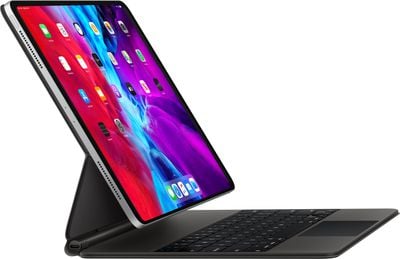
ipadpromagickeyboard
In our latest video, we paired an ‌iPad Pro‌ running iPadOS 13.4 with one of Apple's Magic Trackpad 2 accessories, which is one of the supported trackpad options.
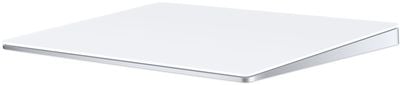
trackpad2
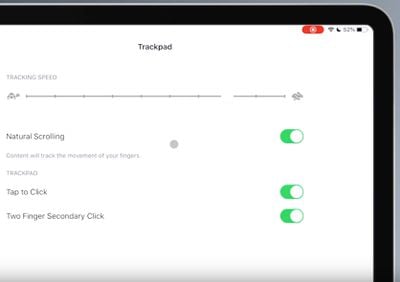
A Bluetooth trackpad or mouse can be paired through the Bluetooth section of the Settings app on the ‌iPad‌, and there are a few settings to adjust, such as adjusting cursor speed and enabling tap to click.
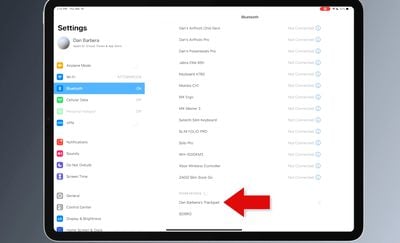
trackpadpairing
When using the trackpad, the cursor displays as a circle on the screen, popping up only when you have a finger on the trackpad. It's similar to using a trackpad on a MacBook, though there are some gestures to learn and nuances to become accustomed to when using the trackpad as Apple designed from the ground up for the ‌iPad‌'s touch-first experience.

trackpadcursor

The circle here is the cursor

Navigating through iPadOS with the cursor is similar to using a cursor on a Mac. The little round button (which Apple made round because it resembles a finger tip) shifts when over a user interface element that can be interacted with. For example, hovering over an app icon will let you know that you can tap it.

There are several gestures that activate different iPadOS functions. Scrolling all the way to the top right corner of the ‌iPad‌ and tapping brings up the Control Center, where you can interact with all of the elements through clicks and long presses without ever taking a finger off of the trackpad.

Scrolling over to the date and time in the top left corner brings up the Notification Center, and a swipe downwards with three fingers accesses the Home screen from anywhere. A two finger swipe downwards brings up Spotlight search, and a three finger swipe up opens up the multitasking interface. Swiping to the left or the right with three fingers swaps between apps.

You can also enter the Slide Over multitasking interface with the trackpad by moving the cursor over to the right side of the screen or dragging an app over from the Dock. Scrolling through a webpage in Safari works like it does on a Mac, and you can use two fingers to scroll up or down. Selecting text to copy or drag and drop can be done with a quick long press. Writing and text editing benefits from the trackpad because it's easy to scroll over to the text you need to tweak.

safariscrollingtrackpad

Scrolling in Safari with the trackpad

Two finger tap gestures in a text editing app bring up Cut, Copy, and Paste options, and there's a right click gesture to bring up menu bars in most apps. Apple says many apps will support mice and trackpad interactions right when iPadOS 13.4 is released, but there is an SDK available for developers to build in deeper support. Apple's own apps will work with trackpad gestures, and Apple is also building compatibility into Pages, Numbers, and Keynote.
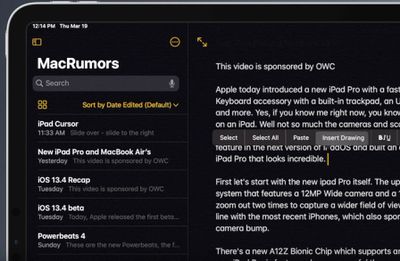
cursorandtexteditingtrackpad

Text editing in the Notes app. A gesture brings up cut/copy/paste.

iPadOS 13.4 is set to launch on Tuesday, March 24, and it will bring mouse and trackpad support to all ‌iPad Pro‌ models, the iPad Air 2 and later, the fifth-generation ‌iPad‌ and later, and the iPad mini 4 and later.

Related Roundup: iPad Pro
Buyer's Guide: iPad Pro (Buy Now)

Popular Stories

wwdc sans text feature

Apple Rumored to Announce New Product on February 19

Thursday February 5, 2026 12:22 pm PST by
Apple plans to announce the iPhone 17e on Thursday, February 19, according to Macwelt, the German equivalent of Macworld. The report, citing industry sources, is available in English on Macworld. Apple announced the iPhone 16e on Wednesday, February 19 last year, so the iPhone 17e would be unveiled exactly one year later if this rumor is accurate. It is quite uncommon for Apple to unveil...
Apple Logo Zoomed

Tim Cook Teases Plans for Apple's Upcoming 50th Anniversary

Thursday February 5, 2026 12:54 pm PST by
Apple turns 50 this year, and its CEO Tim Cook has promised to celebrate the milestone. The big day falls on April 1, 2026. "I've been unusually reflective lately about Apple because we have been working on what do we do to mark this moment," Cook told employees today, according to Bloomberg's Mark Gurman. "When you really stop and pause and think about the last 50 years, it makes your heart ...
maxresdefault

Apple Shows Off a Key Reason to Upgrade to the iPhone 17

Saturday February 7, 2026 9:26 am PST by
Apple today shared an ad that shows how the upgraded Center Stage front camera on the latest iPhones improves the process of taking a group selfie. "Watch how the new front facing camera on iPhone 17 Pro takes group selfies that automatically expand and rotate as more people come into frame," says Apple. While the ad is focused on the iPhone 17 Pro and iPhone 17 Pro Max, the regular iPhone...
Finder Siri Feature

Why Apple's iOS 26.4 Siri Upgrade Will Be Bigger Than Originally Promised

Friday February 6, 2026 3:06 pm PST by
In the iOS 26.4 update that's coming this spring, Apple will introduce a new version of Siri that's going to overhaul how we interact with the personal assistant and what it's able to do. The iOS 26.4 version of Siri won't work like ChatGPT or Claude, but it will rely on large language models (LLMs) and has been updated from the ground up. Upgraded Architecture The next-generation...
iOS 26

iOS 26.3 and iOS 26.4 Will Add These New Features to Your iPhone

Tuesday February 3, 2026 7:47 am PST by
While the iOS 26.3 Release Candidate is now available ahead of a public release, the first iOS 26.4 beta is likely still at least a week away. Following beta testing, iOS 26.4 will likely be released to the general public in March or April. Below, we have recapped known or rumored iOS 26.3 and iOS 26.4 features so far. iOS 26.3 iPhone to Android Transfer Tool iOS 26.3 makes it easier...

Top Rated Comments

kissmo Avatar
77 months ago

Is scrolling support with the magic trackpad 1 or magic mouse 1?
Nope. I have both and nothing works unfortunately :(((

The trackpad is particularly useless.
You will be able to pair but you will not get the settings for two fingers tap or for scrolling. This makes it impossible to use and you need to do touch screen to make basic operations.

I don't get the logic behind (technically)... Financially it may make sense...

The article is incorrect. Only Magic Mouse 2 and Magic Trackpad 2 function with scrolling and gestures.
Score: 11 Votes (Like | Disagree)
NB2020 Avatar
77 months ago
Why is everyone so keen to use their iPad as their main computer?? It's more restrictive, it's nowhere near as full-featured as a Mac, it has an inherently different style of working that doesn't allow multiple windows, it's harder to customize and tinker with and moreover, it’s no longer even cheaper than a Mac. I’m not anti-iPad - I love mine, but I just don’t aspire for it to replace my Mac, which I also love. It’s great to use when I’m out and about or when I’m in bed or sitting on the couch, but it’s definitely NOT great to use when I’m sitting on a desk spending a day at the office doing intensive office stuff.
Score: 7 Votes (Like | Disagree)
jayducharme Avatar
77 months ago
Apple is getting closer and closer to merging Mac OS and iPad OS. Pairing up a Magic Trackpad and Bluetooth keyboard makes the iPad much more like a standard laptop (or Surface). Desktops are getting some impressive competition.
Score: 4 Votes (Like | Disagree)
urbanmacUser Avatar
77 months ago
My original track pad does not work well at all, no scrolling, no gestures.
Score: 3 Votes (Like | Disagree)
radus Avatar
77 months ago
The flexibility of a groups mind is astonishing.
When I asked for exactly the mouse / trackpad support years ago, I was a little bit downvoted.
Now nearly everybody is happy to get more usability for the ipad.
Score: 3 Votes (Like | Disagree)
Spungoflex Avatar
77 months ago

Apple is getting closer and closer to merging Mac OS and iPad OS. Pairing up a Magic Trackpad and Bluetooth keyboard makes the iPad much more like a standard laptop (or Surface). Desktops are getting some impressive competition.
It needs 16:9 support for external monitors.

If it has that, the iPad might be my new PC.
Score: 2 Votes (Like | Disagree)