
2020 iPad Pro Includes Microphone Hardware Disconnect Security Feature - MacRumors
Skip to Content

2020 iPad Pro Includes Microphone Hardware Disconnect Security Feature

Apple has added an anti-eavesdropping feature to the 2020 iPad Pro that ensures the microphone hardware is disabled when a case is attached to the iPad and closed.
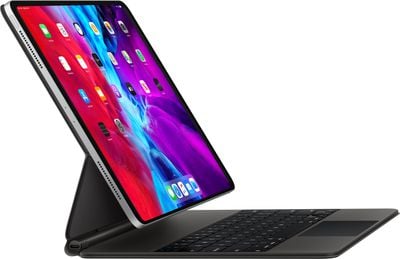
ipadpromagickeyboard
The security feature was first introduced in 2018 in MacBook models using Apple's T2 security chip, which includes a hardware microphone disconnect feature that disables the mics when the notebook's lid is closed.

As spotted by 9to5Mac, an updated version of Apple's Platform Security document makes clear that the anti-eavesdropping is also available on all 2020 ‌iPad Pro‌ models when using an MFi-compliant case.

iPad models beginning in 2020 also feature the hardware microphone disconnect. When an MFi compliant case (including those sold by Apple) is attached to the iPad and closed, the microphone is disconnected in hardware, preventing microphone audio data being made available to any software—even with root or kernel privileges in iPadOS or in case the firmware is compromised.

Apple updated the 11-inch and 12.9-inch ‌iPad Pro‌ models last month with a faster A12Z Bionic chip, a new 10MP Ultra Wide camera to complement the traditional 12MP camera, and a LiDAR depth scanner for improved augmented reality experiences.

For some 2018 ‌iPad Pro‌ owners at least, these updates are relatively modest, but the new security features outlined in Apple's documentation may be enough to tempt more privacy-conscious users.


Related Roundup: iPad Pro
Buyer's Guide: iPad Pro (Buy Now)

Popular Stories

iOS 26

iOS 26.4 Adds Two New Features to CarPlay

Tuesday March 24, 2026 1:55 pm PDT by
iOS 26.4 was released today, and it includes a couple of new features for CarPlay: an Ambient Music widget and support for voice-based chatbot apps. To update your iPhone 11 or newer to iOS 26.4, open the Settings app and tap on General → Software Update. CarPlay will automatically offer the new features so long as the iPhone connected to your vehicle is running iOS 26.4 or later....
Apple Business hero

Apple Unveils 'Apple Business' All-in-One Platform

Tuesday March 24, 2026 8:53 am PDT by
Apple today announced Apple Business, a new all-in-one platform that unifies device management, productivity tools, and customer outreach features. The service is designed to be a consolidated replacement for several of Apple's existing business-focused offerings, including Apple Business Essentials, Apple Business Manager, and Apple Business Connect. It provides organizations with a single...
AirPods Pro Firmware Feature

Apple Releases New Firmware for AirPods Pro 3, AirPods Pro 2 and AirPods 4

Tuesday March 24, 2026 12:31 pm PDT by
Apple today released new firmware for the AirPods Pro 2, AirPods Pro 3, and the AirPods 4. The firmware has a version number of 8B39, up from 8B34 on the AirPods Pro 3, 8B28 on the AirPods Pro 2, and 8B21 on the AirPods 4. There is no word on what's included in the firmware, but Apple has a support document with limited notes. Most updates are limited to bug fixes and performance...

Top Rated Comments

MakeAppleAwesomeAgain Avatar
78 months ago

What if I want Siri to work?
Doesn't matter if the cover is closed or not, it's still unworkable and incredibly stupid after 8 years.
Score: 37 Votes (Like | Disagree)
78 months ago

I appreciate this kind of thing, Apple.

This also seems to give validity to camera covers.


An optional setting would be good. But if not, only options would be to use Hey Siri on another device if you have one, and to leave your ipad uncovered during the lecture.
The thing I love about the Mac is that the camera and green light are linked together through hardware. If the camera is switched on, that light will show. Because of that, I’ve never worried about a cover on my laptop.
Score: 19 Votes (Like | Disagree)
Falhófnir Avatar
78 months ago
Good, ultimately nothing software based is 100% secure, this at least will be.


Siri works really well for me and I would like it to work even if I have a keyboard case with the cover closed. I hope they have a setting for that.

And this isn’t just about Siri. What if I’m recording a voice memo or something similar. I used to do that a lot with the Smart cover on my iPad 2 to record lectures at the university.
If it's a hardware deactivation of the mic, there's definitely no software path around it, that's the whole point!
Score: 10 Votes (Like | Disagree)
Deimos-7 Avatar
78 months ago
When The camera is activated, the electricity used to power the camera also powers the led for the indicator light. It simply added in series electrically, so it can’t be bypassed with a software hack. If the light is on, the camera is receiving electricity, if it’s off, so is the camera.
It’s a really nice attention to detail by Apple.


Is that true! I didn’t know that :)
Score: 6 Votes (Like | Disagree)
Kabeyun Avatar
78 months ago
Yet more Apple privacy goodness. This is where Apple shines. I will never go Android because I will never trust it. And yes, you can thank Tim Cook for doubling down on privacy as the defining tech issue of our time.

What if I want Siri to work?

Doesn't matter if the cover is closed or not, it's still unworkable and incredibly stupid after 8 years.
True, Siri is a pain in the ass. But I’ll tolerate that pain in exchange for a trustworthy container for my personal data. That’s a far bigger consideration that Siri’s feebleness.
Score: 6 Votes (Like | Disagree)
78 months ago
I appreciate this kind of thing, Apple.

This also seems to give validity to camera covers.


Siri works really well for me and I would like it to work even if I have a keyboard case with the cover closed. I hope they have a setting for that.

And this isn’t just about Siri. What if I’m recording a voice memo or something similar. I used to do that a lot with the Smart cover on my iPad 2 to record lectures at the university.
An optional setting would be good. But if not, only options would be to use Hey Siri on another device if you have one, and to leave your ipad uncovered during the lecture.
Score: 6 Votes (Like | Disagree)















