
Microsoft Testing iPadOS Multi-Window Support in Word and PowerPoint

Since iPadOS 13 was released last year, Apple has included native suppport for opening two or more windows in the same application to view them side by side.

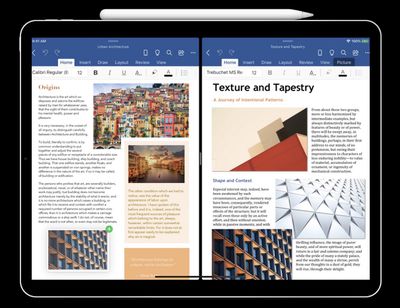
Since then, more and more third-party apps have been building in multi-window support, and now Microsoft is beta testing its own versions for Word and PowerPoint on iPad.
microsoft multi window support word powerpoint
The ability to display two documents next to each other is particularly useful for comparing two versions of the same document or keeping an eye on your reference notes while working. Similarly, PowerPoint support would let users cross-reference presentation slides on the same screen.

In a blog post, Microsoft details three ways to access multi-window support in Word and PowerPoint for ‌iPad‌:

  • Touch, hold, and drag a file from the Recent, Shared, and Open file list in the app to the ‌iPad‌ screen edge to open it side-by-side.
  • In Word or PowerPoint, swipe up from the bottom of the screen and open the dock. Then touch and hold the same app’s icon and drag it off the dock to the left or right edge of the screen. Then tap the document to open it.
  • In Word or PowerPoint, access the Recent, Shared, and Open views in the app start screen, tap the "…" menu for a file in the list, then tap Open in New Window.

Microsoft hasn't said when the multi-window support will be available to all users, but it surely can't be long now, given that the same feature was demoed at WWDC 2019 for Microsoft Word.

Anyone interested in trying out the new feature will need to join the Office Insider program and download beta versions of Word and PowerPoint through Testflight.


Popular Stories

Apple Logo Zoomed

Tim Cook Teases Plans for Apple's Upcoming 50th Anniversary

Thursday February 5, 2026 12:54 pm PST by
Apple turns 50 this year, and its CEO Tim Cook has promised to celebrate the milestone. The big day falls on April 1, 2026. "I've been unusually reflective lately about Apple because we have been working on what do we do to mark this moment," Cook told employees today, according to Bloomberg's Mark Gurman. "When you really stop and pause and think about the last 50 years, it makes your heart ...
wwdc sans text feature

Apple Rumored to Announce New Product on February 19

Thursday February 5, 2026 12:22 pm PST by
Apple plans to announce the iPhone 17e on Thursday, February 19, according to Macwelt, the German equivalent of Macworld. The report, citing industry sources, is available in English on Macworld. Apple announced the iPhone 16e on Wednesday, February 19 last year, so the iPhone 17e would be unveiled exactly one year later if this rumor is accurate. It is quite uncommon for Apple to unveil...
Finder Siri Feature

Why Apple's iOS 26.4 Siri Upgrade Will Be Bigger Than Originally Promised

Friday February 6, 2026 3:06 pm PST by
In the iOS 26.4 update that's coming this spring, Apple will introduce a new version of Siri that's going to overhaul how we interact with the personal assistant and what it's able to do. The iOS 26.4 version of Siri won't work like ChatGPT or Claude, but it will rely on large language models (LLMs) and has been updated from the ground up. Upgraded Architecture The next-generation...
iOS 26

iOS 26.3 and iOS 26.4 Will Add These New Features to Your iPhone

Tuesday February 3, 2026 7:47 am PST by
While the iOS 26.3 Release Candidate is now available ahead of a public release, the first iOS 26.4 beta is likely still at least a week away. Following beta testing, iOS 26.4 will likely be released to the general public in March or April. Below, we have recapped known or rumored iOS 26.3 and iOS 26.4 features so far. iOS 26.3 iPhone to Android Transfer Tool iOS 26.3 makes it easier...
maxresdefault

Apple Shows Off a Key Reason to Upgrade to the iPhone 17

Saturday February 7, 2026 9:26 am PST by
Apple today shared an ad that shows how the upgraded Center Stage front camera on the latest iPhones improves the process of taking a group selfie. "Watch how the new front facing camera on iPhone 17 Pro takes group selfies that automatically expand and rotate as more people come into frame," says Apple. While the ad is focused on the iPhone 17 Pro and iPhone 17 Pro Max, the regular iPhone...

Top Rated Comments

MakeAppleAwesomeAgain Avatar
76 months ago
As I'm writing this I have windows opened of Safari, Slack, Telegram, VSCode, Firefox, Terminal and Finder. I can't see how I'm ever gonna migrate my workflow to iPadOS. This week I tried watching a tutorial and making notes at the same time on an iPad Air. It took me 3 minutes to understand multitasking and it was totally unworkable. It has absolutely nothing to do with screen size, they can make a 17" iPad and it would still suck because iOS was never built for multitasking.

It's unbelievable how some features in their software are pure genius (both in macOS and iOS) but how they can't get multitasking right outside of macOS. I truly hope macOS stays around for a long time and gets the love it deserves, it by far the finest OS ever created.
Score: 21 Votes (Like | Disagree)
Unami Avatar
76 months ago
unfortunately, multitasking on the ipad sucks pretty hard.
Score: 13 Votes (Like | Disagree)
iDento Avatar
76 months ago

As I'm writing this I have windows opened of Safari, Slack, Telegram, VSCode, Firefox, Terminal and Finder. I can't see how I'm ever gonna migrate my workflow to iPadOS. This week I tried watching a tutorial and making notes at the same time on an iPad Air. It took me 3 minutes to understand multitasking and it was totally unworkable. It has absolutely nothing to do with screen size, they can make a 17" iPad and it would still suck because iOS was never built for multitasking.

It's unbelievable how some features in their software are pure genius (both in macOS and iOS) but how they can't get multitasking right outside of macOS. I truly hope macOS stays around for a long time and gets the love it deserves, it by far the finest OS ever created.
You had Terminal window opened, iPadOS isn’t for you.
Score: 7 Votes (Like | Disagree)
Ubuntu Avatar
76 months ago

This. "I have a very specific workflow that works well on macOS but doesn't on iPadOS; therefore, iPadOS multitasking is bad" is a weird leap. iPadOS multitasking has problems, but it not being exactly the same thing as macOS ain't one of them.
I don’t think the two are connected. iPadOS multitasking is not intuitive imo, even if you don’t approach it as a macOS user. I don’t think iPadOS should just ape macOS but I do think it’s a mess when it comes to multitasking, mainly as it’s heavily gesture based with very little feedback as to what’s possible and what isn’t.
Score: 6 Votes (Like | Disagree)
JackieTreehorn Avatar
76 months ago
Took them long enough...
Score: 6 Votes (Like | Disagree)
dockedFile Avatar
76 months ago
FFS, please make a full-fledged excel. The iPad is a very capable device to have a full excel experience and with the new mouse support, it's a no-brainer at this point.
Score: 6 Votes (Like | Disagree)















