
Some Charging Accessories Not Working With iPad Pro Magic Keyboard - MacRumors
Skip to Content

Some Charging Accessories Not Working With iPad Pro Magic Keyboard

Some USB-C power adapters and cables appear to be unable to charge the iPad Pro through the Magic Keyboard, according to multiple complaints from MacRumors readers.
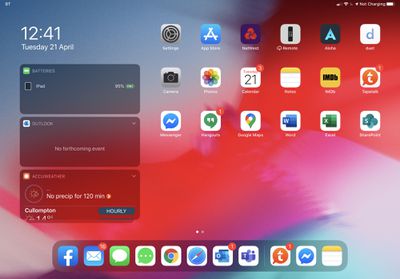
ipadpronotcharging

‌iPad Pro‌ with Magic Keyboard displaying "Not Charging" in the status bar, via MR reader Hallstar

Several new Magic Keyboard owners have noticed that there are issues with the passthrough charging, which can refuse to charge when using a third-party cable or power adapter. From the forums:

Has anyone with the new MK experienced any issues in using the pass-through charging port?

I have tried three different USB-C cables and all result in 'Not Charging' being displayed next to the battery icon (See picture).

I have been on the phone to Apple Support for the last hour trying to explain this to them, it would appear to be a hardware issue and they are arranging collection of this one and dispatching a replacement upon receipt of the faulty unit.

MacRumors can confirm that we've been unable to charge the ‌iPad Pro‌ using Anker's PowerPort Atom and Apple's official USB-C cable. When attempting to charge through the Magic Keyboard's port using this accessory, the iPad refuses to charge and makes the charging sound every few seconds.

Other forum members have reported being unable to use Anker power adapters and charging cables, as well as charging cables from companies like Mophie.

Still other Magic Keyboard owners have had no issues with their third-party cables, so it appears to be an issue that's only affecting some power adapters and third-party cable options.

It's not clear if this is an issue on Apple's end or on the end of the hardware manufacturers who created the cables and power adapters, so more investigation will be needed to figure out what's going on. We've contacted Anker for more information and will update this article when we hear back.

Magic Keyboard owners who want to charge using the USB-C port on the accessory may need to purchase Apple's official charging cables and power adapters to ensure proper charging. At least one forum member was told by Apple's support staff that an Apple USB-C cable is required.


Related Roundup: iPad Pro
Buyer's Guide: iPad Pro (Buy Now)

Popular Stories

iOS 26

iOS 26.4 Adds Two New Features to CarPlay

Tuesday March 24, 2026 1:55 pm PDT by
iOS 26.4 was released today, and it includes a couple of new features for CarPlay: an Ambient Music widget and support for voice-based chatbot apps. To update your iPhone 11 or newer to iOS 26.4, open the Settings app and tap on General → Software Update. CarPlay will automatically offer the new features so long as the iPhone connected to your vehicle is running iOS 26.4 or later....
Apple Business hero

Apple Unveils 'Apple Business' All-in-One Platform

Tuesday March 24, 2026 8:53 am PDT by
Apple today announced Apple Business, a new all-in-one platform that unifies device management, productivity tools, and customer outreach features. The service is designed to be a consolidated replacement for several of Apple's existing business-focused offerings, including Apple Business Essentials, Apple Business Manager, and Apple Business Connect. It provides organizations with a single...
AirPods Pro Firmware Feature

Apple Releases New Firmware for AirPods Pro 3, AirPods Pro 2 and AirPods 4

Tuesday March 24, 2026 12:31 pm PDT by
Apple today released new firmware for the AirPods Pro 2, AirPods Pro 3, and the AirPods 4. The firmware has a version number of 8B39, up from 8B34 on the AirPods Pro 3, 8B28 on the AirPods Pro 2, and 8B21 on the AirPods 4. There is no word on what's included in the firmware, but Apple has a support document with limited notes. Most updates are limited to bug fixes and performance...

Top Rated Comments

shamino Avatar
77 months ago
Keep in mind that the "Not Charging" indicator doesn't mean what the name implies. It doesn't mean that no power is flowing into the iPad. It means that the amount of current is low enough that it may not be able to keep up with the iPad's consumption.

I used to see this indicator all the time when my iPad is plugged into a standard (not high power) USB port on a computer - one that is limited to 500 mA (2.5W). And I've found that if I'm running high-powered apps, the battery will discharge. If I'm not - if it's either idle or running a low-power function, like installing a software update - the battery does charge. It charges slowly, but it does charge, as indicated by the battery indicator shown by iTunes.

In other words, this indicator should only be seen as an indicator that the power brick isn't providing enough current to charge the battery and operate normally at the same time, not that it isn't charging at all.
Score: 10 Votes (Like | Disagree)
CausticSoda Avatar
77 months ago

I can’t say that I’ve had issues. Bit odd that it wouldn’t work with an official cable.
Not really. You probably need a dongle with that.
Score: 9 Votes (Like | Disagree)
GLS Avatar
77 months ago
I'd like to think that Apple has a modest supply of third-party chargers and cables in their labs for testing purposes, including the ultra sketchy kind found in convenience stores, just to prepare for things like this.

Then again, I wouldn't be surprised at all if Apple never tested this keyboard with a third-party charger and/or cable.
Score: 4 Votes (Like | Disagree)
77 months ago

No, but it's on Apple to stick to the spec. Even the thinnest cable should be able to trickle-charge the ipad.
The problem is drawing current through an underspec'ed cable or connector causes it to heat up and potentially catch on fire. There can also be issues like dirt or water contamination of the connectors.

Thus, there are real safety issues that make it a prudent choice to shut down and not attempt anything when something, like voltage drop, appears out-of-spec.
Score: 4 Votes (Like | Disagree)
HiVolt Avatar
77 months ago

Hopefully it’s a bug and not a feature. Otherwise we are back to the MFI certification for all cables even though it’s usb c.
I wouldn't put it past Apple.
Score: 4 Votes (Like | Disagree)
decypher44 Avatar
77 months ago
Mine is working great! 2020 IPP 12.9.

Anker charger and cable:
PowerPort Atom PD1 30W
PowerLine III USB-C 60W PD cable
Score: 3 Votes (Like | Disagree)















