

In this week's App Recap, we've highlighted two apps worth checking out. We've also compiled a list of apps that received major updates this week.
Apps to Check Out
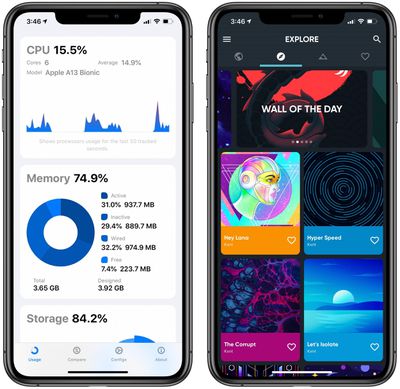
- Usage: System Activity & Info (iOS, Free) - Although not a particularly new app, Usage recently received a major update with version 3.0 in which the app was completely redesigned using SwiftUI. Complete with a sleek and modern design, Usage now features both an extended functionality with device and battery information and deeper, more detailed view of metrics.The app creates metrics based on network activity, connection speed, data usage, and more. Usage also allows users to customize the app to their own likings through six different color options, options to order the various metrics, and four customizable today widget options. Usage is free to download and features no ads, but users looking for the most functionality can purchase the app's compare feature for $1.99, which provides a detailed hardware breakdown of your device and allows you to compare it with any other iPhone. It is also worth pointing out that users can unlock the premium compare feature for one day by simply sharing the app!
- Backdrops (iOS, Free) - Backdrops is a new wallpaper app that features original, high quality designs by the Backdrops team. The app features a wide variety of different wallpapers themes including abstract, scenery, geometric, dark AMOLED friendly, and more. Users can also upload and submit their own wallpapers to be featured in the Community tab. Although free to download, the app does feature a Backdrops Pro in-app purchase for $3.99 which removes ads and unlocks exclusive wallpaper collections. Backdrops also supports Sign in With Apple, so users who sign up for an account using an Apple ID have the option to mask their personal email address.
App Updates
- Apple Store - The Apple Store app was revamped this week with Dark Mode support. Apple has continued to add Dark Mode support to all of its apps after first introducing the feature in iOS and iPadOS 13.
- Logic Pro X (Mac) - Apple this week released Logic Pro X version 10.5 with a new Live Loops feature first introduced in GarageBand for iPhone and iPad, a completely redesigned sampling workflow, new beat-making tools, and many other new features. In addition, the app received several performance improvements, and Apple has referred to the new update as being the "biggest update to Logic since the launch of Logic Pro X."
- Microsoft Word and PowerPoint (iPad) - Microsoft this week updated its Word and PowerPoint apps with Split View, which now allows users to open two documents simultaneously side-by-side. Split View can be accessed by touching and holding on a document in any file view and then dragging it to the left or right side of the screen.
- Norbyte (iOS) - Developer Norbyte this week updated its painting apps HuePaint and iPastels with support for Apple's universal purchases feature, so buying the app once will allow you to have access to it across all of your devices.
- Slack (iOS) - The Slack iPhone app this week was updated with both a redesigned interface and a new navigation bar. In addition to these new features, some of the app's swiping gestures have improved.
- Spark - The Spark email app this week received an update with full mouse and trackpad support for iPadOS. In addition, users who participate in Spark for Teams are now able to react to emails and chats of shared conversations with emojis.
- Spotify - Spotify this week updated its app with a new Group Session feature, which allows two or more Premium users in the same location to share control over the music that's being played. The new feature can be used after the person in charge taps the Connect menu in the bottom left corner of the Play screen which shares the scannable QR code with additional users. Once connected, participants can play, pause, skip, and select tracks to add to the queue with Spotify's controls.
- Twitter - Twitter this week announced a new feature that makes it easier for users to recognize retweets with comments. On Twitter's iPhone and iPad apps, all retweets with comments are now shown in a list that can be accessed by tapping on a tweet and then choosing the "Retweets" option.
Don’t miss the Tweets about your Tweet. Now on iOS, you can see Retweets with comments all in one place. pic.twitter.com/oanjZfzC6y — Twitter (@Twitter) May 12, 2020
Tag: App Recap


















