
Apple Releases macOS Catalina 10.15.5 With Battery Health Management Features, Fix for Finder Freezing

Apple today released macOS Catalina 10.15.5, the fifth update to the macOS Catalina operating system that was released in October 2019. macOS Catalina 10.15.5 comes two months after the launch of macOS Catalina 10.15.4, which introduced Screen Time Communication Limits.
macos catalina wallpaper
macOS Catalina 10.15.5 is a free update that can be downloaded from the Mac App Store using the Update feature in the System Preferences app.

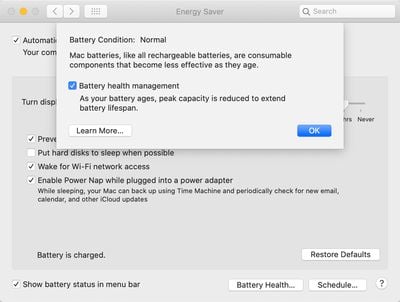
The macOS Catalina 10.15.5 update introduces a new Battery Health Management feature for Mac notebooks. Battery Health Management is meant to extend the overall lifespan of a Mac's battery by reducing the rate of chemical aging.

Battery Health Management analyzes the battery health of a laptop and its charging pattern, and in some cases, it will preserve battery longevity and health by not charging a MacBook to its full capacity. Keeping a MacBook charged at its full capacity at all times can reduce battery health.
batteryhealthmac2
When a Mac is used plugged in and the battery is kept full all the time, the Battery Health Management feature will kick in and stop short of a full charge.

Battery Health Management is an optional feature that can be disabled through the System Preferences app, with instructions available in our how to.

The macOS Catalina 10.15.5 update also addresses an issue that caused large data transfers to RAID volumes to freeze up the Finder app. With the update, large data transfers will no longer cause Finder to become unresponsive.

After installing macOS Catalina 10.15.4, some Mac users began experiencing occasional system crashes, primarily caused by large file transfers. The new update should successfully fix the problem. Apple's full release notes for macOS Catalina 10.15.5 are below.

macOS Catalina 10.15.5 introduces battery health management in the Energy Saver settings for notebooks, an option to control automatic prominence of video tiles on Group FaceTime calls, and controls to fine-tune the built-in calibration of your Pro Display XDR. The update also improves the stability, reliability, and security of your Mac.

Battery Health Management
- Battery health management to help maximize battery lifespan for Mac notebooks
- Energy Saver preference pane now displays battery condition and recommends if the battery needs to be serviced
- Option to disable battery health management
- For more information, please visit https://support.apple.com/kb/HT211094

FaceTime Prominence Preference
- Option to control automatic prominence on Group FaceTime calls so video tiles do not change size when a participant speaks

Calibration Fine-Tuning for Pro Display XDR
- Controls to fine-tune the built-in calibration of your Pro Display XDR by adjusting the white point and luminance for a precise match to your own display calibration target

This update also includes bug fixes and other improvements.
- Fixes an issue that may prevent Reminders from sending notifications for recurring reminders
- Addresses an issue that may prevent password entry on the login screen
- Fixes an issue where System Preferences would continue to show a notification badge even after installing an update
- Resolves an issue where the built-in camera may not be detected when trying to use it after using a video conferencing app
- Addresses an issue for Mac computers with the Apple T2 Security Chip where internal speakers may not appear as a sound output device in Sound preferences
- Fixes a stability issue with uploading and downloading media files from iCloud Photo Library while your Mac is asleep
- Resolves a stability issue when transferring large amounts of data to RAID volumes
- Fixes an issue where the Reduce Motion Accessibility preference did not reduce the speed of animations in a FaceTime group call


Related Forum: macOS Catalina

Popular Stories

maxresdefault

Apple Shows Off a Key Reason to Upgrade to the iPhone 17

Saturday February 7, 2026 9:26 am PST by
Apple today shared an ad that shows how the upgraded Center Stage front camera on the latest iPhones improves the process of taking a group selfie. "Watch how the new front facing camera on iPhone 17 Pro takes group selfies that automatically expand and rotate as more people come into frame," says Apple. While the ad is focused on the iPhone 17 Pro and iPhone 17 Pro Max, the regular iPhone...
Finder Siri Feature

Why Apple's iOS 26.4 Siri Upgrade Will Be Bigger Than Originally Promised

Friday February 6, 2026 3:06 pm PST by
In the iOS 26.4 update that's coming this spring, Apple will introduce a new version of Siri that's going to overhaul how we interact with the personal assistant and what it's able to do. The iOS 26.4 version of Siri won't work like ChatGPT or Claude, but it will rely on large language models (LLMs) and has been updated from the ground up. Upgraded Architecture The next-generation...
wwdc sans text feature

Apple Rumored to Announce New Product on February 19

Thursday February 5, 2026 12:22 pm PST by
Apple plans to announce the iPhone 17e on Thursday, February 19, according to Macwelt, the German equivalent of Macworld. The report, citing industry sources, is available in English on Macworld. Apple announced the iPhone 16e on Wednesday, February 19 last year, so the iPhone 17e would be unveiled exactly one year later if this rumor is accurate. It is quite uncommon for Apple to unveil...
apple wallet drivers license feature iPhone 15 pro

Apple Says These 7 U.S. States Plan to Offer iPhone Driver's Licenses

Monday February 9, 2026 6:24 am PST by
In select U.S. states, residents can add their driver's license or state ID to the Apple Wallet app on the iPhone and Apple Watch, and then use it to display proof of identity or age at select airports and businesses, and in select apps. The feature is currently available in 13 U.S. states and Puerto Rico, and it is expected to launch in at least seven more in the future. To set up the...
14 inch MacBook Pro Keyboard

New MacBook Pros Could Now Arrive in March

Sunday February 8, 2026 6:02 am PST by
New MacBook Pro models with the M5 Pro and M5 Max chips could arrive as soon as Monday, March 2, according to Bloomberg's Mark Gurman. In today's "Power On" newsletter, Gurman said that the release of new MacBook Pro models is tied to the release of macOS Tahoe 26.3. The launch is said to be slated for as early as the week of March 2. He added that the M4 Pro and M4 Max models on sale today...

Top Rated Comments

zorinlynx Avatar
75 months ago
Anyone else pissed off that the MacBooks that can most use this battery management right now, older ones, don't have the feature?

I know Apple wants us to upgrade our hardware but at least don't be so blatant about it.
Score: 35 Votes (Like | Disagree)
Cosmo M3 Avatar
75 months ago
Anyone know if this fixes the sleep crashes?
Score: 28 Votes (Like | Disagree)
falconman515 Avatar
75 months ago
It needs to fix the issue with Mail popping up all the time!

Seems like Sooo often I close a window and the damn Mail window is open right behind it when I never actually brought it up! so annoying.
Score: 22 Votes (Like | Disagree)
farewelwilliams Avatar
75 months ago
Very good as I primarily use my MacBook Pro in clamshell mode. Keeping my battery at 100% for the past month can't be good for the battery.

Tesla cars by default charge to 90%. You have to manually set to 100% if you know you're going to need it the next day (like a road trip). And Tesla definitely has their battery knowledge down. Their scientist recommends 70% for maximum longevity if you know you're not going to need it.
Score: 18 Votes (Like | Disagree)
smithrh Avatar
75 months ago
Does anyone know when Catalina is going to finally come out of beta?

/s (or maybe not /s)
Score: 18 Votes (Like | Disagree)
WannaGoMac Avatar
75 months ago
Is this the release that gets me to upgrade to Catalina? Nope...
Score: 17 Votes (Like | Disagree)















