
iOS 13.6 Beta Adds Toggle for Turning Off Automatic iOS Update Downloads - MacRumors
Skip to Content

iOS 13.6 Beta Adds Toggle for Turning Off Automatic iOS Update Downloads

The second beta of iOS 13.6 that was released this morning adds more granular control over the downloading and installing of iOS updates (via Jeremy Horwitz).
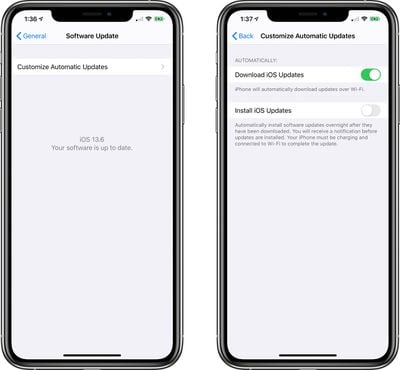
iosautomaticupdatecustom
In earlier versions of iOS, new software downloads automatically in the background and then can be installed through an Automatic Updates feature. In iOS 13.6, there are new toggles for customizing Automatic Updates.

You can now decide whether or not your iPhone or iPad can automatically download iOS updates when connected to WiFi, and when those updates are installed. There's a Download iOS Updates toggle for turning on automatic downloads over WiFi and an Install iOS Updates toggle for installing software updates overnight as an iPhone charges.

This new toggle will be a welcome change for those who do not want iOS updates to download automatically without permission, as this can eat up valuable storage space. Note that this option is enabled by default, so if you want to turn off automatic downloads, you'll need to toggle it off.

The Automatic Updates customization settings can be found by opening the Settings app, choosing the General section, tapping on Software Update, and then choosing the Customize Automatic Updates option.

This feature is limited to developers with the iOS 13.6 beta installed, but it will be available to everyone when the iOS 13.6 update is released.


Related Forum: iOS 13

Popular Stories

iOS 26

iOS 26.4 Adds Two New Features to CarPlay

Tuesday March 24, 2026 1:55 pm PDT by
iOS 26.4 was released today, and it includes a couple of new features for CarPlay: an Ambient Music widget and support for voice-based chatbot apps. To update your iPhone 11 or newer to iOS 26.4, open the Settings app and tap on General → Software Update. CarPlay will automatically offer the new features so long as the iPhone connected to your vehicle is running iOS 26.4 or later....
Apple Business hero

Apple Unveils 'Apple Business' All-in-One Platform

Tuesday March 24, 2026 8:53 am PDT by
Apple today announced Apple Business, a new all-in-one platform that unifies device management, productivity tools, and customer outreach features. The service is designed to be a consolidated replacement for several of Apple's existing business-focused offerings, including Apple Business Essentials, Apple Business Manager, and Apple Business Connect. It provides organizations with a single...
AirPods Pro Firmware Feature

Apple Releases New Firmware for AirPods Pro 3, AirPods Pro 2 and AirPods 4

Tuesday March 24, 2026 12:31 pm PDT by
Apple today released new firmware for the AirPods Pro 2, AirPods Pro 3, and the AirPods 4. The firmware has a version number of 8B39, up from 8B34 on the AirPods Pro 3, 8B28 on the AirPods Pro 2, and 8B21 on the AirPods 4. There is no word on what's included in the firmware, but Apple has a support document with limited notes. Most updates are limited to bug fixes and performance...

Top Rated Comments

NT1440 Avatar
76 months ago

Who wouldn’t want to install updates
You just kicked the bees nest here on MR...
Score: 34 Votes (Like | Disagree)
76 months ago
Everyone who jailbreaks just got a little too excited if you catch my drift.
They hate those auto download updates


Who wouldn’t want to install updates
People who jailbreak, people who don’t like to update right away, people who are very picky about when they update, people who are very picky about what’s taking up storage on the phone, and I could go on
Score: 13 Votes (Like | Disagree)
phenste Avatar
76 months ago
On the flipside, I appreciate this as someone who initiates my own updates. This means they’ll be on my phone when I go to initiate the update (if I’m reading this article/the attached image properly). I know it’s heavily encouraged to update automatically, but…I like the choice.

I sound like the people I usually harp on in this forum, oh well. :p


Who wouldn’t want to install updates
Sometimes updates come out and introduce new bugs. It’s nice to be able to have an update out for a couple days and assess whether I want to actually install it or wait for the next update, where those bugs will ostensibly be fixed.
(That’s arguably a never-ending cycle, I know—I’ll happily update once I’ve assessed that a given bug isn’t going to heavily affect my everyday use.)
Score: 12 Votes (Like | Disagree)
Kylo83 Avatar
76 months ago
Who wouldn’t want to install updates
Score: 11 Votes (Like | Disagree)
GubbyMan Avatar
76 months ago
Finally! After so many years of people asking for this! This is as important as changing video resolution in the camera app or blocking half the screen to show the volume. I guess iOS 14 will not have calls and Siri take up the whole screen?
Score: 9 Votes (Like | Disagree)
76 months ago
This really doesn't fix the Number One gripe people have with Apple's heavy handed nag screen approach that pops open a message at random intervals asking you to install an update.
Makes you hate the company and despise the device.
Score: 7 Votes (Like | Disagree)















