
App Recap: Pastel, Punkt, Remote Control for Mac and Major App Updates

In this week's App Recap, we've highlighted utility app "Pastel," health app "Punkt," and utility app "Remote Control for Mac/PC Pro" as three apps that are worth checking out. We've also compiled a list of apps that received major updates this week.
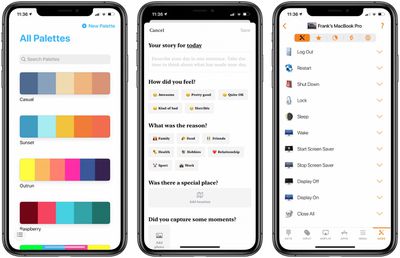
App Recap Pastel Punkt Remote Control e1592105991228

Apps to Check Out

  • Pastel (iOS, Free) - Pastel, an app marketed for developers and artists, allows for the creation of color palettes for use in various projects. Pastel includes diverse color selector options such as a color wheel, RGB sliders, crayons, and even the ability to import specific colors from a photo. In addition, the app allows users to copy a bitmap representation of a palette for use in a pixel editor. The free version of Pastel allows users to add up 20 palettes in their library, and users looking to upgrade to the full version that includes an unlimited number of palettes can opt for a single in-app purchase of $4.99.
  • Punkt: One-Sentence Journal (iOS, Free) - With its streamlined interface, Punkt makes day-to-day journaling very straightforward and intuitive. When crafting a story, users simply add a single sentence. Additionally, users have the ability to select from a list of feelings and reasons, enter a specific location, and add photos to bring the story to life. Every story is saved on both the device and in iCloud, and users looking for more protection can protect stories with either Face ID or Touch ID. Although the app is free to download, adding photos and creating an unlimited number of stories per day is limited to those with a premium subscription. Punkt offers a range of monthly subscriptions in which users can choose to contribute a certain amount per month, an annual subscription, and a lifetime membership, which are priced at $0.99-$2.49, $6.49, and $13.99 respectively.
  • Remote Control for Mac/PC Pro (iOS, $6.99) - Remote Control seamlessly pairs to a Mac client app that introduces efficient productivity methods for users. Users are able to control volume, playback, and AirPlay mirroring directly from an iOS device. Additionally, the app can morph into a trackpad for a Mac, control any app, launch and quit apps, and more. All of Remote Control's features are included with its purchase price, so no extra in-app purchases are present. In addition to the paid version, Remote Control's developer has also released a free version of the app that contains ads and all of the pro version's features without advanced media controls for apps and websites as well as the ability to control apps and execute system actions.

App Updates

  • Darkroom: Photo & Video Editor - Popular editing app Darkroom was updated this week with the ability to manage albums within the app. In the library that's located within the Darkroom app, users now have the ability to create, rename, and delete albums. Any changes made within Darkroom will be reflected in the device's native photo library.

  • Spike (iOS) - Collaborative email app Spike this week announced a major update that gives users the ability to manage tasks, create notes, and collaborate on documents in real-time without the need to leave the app. The new tasks feature allows users to seamlessly set reminders and set to-dos, which can help enhance day-to-day productivity. Spike has also added the ability to sync notes and tasks across all devices signed into the same account.

  • Phone Buddy Notifier for Watch (iOS) - Phone Buddy, an Apple Watch app that alerts users when the Bluetooth connection with a paired iPhone is lost, was updated recently with several new features. The Distance Alerts feature was updated with a new customizable distance threshold for signal strength and time. In addition, the iPhone app was updated with a streamlined interface, and it's now possible to manage all alerts directly on the Apple Watch companion app.


Know of a great new app that we've missed? Let us know in the comments and we'll check it out for next week's App Recap.

Popular Stories

Apple Logo Zoomed

Tim Cook Teases Plans for Apple's Upcoming 50th Anniversary

Thursday February 5, 2026 12:54 pm PST by
Apple turns 50 this year, and its CEO Tim Cook has promised to celebrate the milestone. The big day falls on April 1, 2026. "I've been unusually reflective lately about Apple because we have been working on what do we do to mark this moment," Cook told employees today, according to Bloomberg's Mark Gurman. "When you really stop and pause and think about the last 50 years, it makes your heart ...
wwdc sans text feature

Apple Rumored to Announce New Product on February 19

Thursday February 5, 2026 12:22 pm PST by
Apple plans to announce the iPhone 17e on Thursday, February 19, according to Macwelt, the German equivalent of Macworld. The report, citing industry sources, is available in English on Macworld. Apple announced the iPhone 16e on Wednesday, February 19 last year, so the iPhone 17e would be unveiled exactly one year later if this rumor is accurate. It is quite uncommon for Apple to unveil...
Finder Siri Feature

Why Apple's iOS 26.4 Siri Upgrade Will Be Bigger Than Originally Promised

Friday February 6, 2026 3:06 pm PST by
In the iOS 26.4 update that's coming this spring, Apple will introduce a new version of Siri that's going to overhaul how we interact with the personal assistant and what it's able to do. The iOS 26.4 version of Siri won't work like ChatGPT or Claude, but it will rely on large language models (LLMs) and has been updated from the ground up. Upgraded Architecture The next-generation...
iOS 26

iOS 26.3 and iOS 26.4 Will Add These New Features to Your iPhone

Tuesday February 3, 2026 7:47 am PST by
While the iOS 26.3 Release Candidate is now available ahead of a public release, the first iOS 26.4 beta is likely still at least a week away. Following beta testing, iOS 26.4 will likely be released to the general public in March or April. Below, we have recapped known or rumored iOS 26.3 and iOS 26.4 features so far. iOS 26.3 iPhone to Android Transfer Tool iOS 26.3 makes it easier...
maxresdefault

Apple Shows Off a Key Reason to Upgrade to the iPhone 17

Saturday February 7, 2026 9:26 am PST by
Apple today shared an ad that shows how the upgraded Center Stage front camera on the latest iPhones improves the process of taking a group selfie. "Watch how the new front facing camera on iPhone 17 Pro takes group selfies that automatically expand and rotate as more people come into frame," says Apple. While the ad is focused on the iPhone 17 Pro and iPhone 17 Pro Max, the regular iPhone...

Top Rated Comments

jshrager1985 Avatar
74 months ago
Along the same mental health theme as Punkt I came across a nice little app recently called sidekick
https://apps.apple.com/gb/app/sidekick-app/id1477249545?ls=1

Really nice design and collection of exercises. Think they're a community based in the UK from their website - www.sidekick.org.uk (http://www.sidekick.org.uk)
Score: 2 Votes (Like | Disagree)
Apple_Robert Avatar
74 months ago
I use Phone Buddy every day on my watch. It has worked well and the developers are very responsive. Glad I have it.
Score: 2 Votes (Like | Disagree)
Apple_Robert Avatar
74 months ago
Another great app to check out is “Watch Feeds.” It allows you to read RSS feeds on your watch. This is especially nice for those with cellular watches. You don’t need your phone to use the app when you have a cellular watch.

The interface is easy on the eyes and the colors can be adjusted to suit your needs, along with the ability to send articles to your phone for later viewing, should you wish to do so.

The developer is very responsive as well. Highly recommend the app.

https://app.zeyguan.com/watchfeeds/
Score: 2 Votes (Like | Disagree)
gorkt Avatar
74 months ago

Man am I sick of these attempts at email apps. For me, they will never top the experience of Apple's build in mail app. Even if it isn't perfect, it's FAR superior than any of these countless idiotic attempts at reinventing the email wheel for one reason and one reason only I find annoying:

Sync.

I have multiple apple devices, I want to enter my email accounts in one and it syncs with the other device. With Spike, as with Spark, Spoke, Speck, or whatever else I've tried, I have to enter the account info AGAIN on the other device.

So.....I'm out. Apple mail all the way.
Inbox by Google was absolutely brilliant and when they stopped supporting it I was a
so annoyed. They rolled in some of the features to gmail but they spam me with ads.
Score: 1 Votes (Like | Disagree)

















