

Apple today unveiled iOS 14 with major new features like widgets for the Home screen, App Clips, a new App Library view that shows you all of your apps at a glance, new @mentions and pinned chats in Messages, Maps updates, and more, but there are also tons of smaller changes and tweaks that went unmentioned.
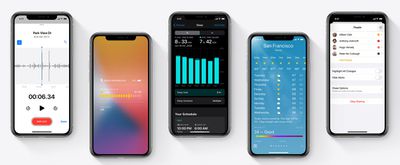
Below, we've rounded up many of the minor updates and feature changes that Apple has added in the iOS and iPadOS 14 updates.
- Emoji picker - iOS 14 includes the same emoji search interface that's available on the Mac, making it easier to find a specific emoji that you're looking for.
- Messages Threaded Conversations - Apple introduced conversation threads as a feature for group chats in the Messages app, but this feature also works in standard chats with just one other person. You can tap on any message to reply to that message directly, providing more organization for conversations.
- Photos Privacy - In iOS 14, when apps ask for access to your Photos app, you can give them access only to select photos rather than the entire Photo Library.
- Local Network Privacy - Apps in iOS 14 need to ask permission to find and connect with devices on the local network.
- Home screen - Home screen settings can be customized in the Settings app, where you can choose to add new apps to the Home screen or only to the new App Library.
- Music App Redesign - The Music app's interface has been overhauled with a "Listen Now" feature front and center. A bottom navigation menu includes tabs for Browse, Radio, Library, and Search, with the "For You" option replaced by "Listen Now." Search has also been improved, and there's a new Autoplay feature that automatically finds new music when you reach the end of a song or a playlist. The Now Playing background also shows album art from the current artist playing.
- Exposure Compensation in Camera - There's a new exposure compensation control in Photos that lets you lock an exposure value while separately locking camera focus. Apple says taking photos is also faster with a faster time to first shot and shot to shot performance.
- Health Checklist - A Health Checklist in the Health app lets you manage health and safety info in one place, and there are new data types for mobility, health records, symptoms, and ECG.
- Notes - With on-device intelligence, search in the Notes app is faster, and you can capture sharper document scans. A touch and a hold on the Aa button lets text styles be edited quickly. On the iPad, Notes has shape recognition to turn imperfectly drawn shapes into perfect ones.
- Photos - Photos can be organized with new options to filter and sort, and it's easier to navigate using pinch and zoom gestures. Captions can be added to photos and videos to add context, and Memories have been enhanced. Apps also feature an updated image picker with smart search to make it easier to find what you're looking for.
- Reminders - There's a new Quick Entry option for the Reminders app, as well as smart suggestions for capturing new reminders more quickly. Shared list members can also assign reminders to each other to make it easier to split up tasks, and multiple reminders can be edited at once.
- AirPods API - Developers can access a Motion API for the AirPods Pro that allows access to orientation, user acceleration, and rotational rates for AirPods Pro, which will be useful for fitness apps and games.
- Third-Party defaults - Third-Party mail and browser apps can be set as the default in iOS and iPadOS 14.
- Podcasts - There's a new Up Next feature in Podcasts that lets you make an episode queue, plus you can find new recommended content.
- Voice Memos - There's a new Enhance Recording feature that lets you improve the sound quality of your recordings with a tap, plus there are new organizational options.
- Weather - The Weather app provides info on severe weather events as well as upcoming shifts in weather. In the U.S., there's also a chart with a minute-by-minute forecast of precipitation intensity, which appears to take advantage of functionality in Dark Sky, an app Apple recently purchased.
- AirPods Battery Notifications - iOS 14 will provide battery notifications that let you know if you need to charge your AirPods.
- QuickTake for iPhone XR and XS - QuickTake, the feature that lets you capture video by holding down the button in Photo mode, is now available on iPhone XR, XS, and XS Max in addition to Apple's newer iPhones.
- QuickTake Volume Buttons - There's a new option that lets you capture QuickTime video by pressing on the Volume Down button. Pressing on Volume Up lets you take burst mode photos.
- Video Mode Quick Toggles - All iPhones now have quick toggles for changing video resolution and frame rate.
- Night Mode Improvements - When using Night Mode on iPhone 11 and 11 Pro, the camera now uses the gyroscope to provide a guidance indicator that helps you hold the camera steady. There's also a new option to cancel a photo mid-capture.
- Mirrored Selfies - There's a new option in Settings that lets you capture mirrored selfies that reflect the front camera preview rather than flipped selfies.
- FaceTime Picture in Picture - You can do other things on your iPhone or iPad while continuing your FaceTime call thanks to a new picture in picture option.
- FaceTime Eye Contact - Apple is reintroducing the Attention Aware feature that was removed from an iOS 13 beta with a new "eye contact" feature that Apple says helps you establish eye contact even when you're looking at the screen instead of the camera.
- APFS Support for Files - The Files app now supports external drives that use APFS encryption.
- Magnifier UI - There's an updated interface for the magnification feature
- Sound Recognition in Control Center - There's a new Control Center toggle for Sound Recognition, a feature that continuously listens for certain sounds and attempts to notify you when sounds are recognized.
- Sleep Mode in Control Center - A new Sleep Mode toggle lets you put your iPhone in Sleep Mode, which darkens the screen and turns on Do Not Disturb.
- HomeKit Favorites in Control Center - Your favorite HomeKit scenes now show up in the Control Center for quick access.
- Back Tap Accessibility Option - Back Tap lets you create a double tap or triple tap gesture that activates an action when you tap on the back of the iPhone.
- WiFi Private Address - When connected to a WiFi network, there's a new option to "Use Private Address" to prevent network operators from tracking your iPhone. The feature can be found in Settings under WiFi when tapping on a WiFi network you're using.
Have you found other new features in iOS and iPadOS 14 that went unmentioned by Apple? Let us know in the comments and we'll add them to this list. We'll be updating the hidden features list as we discover new changes and updates in the software releases.
Related Forum: iOS 14






















