
Apple Drops Force Touch Gesture in watchOS 7 - MacRumors
Skip to Content

Apple Drops Force Touch Gesture in watchOS 7

Apple has elected to drop support for Force Touch in watchOS 7, indicating that the Apple Watch Series 6 will not include the firm-press gesture from the outset.
weather force touch

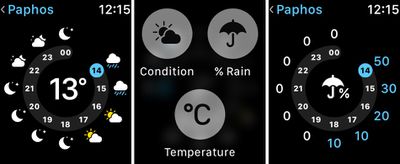
Force Touch used in the Weather app on watchOS 6

Force Touch can be used in watchOS 6 to reveal hidden menus on Apple Watch, such as options to clear notifications and customize the current Watch Face. These options will no longer be accessed using the Force Touch gesture when watchOS 7 is released. Apple's new Human Interface Guidelines for developers making apps for watchOS 7 confirms the change:

Firm press and long press. In versions of watchOS before watchOS 7, people could press firmly on the display to do things like change the watch face or reveal a hidden menu called a Force Touch menu. In watchOS 7 and later, system apps make previously hidden menu items accessible in a related screen or a settings screen. If you formerly supported a long-press gesture to open a hidden menu, consider relocating the menu items elsewhere.

Several native apps in the watchOS 7 beta already reflect the gesture's removal. For example, the Force Touch gesture for the app layout Grid/List View has been replaced by a menu option in the Settings app. Similarly, changing the Calendar view must now be done in Settings, while the gesture to Change Move Goal in the Activity app has become just another menu item. The Customize Watch Face menu is now accessed via a long press.

In 2018, Apple did something similar when the iPhone XR was introduced with a ‌Haptic Touch‌ feature that replaced ‌3D Touch‌. While ‌Haptic Touch‌ (aka long press) is essentially a feedback mechanism, ‌3D Touch‌ offered genuine input options like Peek and Pop. This change has since expanded to the entire iPhone lineup, which has allowed Apple to remove the capacitive layer integrated into the iPhone display.

Apple's reasoning behind the removal of the firm-press gesture on Apple Watch isn't clear, but it could be that not enough users were aware of it for it to be genuinely useful, or perhaps Apple decided that some of the functions it offered were replicated elsewhere and therefore redundant.

With no need for a Force Touch layer in future Apple Watch models, Apple could conceivably use the extra space to include a larger battery, but that's pure speculation at this point. We won't know until the Apple Watch Series 6 makes its debut in the fall. Will you miss Force Touch or was it something you didn't use? Let us know in the comments.


Related Roundup: Apple Watch 11
Buyer's Guide: Apple Watch (Neutral)

Popular Stories

iOS 26

iOS 26.4 Adds Two New Features to CarPlay

Tuesday March 24, 2026 1:55 pm PDT by
iOS 26.4 was released today, and it includes a couple of new features for CarPlay: an Ambient Music widget and support for voice-based chatbot apps. To update your iPhone 11 or newer to iOS 26.4, open the Settings app and tap on General → Software Update. CarPlay will automatically offer the new features so long as the iPhone connected to your vehicle is running iOS 26.4 or later....
Apple Business hero

Apple Unveils 'Apple Business' All-in-One Platform

Tuesday March 24, 2026 8:53 am PDT by
Apple today announced Apple Business, a new all-in-one platform that unifies device management, productivity tools, and customer outreach features. The service is designed to be a consolidated replacement for several of Apple's existing business-focused offerings, including Apple Business Essentials, Apple Business Manager, and Apple Business Connect. It provides organizations with a single...
AirPods Pro Firmware Feature

Apple Releases New Firmware for AirPods Pro 3, AirPods Pro 2 and AirPods 4

Tuesday March 24, 2026 12:31 pm PDT by
Apple today released new firmware for the AirPods Pro 2, AirPods Pro 3, and the AirPods 4. The firmware has a version number of 8B39, up from 8B34 on the AirPods Pro 3, 8B28 on the AirPods Pro 2, and 8B21 on the AirPods 4. There is no word on what's included in the firmware, but Apple has a support document with limited notes. Most updates are limited to bug fixes and performance...

Top Rated Comments

75 months ago
This is not good, IMO.

I adjusted away from 3D Touch pretty quickly, but this was an important mechanism for a device with a tiny screen.
Score: 76 Votes (Like | Disagree)
johannnn Avatar
75 months ago
”Similarly, changing the Calendar view must now be done in Settings”

wait what? if I want to quickly change between list and today view, I need to go back to the app drawer, find Settings, scroll down to Calendar, and pick the new view?

I hope I’m wrong?
Score: 56 Votes (Like | Disagree)
Sirious Avatar
75 months ago
This is the worst news I have heard all day. Force touch makes soooooooo much sense on the Watch.
Score: 51 Votes (Like | Disagree)
otternonsense Avatar
75 months ago
Hey Apple, please stop killing useful features!
Score: 43 Votes (Like | Disagree)
alpi123 Avatar
75 months ago
Why are they trying to get rid of 3D Touch... it's actually one of the few innovative features Apple offered that others didn't and for 1-2 years we saw it was very useful.

Maybe for them it feels too much like a real button and that's why they shy away from it.
Score: 41 Votes (Like | Disagree)
MrLoL Avatar
75 months ago
I'm truly annoyed by that. It's not like 3D touch where you didn't even know it existed, it's essential to the platform to edit watch faces, clear all, open menus... and it's there since Series 0! They're basically scrapping the hardware on all the watches by not even leaving the option to press harder to go faster.
Score: 33 Votes (Like | Disagree)















