
Apple's iOS 14 update adds several new features to the Photos app, including an option to add captions to images right from the iPhone, which is something that Photos users have been wanting for quite some time.
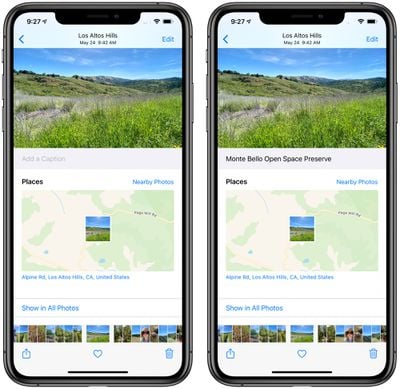
The Photos app for Mac previously supported captions through the Description field, but on the iPhone, there has been no method for adding similar information. In iOS 14, entering a caption is quick and easy.
Tap to view any photo full screen on the iPhone, and then swipe up to get to the caption field. Tap the field, type the caption, and press enter.
Captions in iOS 14 sync across all devices if iCloud Photo Library is enabled, and the Description field in macOS Big Sur has been renamed to Captions for continuity.
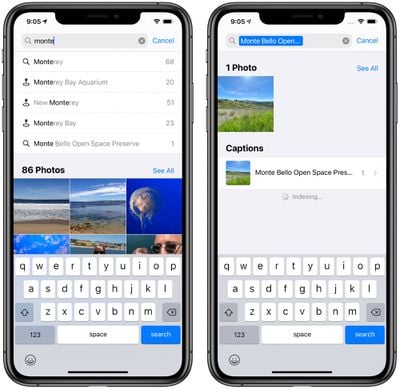
Adding a caption to a photo using iOS 14 allows for an additional level of tagging and organization because captions can be searched for using the Photos search interface. There's still no native option for editing metadata for photos, but Captions make it easier to add labels that are visible cross device.
There are a few other useful improvements to the Photos app, such as filters for viewing all images or albums by Favorites, Edited, Photos, and Videos, sorting inside albums, and better autoplay for Live Photos. Navigating through photos also lets you zoom in and out on all albums, much like you can do with the "All Photos" interface in iOS 13, so it's easier to find specific images that you're looking for.

Thursday February 5, 2026 12:54 pm PST by Joe Rossignol
Apple turns 50 this year, and its CEO Tim Cook has promised to celebrate the milestone. The big day falls on April 1, 2026.
"I've been unusually reflective lately about Apple because we have been working on what do we do to mark this moment," Cook told employees today, according to Bloomberg's Mark Gurman. "When you really stop and pause and think about the last 50 years, it makes your heart ...
Thursday February 5, 2026 12:22 pm PST by Joe Rossignol
Apple plans to announce the iPhone 17e on Thursday, February 19, according to Macwelt, the German equivalent of Macworld.
The report, citing industry sources, is available in English on Macworld.
Apple announced the iPhone 16e on Wednesday, February 19 last year, so the iPhone 17e would be unveiled exactly one year later if this rumor is accurate. It is quite uncommon for Apple to unveil...
Friday February 6, 2026 3:06 pm PST by Juli Clover
In the iOS 26.4 update that's coming this spring, Apple will introduce a new version of Siri that's going to overhaul how we interact with the personal assistant and what it's able to do.
The iOS 26.4 version of Siri won't work like ChatGPT or Claude, but it will rely on large language models (LLMs) and has been updated from the ground up.
Upgraded Architecture
The next-generation...
Tuesday February 3, 2026 7:47 am PST by Joe Rossignol
While the iOS 26.3 Release Candidate is now available ahead of a public release, the first iOS 26.4 beta is likely still at least a week away. Following beta testing, iOS 26.4 will likely be released to the general public in March or April.
Below, we have recapped known or rumored iOS 26.3 and iOS 26.4 features so far.
iOS 26.3
iPhone to Android Transfer Tool
iOS 26.3 makes it easier...
The iPhone 18 Pro Max will feature a bigger battery for continued best-in-class battery life, according to a known Weibo leaker.
Citing supply chain information, the Weibo user known as "Digital Chat Station" said that the iPhone 18 Pro Max will have a battery capacity of 5,100 to 5,200 mAh. Combined with the efficiency improvements of the A20 Pro chip, made with TSMC's 2nm process, the...
I just want the ability to make folders and move photos from the camera roll to those folders. I don't want multiple copies or links. I just want to move them!
Two days ago i taught my daughter how to do this so she could create an album of her stuffies. For each video, she puts a text caption explaining the name, the origin, the origin of the name, her favorite thing about it, etc. It’s adorable.
UPDATE: LOL. Some dude marked this as “disagree.” Probably hates puppies and the flag, too.
What about keywords, titles, descriptions, and location information? Why add an entirely new information field in “captions” instead of just using what we already have labeled and use on our Macs? This is one of the few things keeping me from using iPadOS and iOS solely. I’ve been waiting for years and I guess I’ll be waiting longer.
I just want the ability to make folders and move photos from the camera roll to those folders. I don't want multiple copies or links. I just want to move them!
Sorry what? ...
adding photos to any amount of folders does not create a single new copy. You know that right?
















