
Some iPhone Users Report Significant Battery Drain Due to Music App Background Activity in iOS 13.5.1 - MacRumors
Skip to Content

Some iPhone Users Report Significant Battery Drain Due to Music App Background Activity in iOS 13.5.1

apple music icon for ios 100594580 origA significant minority of iPhone users have taken to Apple's Support Communities and Reddit to report battery drain issues largely related to the Music app and high levels of background activity.

Hundreds of users, many running iOS 13.5.1 on devices both new and old, are experiencing rapid battery drain when the Music app is not in use. In some cases, the background activity occurs over several hours each day, even if the app has not been used for weeks or even at all.

User: Mojo06
I just purchased a new iPhone 11 a few days ago, and my battery is crashing so fast. I haven't even used the Apple Music App yet and it says that it has been running in the background for over 18 hours and has used 95% of my battery. My phone is also getting very hot from this. I am concerned this will kill my battery on my new phone.

User: Brianwpi
Phone is burning up. Switched off background app refresh. Restarted phone. Battery health 91%. iPhone X running iOS 13.5.1. Had to recharge several times during the day just to keep up. Help?

User: svphies
I'm having this exact same problem with my iPhone 11, recently updated to IOS 13.5.1. I never had Background App Refresh turned on and I haven't found any downloading song in the Music app. I might try to backup my phone to iTunes and do a reset later. I hope Apple fixes this issue soon.

While reports of the Music app draining battery in the background go back to April, there has been a rapid uptick in reports over the last week, suggesting Apple may have recently changed something on the server side which is causing the problem.
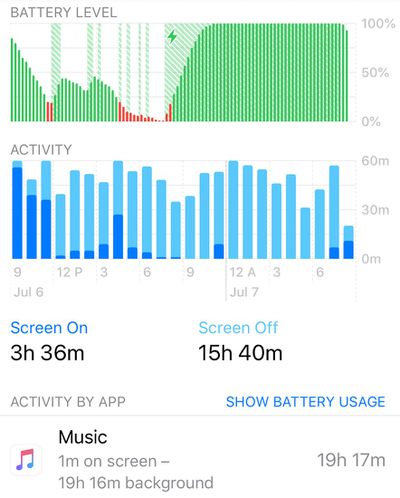
apple music battery drain
Below are some of the steps that users have taken to try to resolve the issue, but which appear to have a low rate of success.

  • Force quit the Music app.
  • Restart / Restore iPhone.
  • Delete Music app then reinstall it.
  • Turn off Automatic Downloads (Settings -> Music -> Automatic Downloads).
  • Disable background app refresh (Settings -> General -> Background App Refresh -> Disable Music).
  • Turn off Mobile Data (Settings -> Music -> Mobile Data).
  • Cancel all downloads in the Music Library.

Some users have resorted to deleting the Music app on their device, which brings the battery usage to an end. For those with Apple Music subscriptions, however, this isn't even a short-term solution, so we're bringing these reports to the attention of the wider community in the hope that it will prompt Apple to investigate.


Popular Stories

iOS 26

iOS 26.4 Adds Two New Features to CarPlay

Tuesday March 24, 2026 1:55 pm PDT by
iOS 26.4 was released today, and it includes a couple of new features for CarPlay: an Ambient Music widget and support for voice-based chatbot apps. To update your iPhone 11 or newer to iOS 26.4, open the Settings app and tap on General → Software Update. CarPlay will automatically offer the new features so long as the iPhone connected to your vehicle is running iOS 26.4 or later....
Apple Business hero

Apple Unveils 'Apple Business' All-in-One Platform

Tuesday March 24, 2026 8:53 am PDT by
Apple today announced Apple Business, a new all-in-one platform that unifies device management, productivity tools, and customer outreach features. The service is designed to be a consolidated replacement for several of Apple's existing business-focused offerings, including Apple Business Essentials, Apple Business Manager, and Apple Business Connect. It provides organizations with a single...
AirPods Pro Firmware Feature

Apple Releases New Firmware for AirPods Pro 3, AirPods Pro 2 and AirPods 4

Tuesday March 24, 2026 12:31 pm PDT by
Apple today released new firmware for the AirPods Pro 2, AirPods Pro 3, and the AirPods 4. The firmware has a version number of 8B39, up from 8B34 on the AirPods Pro 3, 8B28 on the AirPods Pro 2, and 8B21 on the AirPods 4. There is no word on what's included in the firmware, but Apple has a support document with limited notes. Most updates are limited to bug fixes and performance...

Top Rated Comments

75 months ago
It’s not only the Music app, since 13.5 a lot of apps suffer of constant background activity. You can check this subject ('https://discussions.apple.com/thread/251435983?answerId=253009672022&page=1') on Apple forum.
Score: 14 Votes (Like | Disagree)
75 months ago

Nah, it was 100% the music app.
Maybe for you. But if you check Apple’s forum, it’s far from the only one app with troubles.
Score: 8 Votes (Like | Disagree)
75 months ago

I don't know if this is related, I checked this background activity and on my phone it showed the KMB app (only relevant to users in HK) had 19hrs of background activity within the last day. Doesn't seem to affect the battery though, as it is just an app for bus schedules.
Yes, it’s related. The bug is for background activity in general, not only Music app.
Score: 7 Votes (Like | Disagree)
ChpTrk Avatar
75 months ago

I’ll ask again and re-phrase. Does everyone with this issue subscribe to iTunes Match?
I use iTunes Match, and I have the issue.

I believe the assumptions about a server side issue are correct. I typically manually download a couple of playlists to my iPhone for offline listening. For the past couple of days I haven't been able to download the songs in any of my playlists. It looks like the phone starts to download a song, then fails and keeps retrying. I might be able to download a few songs, but the majority won't download. They don't time out and give an error or anything, the app just keeps trying to download them, which I think is where the background utilization/hot iPhone issue is happening.

My phone got so hot one day the flash wouldn't work until I was able to cool the device down.

It's now 10:00 AM. I unplugged my iPhone at 7:00 AM with 100% charge and haven't used it much today. I'm at 57% battery. I have a iPhone SE 2020.
Score: 6 Votes (Like | Disagree)
Squuiid Avatar
75 months ago
A picture tells 1000 words. Didn't even use Apple Music. All 'Background Activity".
One more thing, as soon as this started happening, iTunes Match no longer works on my HomePods. I've tried so many things to try and fix, nothing.

Definitely a server side change Apple have made to their music backend to cause this IMO.


Attachment Image
Score: 5 Votes (Like | Disagree)
itsmilo Avatar
75 months ago
significant minority?

Either way, one of the reasons i keep closing apps at least daily. MR can say what they want. Stuff like Instagram does seem to stay active longer than it should and since there is no indicator which apps are actually indeed still running, i will keep closing them (if not for being a habit)
Score: 4 Votes (Like | Disagree)